Account Contact
Your Cart
Pay on delivery – no extra fees
Need help? Ask our AI

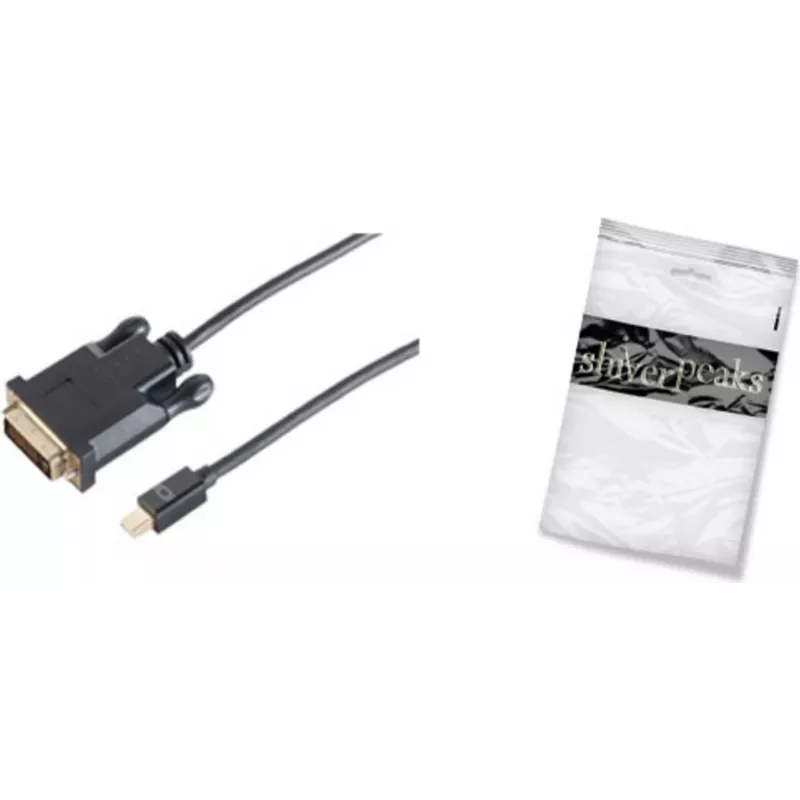
Video cable adapter ShiverPeaks BS10-55055

Video cable adapter ShiverPeaks BS10-55055
R602
PDF
PDF
Stock 113 Code 2231079 Model BS10-55055 Warranty 2 Years

Shipping & Returns

Estimated delivery Monday, December 14
You will be kept updated through our detailed tracking system
Payment options
EFTPayFastBank CardSnapScanZapperGoogle PayApple PayMobicredMoreTymePay on Arrival

Ask a question – the AI assistant answers instantly.

Description

The ShiverPeaks BS10-55055 is a 5 m video cable adapter that converts Mini DisplayPort output to a DVI-D input. Designed for transmitting digital video signals from laptops, mini PCs or graphics cards with Mini DisplayPort to monitors and projectors with DVI-D, the cable provides a simple, single-cable connection in a black finish and is supplied in a polybag for compact storage and transport.

Advantages

This Mini DisplayPort to DVI-D cable offers a stable digital video connection over a 5 m length, reducing the need for additional converters or docking stations. Its fixed cable design eliminates connector adapters that can be lost or disconnected, and the black outer jacket provides discreet integration with typical office and home setups. Supplied in a polybag, the adapter is lightweight and easy to carry between workstations.

Suitable for

  • Connecting laptops or desktops with Mini DisplayPort to DVI-D monitors
  • Setting up presentations with projectors that accept DVI-D
  • Home office multi-monitor configurations using DVI-D inputs
  • Temporary workstation setups and IT troubleshooting

Key specifications

  • Cable length: 5 m
  • Connector 1: Mini DisplayPort
  • Connector 2: DVI-D (digital only)
  • Colour: Black
  • Packaging: Polybag

How to use

Connect the Mini DisplayPort end of the adapter to the Mini DisplayPort output on your source device and insert the DVI-D connector into the display or projector's DVI-D input. Ensure both devices are powered off or set to the correct input before connecting to prevent signal issues. After connection, power on the display and source device and select the DVI input on the monitor if needed. Adjust display settings on the source device to match the monitor's native resolution for optimal image quality.

Recommendations

For best results, use the cable for digital video signals only and avoid forcing connectors. If longer distances or additional functionality (audio pass-through or active conversion) are required, consider compatible active adapters or signal extenders. Store the cable in its polybag when not in use to protect the connectors and jacket.

Key Highlights
  • Connecting laptops or desktops with Mini DisplayPort to DVI-D monitors
  • Setting up presentations with projectors that accept DVI-D
  • Home office multi-monitor configurations using DVI-D inputs
  • Temporary workstation setups and IT troubleshooting
  • Cable length: 5 m
  • Connector 1: Mini DisplayPort
  • Connector 2: DVI-D (digital only)
  • Colour: Black
  • Packaging: Polybag

Specifications

Specifications
Cable length
5 m
Connector 1
Mini DisplayPort
Connector 1 gender
Male
Connector 2
DVI-D
Connector 2 gender
Female
Connector contacts plating
Gold
DisplayPort version
1.2
Maximum resolution
2560 x 1600
Package type
Polybag
Plug and Play
Yes
Product colour
Black
Quantity per pack
1 pc(s)
Price history over the last 6 months
Video cable adapter ShiverPeaks BS10-55055
Current
R602
Lowest 7d
R584
Highest 7d
R602
Change 24H
+R4   +1%
Change 7D
+R18   +3%
Change 30D
+R4   +1%

Write a review

Rating *
Your name will be shown publicly – you can use a nickname. We invite buyers to write reviews; we check reviews before publishing and publish critical ones too.

Same series and alternatives

12

Popular products in this category

8
WhatsApp
Messenger
Hi, I’m DistriNode’s AI assistant. I can help you find products, compare options, create quote PDFs, or open support requests.
All categories