Account Contact
Your Cart
Pay on delivery – no extra fees
Need help? Ask our AI

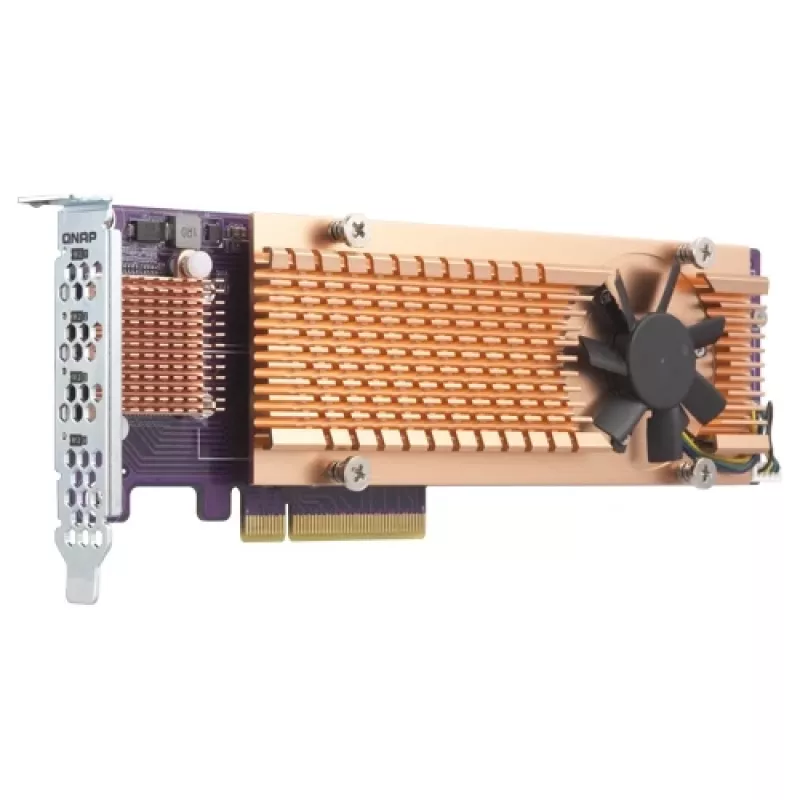
QNAP QM2-4P-384 interface cards/adapter Internal PCIe

QNAP QM2-4P-384 interface cards/adapter Internal PCIe
R4,362
PDF
PDF
Stock 1 Code 100158 Model QM2-4P-384 Warranty 2 Years

Shipping & Returns

Estimated delivery Thursday, November 19
You will be kept updated through our detailed tracking system
Payment options
EFTPayFastBank CardSnapScanZapperGoogle PayApple PayMobicredMoreTymePay on Arrival

Ask a question – the AI assistant answers instantly.

Description

The QNAP QM2-4P-384 is a PCIe expansion card that enables adding M.2 SSDs to a PC or workstation to increase storage capacity and improve IOPS and data access speeds. Using a PCIe interface rather than SATA provides higher bandwidth for faster computing and reduced application loading times. The card follows the PCIe 3.0 standard, includes an active cooling system with a fan, and requires no extra drivers for operation.

Advantages

The QM2-4P-384 delivers higher bandwidth and lower latency compared with SATA-based solutions by leveraging PCIe connectivity. Its active cooling and single-fan design help maintain optimal SSD performance under sustained load. Installation does not require additional drivers, and the card does not occupy 3.5-inch drive bays, allowing you to expand capacity without sacrificing existing drive slots.

Suitable for

  • Workstations requiring increased IOPS for demanding applications
  • PCs used for video editing and content creation
  • Gaming systems needing faster storage access
  • Linux and Windows systems where additional M.2 storage is required

Key specifications

  • Model: QNAP QM2-4P-384
  • Host interface: PCIe (PCIe 3.0 standard)
  • Output interface: PCIe
  • Form factor: Internal PCIe expansion card
  • Cooling: Active cooling with single fan
  • Dimensions (W×D×H): 68.9 mm × 204.9 mm × 20.6 mm
  • Driver: No extra drivers required
  • MPN: QM2-4P-384
  • EAN: 4713213513491

How to use

Power off the PC or workstation and insert the QM2-4P-384 into a compatible PCIe slot on the motherboard. Secure the card, install one or more M.2 SSDs into the card’s M.2 slots following the manufacturer’s instructions, connect any required power if applicable, and replace the system cover. Power on the system; the card should be recognized by Windows or Linux without installing additional drivers. Configure the newly attached SSDs in the operating system or storage management software as needed.

Recommendations

Install the card in a PCIe 3.0 x4 (or higher) slot for optimal performance, ensure adequate case airflow to support the card’s active cooling, and use high-quality M.2 SSDs appropriate for your workload to realize improved IOPS and reduced application load times.
Key Highlights
  • Workstations requiring increased IOPS for demanding applications
  • PCs used for video editing and content creation
  • Gaming systems needing faster storage access
  • Linux and Windows systems where additional M.2 storage is required
  • Model: QNAP QM2-4P-384
  • Host interface: PCIe (PCIe 3.0 standard)
  • Output interface: PCIe
  • Form factor: Internal PCIe expansion card
  • Cooling: Active cooling with single fan
  • Dimensions (W×D×H): 68.9 mm × 204.9 mm × 20.6 mm
  • Driver: No extra drivers required
  • MPN: QM2-4P-384
  • EAN: 4713213513491

Specifications

Specifications
Cooling type
Active
Depth
204.9 mm
Expansion card standard
PCIe 3.0
Harmonized System (HS) code
84733020
Height
20.6 mm
Host interface
PCIe
Internal
Yes
Number of fans
1 fan(s)
Number of M.2 (M) slots
4
Output interface
PCIe
Quantity
1
Width
68.9 mm

Document

Open Document

Leaflet

Open Leaflet
Price history over the last 6 months
QNAP QM2-4P-384 interface cards/adapter Internal PCIe
Current
R4,362
Lowest
R3,825
Highest
R5,457
Change 24H
+R4   +0%
Week
R0   0%
Month
-R29   -1%

Write a review

Rating *
Your name will be shown publicly – you can use a nickname. We invite buyers to write reviews; we check reviews before publishing and publish critical ones too.

More QNAP products in this category

3

Popular products in this category

8
WhatsApp
Messenger
Hi, I’m DistriNode’s AI assistant. I can help you find products, compare options, create quote PDFs, or open support requests.
All categories