Account Contact
Your Cart
Pay the courier with no extra fees.
Need help? DistriNode AI can handle any task on our site.

QNAP SP-TS-TRAY-WOLOCK rack accessory

QNAP SP-TS-TRAY-WOLOCK rack accessory
R672
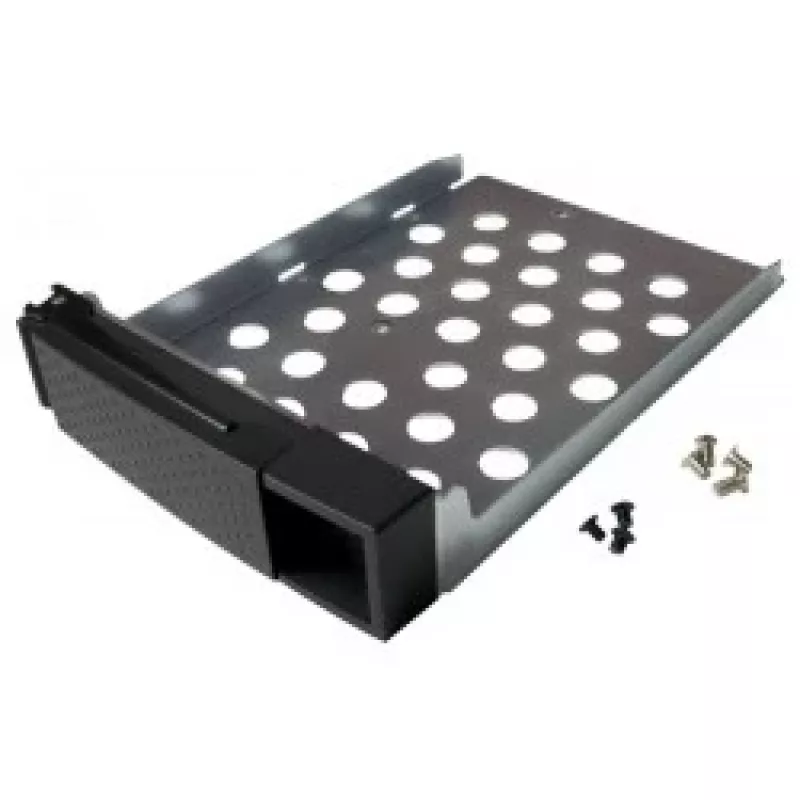
The QNAP SP-TS-TRAY-WOLOCK is a black rack accessory tray designed for use with QNAP TS-119P+, TS-219P+, TS-419P+, and TS-419P II models. It measures 3.5 inches (8.89 cm) in drive size with overall dimensions of 140 mm width and 181 mm depth, and includes mounting screws for both 2.5" and 3.5" hard ... Read More
Stock 2 Code 120517 Brand QNAP Model SP-TS-TRAY-WOLOCK Warranty 2 Years

Shipping & Returns

Estimated delivery Monday, October 26
You will be kept updated through our detailed tracking system
Payment options
EFTPayFastBank CardSnapScanZapperGoogle PayApple PayMobicredMoreTymePay on Arrival

The QNAP SP-TS-TRAY-WOLOCK is a black rack accessory tray designed for use with QNAP TS-119P+, TS-219P+, TS-419P+, and TS-419P II models. It measures 3.5 inches (8.89 cm) in drive size with overall dimensions of 140 mm width and 181 mm depth, and includes mounting screws for both 2.5" and 3.5" hard drives to simplify installation and organization in compatible QNAP enclosures.

Advantages

This tray is finished in black for visual consistency with rack equipment and comes with six black flat-head machine screws for 2.5" HDDs and eight silver flat-head machine screws for 3.5" HDDs. It provides a compact, model-specific mounting solution that fits the listed TS-series QNAP units and helps secure drives reliably within the enclosure.

Suitable for

  • Mounting 2.5" hard drives in QNAP TS-119P+/219P+/419P+/419P II
  • Mounting 3.5" hard drives in QNAP TS-119P+/219P+/419P+/419P II
  • Replacing or organizing drive trays in compatible QNAP network storage units

Key specifications

  • Model: QNAP SP-TS-TRAY-WOLOCK
  • Compatible models: TS-119P+, TS-219P+, TS-419P+, TS-419P II
  • Drive size: 3.5" (8.89 cm)
  • Dimensions: 140 mm (W) x 181 mm (D)
  • Included screws: 6 × black flat-head machine screws for 2.5" HDD, 8 × silver flat-head machine screws for 3.5" HDD
  • Color: Black
  • Brand: QNAP
  • MPN: SP-TS-TRAY-WOLOCK
  • EAN: 4712511121889

How to use

Install the tray into a compatible QNAP TS-series bay according to the NAS service manual. Position the 2.5" or 3.5" drive in the tray, align the screw holes, and secure the drive using the supplied flat-head machine screws (use the black screws for 2.5" drives and the silver screws for 3.5" drives). Slide or fasten the tray into the enclosure until it locks into place as described for your specific QNAP model.

Recommendations

Use the tray only with the listed QNAP TS-119P+/219P+/419P+/419P II models to ensure proper fit; follow the NAS manufacturer’s instructions for drive installation and handling. Keep screws tightened to prevent drive movement but avoid overtightening to prevent damage to drive housings.
Key Highlights
  • Mounting 2.5" hard drives in QNAP TS-119P+/219P+/419P+/419P II
  • Mounting 3.5" hard drives in QNAP TS-119P+/219P+/419P+/419P II
  • Replacing or organizing drive trays in compatible QNAP network storage units
  • Model: QNAP SP-TS-TRAY-WOLOCK
  • Compatible models: TS-119P+, TS-219P+, TS-419P+, TS-419P II
  • Drive size: 3.5" (8.89 cm)
  • Dimensions: 140 mm (W) x 181 mm (D)
  • Included screws: 6 × black flat-head machine screws for 2.5" HDD, 8 × silver flat-head machine screws for 3.5" HDD
  • Color: Black
  • Brand: QNAP
  • MPN: SP-TS-TRAY-WOLOCK
  • EAN: 4712511121889
Specifications
Compatibility
TS-119P+/219P+/419P+/419P II
Depth
181 mm
Harmonized System (HS) code
85389099
Height
40 mm
Product colour
Black
Size (imperial)
8.89 cm (3.5")
Weight
200 g
Width
140 mm

Leaflet

Open Leaflet
Price history over the last 6 months
QNAP SP-TS-TRAY-WOLOCK rack accessory
Current
R672
Lowest
R376
Highest
R742
Change 24H
+R295   +78%
Week
+R295   +78%
Month
—   

Popular products in this category

WhatsApp
Hi, I’m DistriNode’s AI assistant. I can help you find products, compare options, create quote PDFs, or open support requests.