Account Contact
Your Cart
Pay the courier with no extra fees.
Need help? DistriNode AI can handle any task on our site.

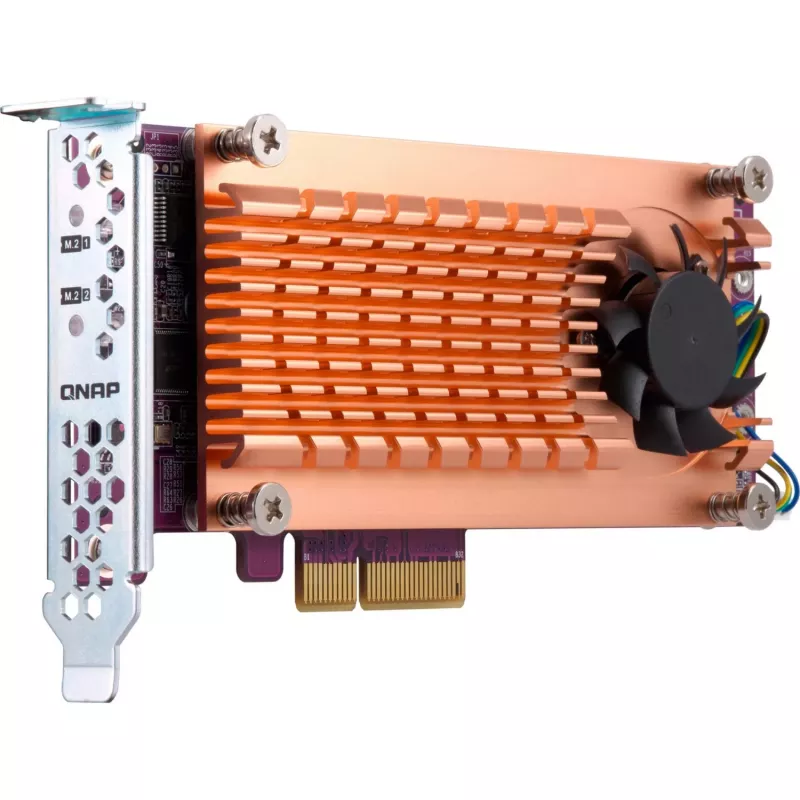
QNAP QM2-2S-220A interface cards/adapter Internal M.2

QNAP QM2-2S-220A interface cards/adapter Internal M.2
R2,236
The QNAP QM2-2S-220A is an internal PCIe interface card that lets you add M.2 SSDs to a Windows or Linux PC/workstation to increase storage capacity and reduce application load times. With support for M.2 22110 and 2280 modules and a PCIe host interface, the card is designed to improve IOPS and over... Read More
Stock 9 Code 975249 Brand QNAP Model QM2-2S-220A Warranty 2 Years

Shipping & Returns

Estimated delivery Thursday, October 1
You will be kept updated through our detailed tracking system
Payment options
EFTPayFastBank CardSnapScanZapperGoogle PayApple PayMobicredMoreTymePay on Arrival

The QNAP QM2-2S-220A is an internal PCIe interface card that lets you add M.2 SSDs to a Windows or Linux PC/workstation to increase storage capacity and reduce application load times. With support for M.2 22110 and 2280 modules and a PCIe host interface, the card is designed to improve IOPS and overall data-transfer performance without occupying 3.5-inch drive bays.

Advantages

By offloading bandwidth-intensive tasks to M.2 SSDs, the QM2-2S-220A raises system responsiveness for demanding workflows. The card supports high-speed M.2 modules, increases available storage without using standard drive bays, and integrates via a PCIe connection for direct, low-latency data paths. Its internal design and compact form factor allow installation inside a compatible PC or workstation.

Suitable for

  • Inline video editing and post-production
  • High-performance gaming systems
  • Workstations running data-intensive applications
  • Systems needing additional M.2 storage without occupying 3.5" bays

Key specifications

  • Host interface: PCIe (internal)
  • M.2 connectors: 22110 and 2280
  • Output interface: M.2 SSD
  • Product colour: Gold
  • Model/MPN: QM2-2S-220A
  • EAN: 4713213512906

How to use

Install the QM2-2S-220A into an available PCIe slot on a compatible desktop or workstation motherboard. Mount supported M.2 22110 or 2280 SSDs into the card’s M.2 slots and secure them according to the motherboard or card instructions. After hardware installation, boot the system and configure the newly added SSDs in the operating system (Windows or Linux), including initializing, partitioning, and formatting as required.

Recommendations

Use SATA or NVMe M.2 SSDs that match your performance needs and thermal constraints; ensure adequate case airflow and, if available, use heatsinks for sustained high-load operation. Verify motherboard PCIe lane availability and BIOS settings before installation.
Key Highlights
  • Inline video editing and post-production
  • High-performance gaming systems
  • Workstations running data-intensive applications
  • Systems needing additional M.2 storage without occupying 3.5" bays
  • Host interface: PCIe (internal)
  • M.2 connectors: 22110 and 2280
  • Output interface: M.2 SSD
  • Product colour: Gold
  • Model/MPN: QM2-2S-220A
  • EAN: 4713213512906
Specifications
Connector type
M.2 22110/2280
Expansion card standard
PCIe 2.0
Harmonized System (HS) code
84733020
Host interface
PCIe
Internal
Yes
Mounting brackets included
Yes
Output interface
M.2
Product colour
Gold

Leaflet

Open Leaflet
Price history over the last 6 months
QNAP QM2-2S-220A interface cards/adapter Internal M.2
Current
R2,236
Lowest
R2,131
Highest
R2,256
Change 24H
+R84   +4%
Week
+R91   +4%
Month
+R86   +4%

Popular products in this category

WhatsApp
Hi, I’m DistriNode’s AI assistant. I can help you find products, compare options, create quote PDFs, or open support requests.