Account Contact
Your Cart
Pay on delivery – no extra fees
Need help? Ask our AI

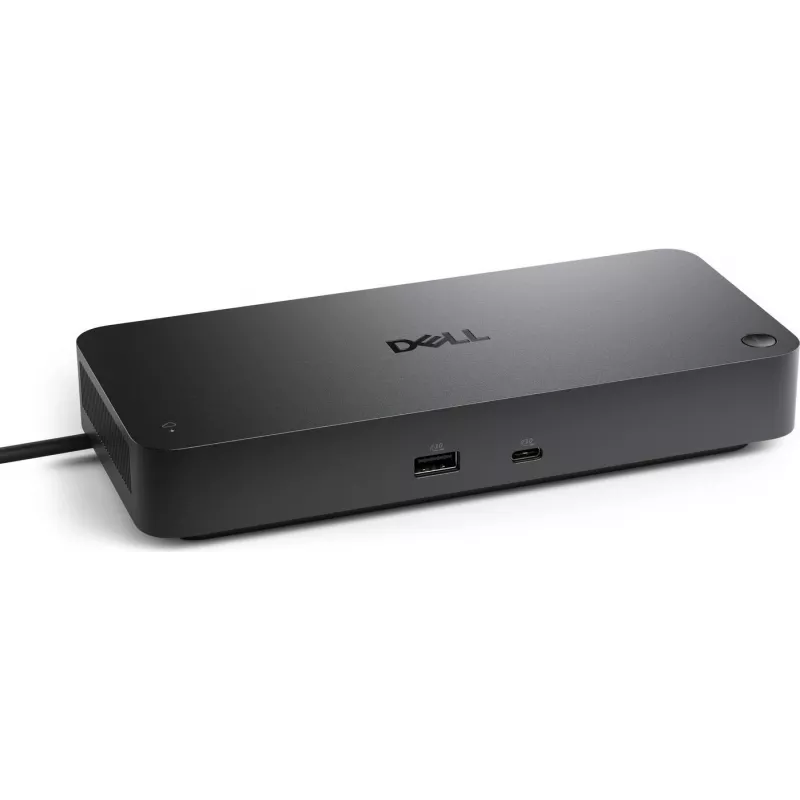
Docking station Dell Pro Smart Dock SD25 USB-C with Power Delivery for laptops

Docking station Dell Pro Smart Dock SD25 USB-C with Power Delivery for laptops
R4,885
PDF
PDF
Stock 213 Code 2381606 Model SD25 Warranty 2 Years

Shipping & Returns

Estimated delivery Wednesday, December 16
You will be kept updated through our detailed tracking system
Payment options
EFTPayFastBank CardSnapScanZapperGoogle PayApple PayMobicredMoreTymePay on Arrival

Ask a question – the AI assistant answers instantly.

Description

The Dell Pro Smart Dock SD25 USB-C with Power Delivery is a compact docking station that expands connectivity for compatible laptops through a single USB‑C connection. It supplies power to the host device while adding multiple ports for external displays, wired network access, and peripherals, enabling a streamlined workstation setup at home or in the office. The design focuses on practical port layout and reliable power delivery to reduce cable clutter and simplify daily docking and undocking.

Advantages

This docking station combines power delivery and multiple I/O ports in a single unit, allowing simultaneous charging and connection of external devices. It supports simplified cable management by consolidating display, network and peripheral connections into one hub. The SD25 is built for consistent performance with office peripherals and external monitors, and it is compatible with a wide range of USB‑C laptops that support host charging and data/video over USB‑C.

Suitable for

  • Office workstations where a laptop needs fast connection to monitors, keyboard, mouse and wired LAN
  • Home offices that require reduced cable clutter and a single connection point for peripherals
  • Hot‑desking or shared workspaces where users frequently dock and undock laptops
  • Presentations and meeting rooms needing reliable video output and network access

Key specifications

  • Connection to host: USB‑C with Power Delivery support
  • Power delivery: supplies charging to connected laptop via USB‑C
  • Video outputs: multiple display ports (supports external monitors via USB‑C alternate mode or integrated video ports)
  • Network: Gigabit Ethernet port for wired LAN connectivity
  • USB ports: several USB‑A and/or USB‑C ports for peripherals and data transfer
  • Form factor: compact desktop dock designed for stable placement next to a workstation

How to use

Connect the docking station to a compatible laptop using the included USB‑C cable. Attach external displays to the dock’s video outputs and connect a keyboard, mouse and other USB peripherals to the available USB ports. Plug a network cable into the Gigabit Ethernet port if wired LAN access is needed. Ensure the laptop’s USB‑C port supports Power Delivery and video/data transfer to enable charging and external monitor support. After initial connection, the operating system should detect attached devices and configure drivers as needed; follow any on‑screen prompts to complete setup.

Recommendations

Use the dock on a stable, flat surface and avoid blocking ventilation areas around the unit. For reliable video performance, use certified display cables and verify that your laptop’s USB‑C port supports the required alternate mode and power delivery. Regularly update laptop system drivers and firmware to maintain compatibility with docking features.

Key Highlights
  • Office workstations where a laptop needs fast connection to monitors, keyboard, mouse and wired LAN
  • Home offices that require reduced cable clutter and a single connection point for peripherals
  • Hot‑desking or shared workspaces where users frequently dock and undock laptops
  • Presentations and meeting rooms needing reliable video output and network access
  • Connection to host: USB‑C with Power Delivery support
  • Power delivery: supplies charging to connected laptop via USB‑C
  • Video outputs: multiple display ports (supports external monitors via USB‑C alternate mode or integrated video ports)
  • Network: Gigabit Ethernet port for wired LAN connectivity
  • USB ports: several USB‑A and/or USB‑C ports for peripherals and data transfer
  • Form factor: compact desktop dock designed for stable placement next to a workstation
Price history over the last 6 months
Docking station Dell Pro Smart Dock SD25 USB-C with Power Delivery for laptops
Current
R4,885
Lowest 7d
R4,727
Highest 7d
R4,885
Change 24H
+R64   +1%
Change 7D
+R158   +3%
Change 30D
+R178   +4%

Write a review

Rating *
Your name will be shown publicly – you can use a nickname. We invite buyers to write reviews; we check reviews before publishing and publish critical ones too.

Same series and alternatives

12

Popular products in this category

8
WhatsApp
Messenger
Hi, I’m DistriNode’s AI assistant. I can help you find products, compare options, create quote PDFs, or open support requests.
All categories