Account Contact
Your Cart
Pay the courier with no extra fees.
Need help? DistriNode AI can handle any task on our site.

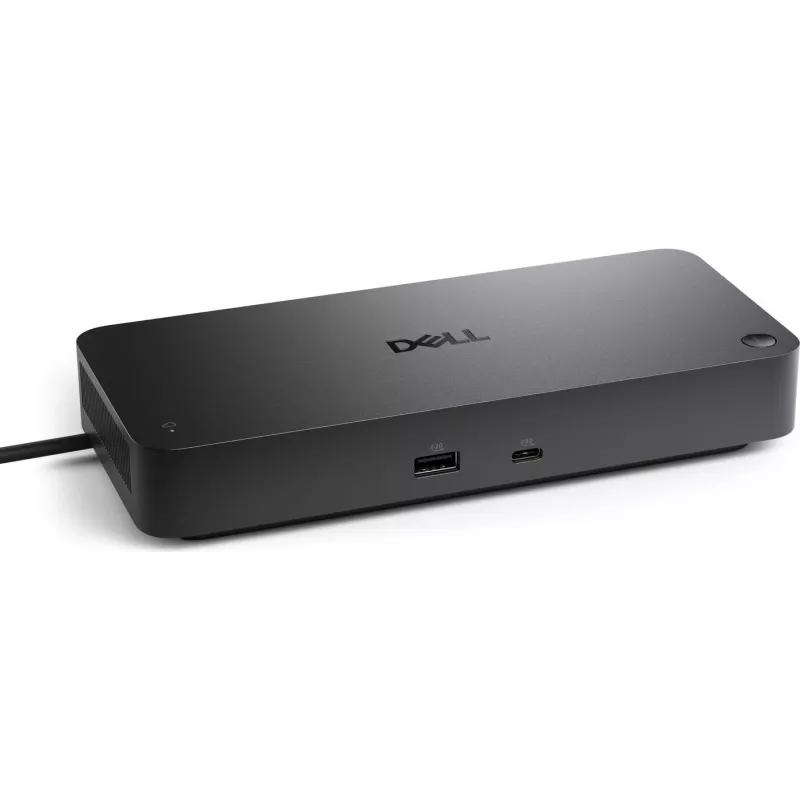
Docking Station Dell Pro Smart Dock SD25 USB-C Power Delivery, model 59JXY

Docking Station Dell Pro Smart Dock SD25 USB-C Power Delivery, model 59JXY
R4,235
The Dell Pro Smart Dock SD25 USB-C Power Delivery (model 59JXY) is a compact docking station that expands connectivity for compatible laptops through a single USB‑C connection. It provides power delivery while enabling multiple peripheral and display connections, allowing one-cable convenience for d... Read More
Stock 148 Code 2457733 Brand DELL Model 59JXY Warranty 2 Years

Shipping & Returns

Estimated delivery Tuesday, October 6
You will be kept updated through our detailed tracking system
Payment options
EFTPayFastBank CardSnapScanZapperGoogle PayApple PayMobicredMoreTymePay on Arrival

The Dell Pro Smart Dock SD25 USB-C Power Delivery (model 59JXY) is a compact docking station that expands connectivity for compatible laptops through a single USB‑C connection. It provides power delivery while enabling multiple peripheral and display connections, allowing one-cable convenience for desktop setups. The dock is designed for office and home environments where simplified cabling, network access and additional USB ports are required.

Advantages

This docking station delivers simultaneous power delivery and data connectivity over a single USB‑C cable, reducing clutter and streamlining the user workspace. It supports multiple external displays and a range of wired and wireless peripherals, and includes an Ethernet port for reliable network connections. The device is compact and designed to sit on a desk without occupying significant space, while its port selection covers common office needs.

Suitable for

  • Office workstations requiring external monitors and wired ethernet
  • Home offices where quick connection/disconnection of laptop is needed
  • Remote and hybrid work setups that use multiple peripherals (keyboard, mouse, external storage)
  • Presentations and meetings where connecting a laptop to displays and network is necessary

Key specifications

  • Connection interface: USB‑C host connection with Power Delivery support
  • Video outputs: ports for connecting one or more external monitors (check laptop and display compatibility for supported configurations and resolutions)
  • USB ports: multiple USB-A and USB-C downstream ports for peripherals and charging
  • Network: Gigabit Ethernet port for wired network access
  • Form factor: compact desktop dock suitable for placement on a desk
  • Power delivery: supports laptop charging via USB‑C while docked (power delivery capacity varies by laptop model)

How to use

Connect the dock to your laptop using the integrated or supplied USB‑C cable and ensure the laptop supports USB‑C Power Delivery and alternate mode for video over USB‑C. Attach external displays, peripherals and Ethernet cable to the corresponding ports on the dock. When connected, the dock routes power to the laptop, provides network access and enables attached devices without the need to plug each accessory directly into the computer. Follow your laptop manufacturer’s guidance for display configuration and power settings if multiple monitors are used.

Recommendations

Use a USB‑C cable rated for power delivery and data transfer that is appropriate for your laptop’s power requirements. Verify that your laptop’s USB‑C port supports both Power Delivery and video output to enable full functionality. For optimal performance with multiple high-resolution monitors, ensure your laptop’s graphics and USB‑C capabilities meet the required specifications and update drivers or firmware as provided by the laptop manufacturer.

Key Highlights
  • Office workstations requiring external monitors and wired ethernet
  • Home offices where quick connection/disconnection of laptop is needed
  • Remote and hybrid work setups that use multiple peripherals (keyboard, mouse, external storage)
  • Presentations and meetings where connecting a laptop to displays and network is necessary
  • Connection interface: USB‑C host connection with Power Delivery support
  • Video outputs: ports for connecting one or more external monitors (check laptop and display compatibility for supported configurations and resolutions)
  • USB ports: multiple USB-A and USB-C downstream ports for peripherals and charging
  • Network: Gigabit Ethernet port for wired network access
  • Form factor: compact desktop dock suitable for placement on a desk
  • Power delivery: supports laptop charging via USB‑C while docked (power delivery capacity varies by laptop model)
Price history over the last 6 months
Docking Station Dell Pro Smart Dock SD25 USB-C Power Delivery, model 59JXY
Current
R4,235
Lowest
R4,225
Highest
R4,240
Change 24H
-R6   0%
Week
—   
Month
—   

Popular products in this category

WhatsApp
Hi, I’m DistriNode’s AI assistant. I can help you find products, compare options, create quote PDFs, or open support requests.