Account Contact
Your Cart
Pay the courier with no extra fees.
Need help? DistriNode AI can handle any task on our site.

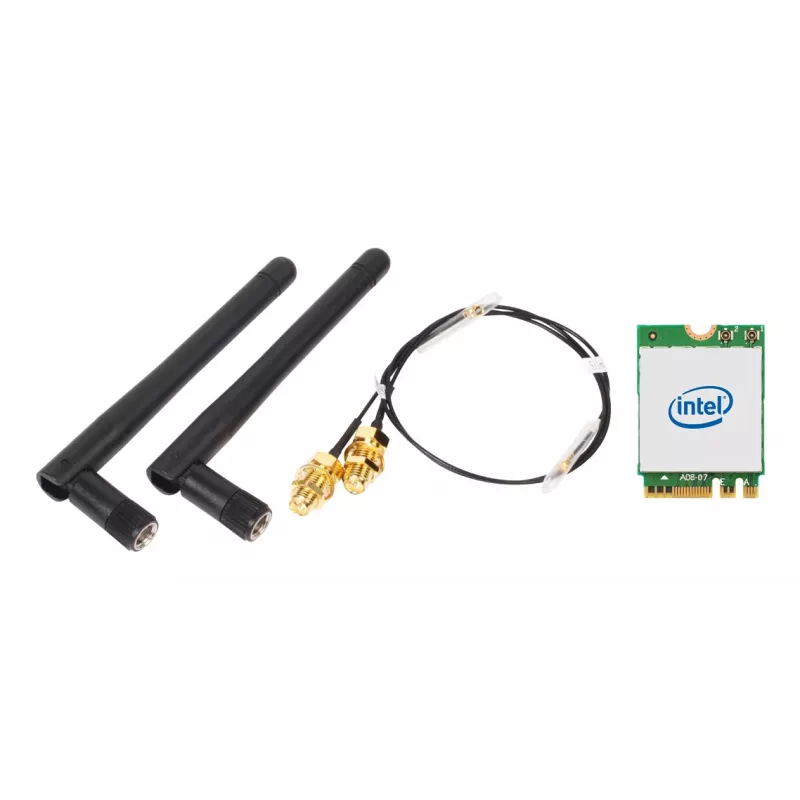
Wireless WLAN/Bluetooth Kit SHUTTLE WLN-M12 with Intel AX210 M.2 card, Tri-band Wi‑Fi 6E (2.4/5/6 GHz), 2x2, 2400 Mbit/s, external antennas

Wireless WLAN/Bluetooth Kit SHUTTLE WLN-M12 with Intel AX210 M.2 card, Tri-band Wi‑Fi 6E (2.4/5/6 GHz), 2x2, 2400 Mbit/s, external antennas
R982
SHUTTLE WLN-M12 is a WLAN and Bluetooth combo kit designed for slim desktop systems. The kit includes an Intel AX210 M.2-2230 wireless card, antenna cables and two external antennas to provide tri-band Wi‑Fi 6E connectivity (2.4 / 5 / 6 GHz) with a 2x2 antenna configuration and maximum theoretical t... Read More
Stock 8 Code 1732419 Brand SHUTTLE Model WLN-M12 Warranty 2 Years

Shipping & Returns

Estimated delivery Wednesday, October 7
You will be kept updated through our detailed tracking system
Payment options
EFTPayFastBank CardSnapScanZapperGoogle PayApple PayMobicredMoreTymePay on Arrival

SHUTTLE WLN-M12 is a WLAN and Bluetooth combo kit designed for slim desktop systems. The kit includes an Intel AX210 M.2-2230 wireless card, antenna cables and two external antennas to provide tri-band Wi‑Fi 6E connectivity (2.4 / 5 / 6 GHz) with a 2x2 antenna configuration and maximum theoretical throughput up to 2400 Mbit/s. Bluetooth 5.2 support is included for wireless peripherals and audio.

Advantages

The kit integrates an Intel WLAN‑AX210 M.2 card and accessories needed to add wireless networking to compatible slim PCs, offering Wi‑Fi 6E performance and modern Bluetooth support in a compact internal module. Its external antennas and dedicated cables improve signal reception compared with small onboard antennas, while the M.2 interface provides a straightforward installation path into systems that accept M.2 2230 wireless cards.

Suitable for

When it may not be suitable

The WLN-M12 requires a compatible M.2 slot and appropriate driver support from the host system; it is not a USB or PCIe adapter. Systems without an M.2 2230 wireless slot or where the manufacturer blocks non‑certified modules will not be able to use this kit. Performance depends on router capabilities, environmental factors, and driver configuration, so peak throughput is achievable only with matching network infrastructure and favorable conditions.

Key specifications

How to use

Power down the PC and open the chassis according to the system manufacturer’s instructions. Insert the M.2 wireless card into an available M.2 2230 slot and secure it with the appropriate screw. Route and connect the supplied antenna cables to the card’s antenna connectors, then mount the external antennas in the desired positions for optimum reception. Close the chassis, power on the system, and install any required drivers provided by the system manufacturer or Intel. Configure wireless network settings through the operating system’s network manager once drivers are installed.

What to consider before purchase

Recommendations

For best wireless performance, pair the WLN-M12 with a Wi‑Fi 6E capable router and place the external antennas with clear line of sight to the router where possible. Keep system firmware and wireless drivers up to date and verify that the 6 GHz band is permitted and supported in your region before relying on that band for connectivity.

Key Highlights
  • Upgrading a slim PC or barebone system to Wi‑Fi 6E and Bluetooth 5.2
  • Users who need tri‑band wireless (2.4 / 5 / 6 GHz) for reduced congestion and improved performance
  • Setups that benefit from external antennas to achieve better wireless range and stability
  • Systems with an available M.2 slot compatible with M.2‑2230 wireless cards
  • Wireless standard: Wi‑Fi 6E (802.11ax), backward compatible with earlier 802.11 standards
  • Frequency bands: Tri‑band — 2.4 GHz, 5 GHz, 6 GHz
  • Maximum theoretical data rate: up to 2400 Mbit/s
  • Antenna configuration: 2x2 antenna ports with external antennas included
  • Bluetooth version: Bluetooth 5.2
  • Form factor / host interface: M.2 (M.2‑2230 wireless card)
  • Confirm your system has a compatible M.2 2230 slot and allows user‑installed wireless modules
  • Check operating system driver support for the Intel AX210 card in your OS version
  • Ensure your router or access point supports Wi‑Fi 6E (6 GHz) if you require 6 GHz band operation
  • Plan antenna placement to achieve the best signal for your environment
Specifications
Antenna
Yes
Antenna design
External
Antenna direction type
Omni-directional
Antenna type
2x2
Bluetooth
Yes
Bluetooth version
5.2
Component for
PC
Connectivity technology
Wireless
Depth
22 mm
Harmonized System (HS) code
85177900
Height
2.4 mm
Host interface
M.2
Interface
WLAN / Bluetooth
Internal
Yes
Linux operating systems supported
Yes
Maximum data transfer rate
2400 Mbit/s
Networking standards
IEEE 802.11b, IEEE 802.11g, IEEE 802.11n, IEEE 802.11ax, IEEE 802.11ac
Operating temperature (T-T)
0 - 80 °C
Quick installation guide
Yes
Top Wi-Fi standard
Wi-Fi 6E (802.11ax)
Wi-Fi
Yes
Wi-Fi band
Tri-band (2.4 GHz / 5 GHz / 6 GHz)
Wi-Fi standards
802.11b, 802.11g, Wi-Fi 4 (802.11n), Wi-Fi 5 (802.11ac), Wi-Fi 6E (802.11ax)
Width
30 mm
Windows operating systems supported
Windows 10, Windows 11

Leaflet

Open Leaflet
Price history over the last 6 months
Wireless WLAN/Bluetooth Kit SHUTTLE WLN-M12 with Intel AX210 M.2 card, Tri-band Wi‑Fi 6E (2.4/5/6 GHz), 2x2, 2400 Mbit/s, external antennas
Current
R982
Lowest
R956
Highest
R1,026
Change 24H
+R16   +2%
Week
+R4   +0%
Month
+R23   +2%

Popular products in this category

WhatsApp
Hi, I’m DistriNode’s AI assistant. I can help you find products, compare options, create quote PDFs, or open support requests.