Account Contact
Your Cart
Pay on delivery – no extra fees
Need help? Ask our AI

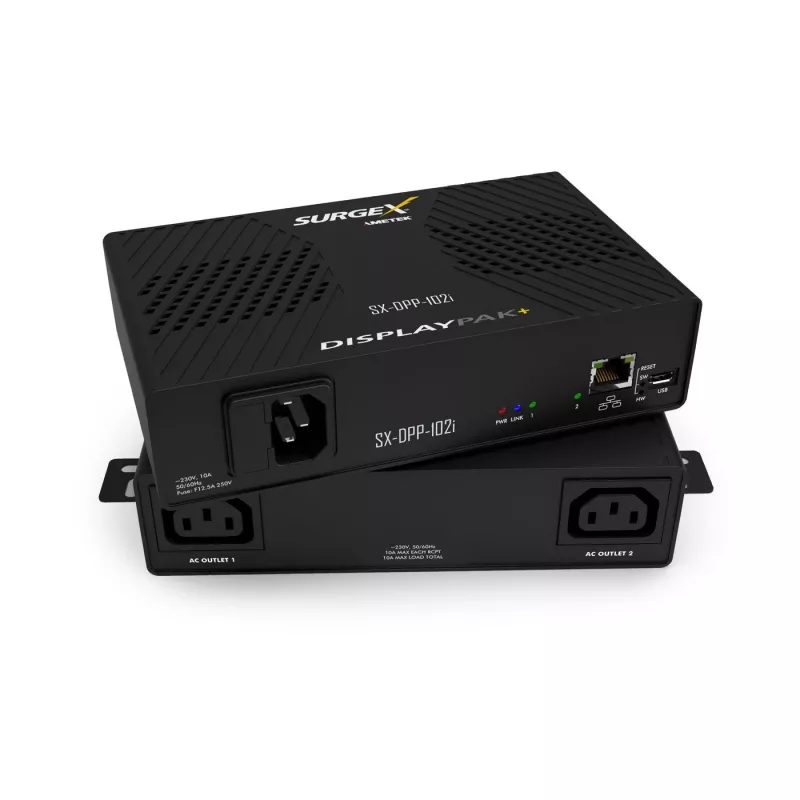
SurgeX Surge Protector DisplayPak IP Controlled SX-DPP-102I — network-managed power protection

SurgeX Surge Protector DisplayPak IP Controlled SX-DPP-102I — network-managed power protection
R7,345
PDF
PDF
Stock 5 Code 2190405 Model SX-DPP-102I Warranty 2 Years

Shipping & Returns

Estimated delivery Thursday, December 10
You will be kept updated through our detailed tracking system
Payment options
EFTPayFastBank CardSnapScanZapperGoogle PayApple PayMobicredMoreTymePay on Arrival

Description

SurgeX DisplayPak IP Controlled SX-DPP-102I is a network-managed surge protector engineered to provide controlled power protection for sensitive electronic systems. Designed for use in IT racks, AV installations and professional equipment racks, this device combines surge suppression with IP-based remote monitoring and switching to help protect connected equipment from transients while enabling centralized power control.

Advantages

The unit integrates surge suppression technology with IP control for remote status monitoring and switched power outputs, reducing the need for on-site intervention. Its design emphasizes predictable suppression performance to limit the impact of line transients on connected devices. Network management functionality enables scheduled or remote power cycling and centralized diagnostics, supporting efficient maintenance workflows in managed environments.

Key specifications

  • Network management: IP-based monitoring and control over LAN
  • Switched outputs: remote power switching for connected loads
  • Surge protection: designed to suppress power transients and spikes
  • Form factor: rack- and equipment-rack compatible design for integration into professional installations
  • Indicators and status: local and remote status reporting for connected outlets and protection state

How to use

Install the device according to rack or equipment mounting requirements and connect incoming AC power and load devices to the protected outputs. Configure network settings to allow IP access from your management network, then register the unit with your monitoring or control system. Use the device’s web interface or supported network management tools to observe surge status, control switched outlets, and perform remote power cycles as needed. Follow local electrical codes when wiring and grounding the unit.

Recommendations

Place the unit in an environment with stable ambient temperature and adequate ventilation. For critical systems, combine network-managed surge protection with upstream grounding and UPS support to ensure continuous protection and orderly shutdown in case of extended outages.

Key Highlights
  • IT-серверных шкафов и сетевого оборудования
  • AV-комплексов, студий и трансляционных установок
  • Профессиональных инсталляций и тестовых лабораторий
  • Централизованного управления питанием и удаленного перезапуска оборудования
  • Network management: IP-based monitoring and control over LAN
  • Switched outputs: remote power switching for connected loads
  • Surge protection: designed to suppress power transients and spikes
  • Form factor: rack- and equipment-rack compatible design for integration into professional installations
  • Indicators and status: local and remote status reporting for connected outlets and protection state
Price history over the last 6 months
SurgeX Surge Protector DisplayPak IP Controlled SX-DPP-102I — network-managed power protection
Current
R7,345
Lowest 7d
R7,217
Highest 7d
R7,379
Change 24H
-R34   0%
Change 7D
+R97   +1%
Change 30D
+R66   +1%

Write a review

Rating *
Your name will be shown publicly – you can use a nickname. We invite buyers to write reviews; we check reviews before publishing and publish critical ones too.

More SURGEX products in this category

4

Popular products in this category

8
WhatsApp
Messenger
Hi, I’m DistriNode’s AI assistant. I can help you find products, compare options, create quote PDFs, or open support requests.
All categories