Account Contact
Your Cart
Pay the courier with no extra fees.
Need help? DistriNode AI can handle any task on our site.

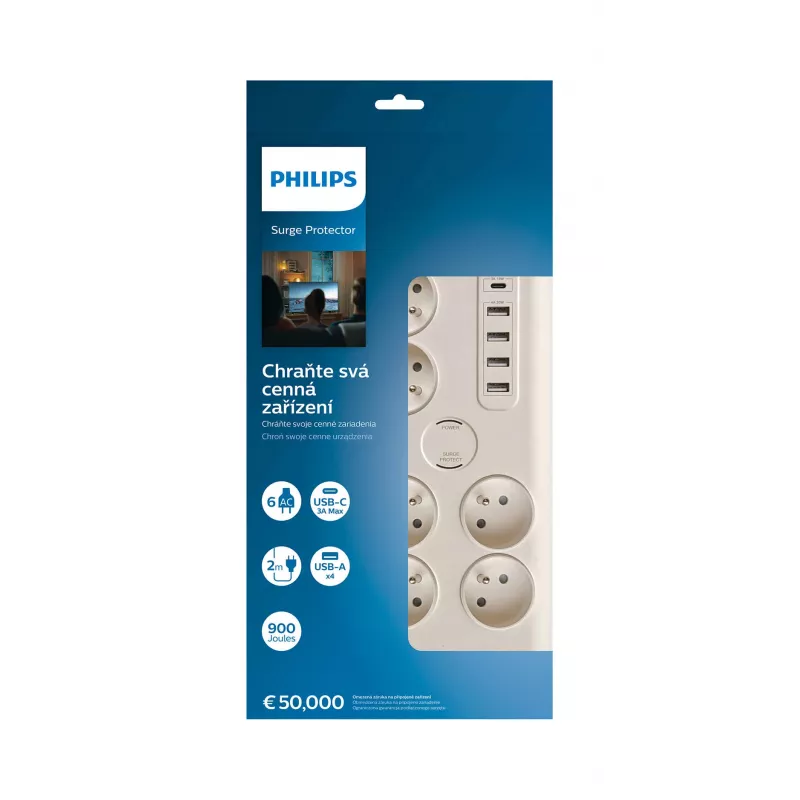
Philips SPN7060WA/60 surge protector White 6 AC outlet(s) 2 m

Philips SPN7060WA/60 surge protector White 6 AC outlet(s) 2 m
R996
The Philips SPN7060WA/60 surge protector offers reliable protection for home and office electronics with six AC outlets and a surge energy rating of 900 J. Designed in white with a compact footprint and a 2 m power cable, this unit provides convenient placement options and straightforward protection... Read More
Stock 17 Code 97694 Brand PHILIPS Model SPN7060WA/60 Warranty 2 Years

Shipping & Returns

Estimated delivery Tuesday, September 29
You will be kept updated through our detailed tracking system
Payment options
EFTPayFastBank CardSnapScanZapperGoogle PayApple PayMobicredMoreTymePay on Arrival

The Philips SPN7060WA/60 surge protector offers reliable protection for home and office electronics with six AC outlets and a surge energy rating of 900 J. Designed in white with a compact footprint and a 2 m power cable, this unit provides convenient placement options and straightforward protection against voltage spikes. Weighing 0.72 kg, it is sturdy enough for desktop or floor use while remaining easy to move when rearranging equipment.

Advantages

This surge protector delivers multiple outlets to power several devices simultaneously while limiting damage from transient voltage surges thanks to a 900 J surge energy rating. The 2 m cable provides flexible placement relative to wall sockets, and the compact, white housing fits unobtrusively in most environments. The design balances portability and durability for everyday use with computers, peripherals, and consumer electronics.

Suitable for

  • Desktop computers, monitors and printers
  • Home entertainment systems and set-top boxes
  • Modems, routers and network equipment
  • Chargers for phones, tablets and small devices
  • Workstations and home office setups

Key specifications

  • Number of AC outlets: 6
  • Surge energy rating: 900 J
  • Cable length: 2 m
  • Colour: White
  • Weight: 0.72 kg

How to use

Place the surge protector on a stable surface near a wall outlet and connect the cable to the mains socket. Plug electrical devices into the available AC outlets without exceeding the combined load rating of your household circuit. Ensure that connected equipment has proper ventilation and avoid stacking heavy objects on the unit. In case of a detected surge or visible damage to the unit, disconnect all devices and inspect the protector before further use.

Recommendations

For best results, connect high-value or sensitive electronics (computers, TVs, routers) directly to the surge protector rather than to extension cords. Do not use the unit outdoors or in wet environments. Periodically check the power cable and housing for signs of wear, and replace the unit if it shows damage or no longer indicates protection.

Key Highlights
  • Desktop computers, monitors and printers
  • Home entertainment systems and set-top boxes
  • Modems, routers and network equipment
  • Chargers for phones, tablets and small devices
  • Workstations and home office setups
  • Number of AC outlets: 6
  • Surge energy rating: 900 J
  • Cable length: 2 m
  • Colour: White
  • Weight: 0.72 kg
Specifications
AC outlets quantity
6 AC outlet(s)
Cable length
2 m
Package depth
50 mm
Package height
370 mm
Package width
180 mm
Product colour
White
Surge energy rating
900 J
USB charging
Yes
USB ports quantity
5
Weight
720 g

Leaflet

Open Leaflet
Price history over the last 6 months
Philips SPN7060WA/60 surge protector White 6 AC outlet(s) 2 m
Current
R996
Lowest
R857
Highest
R1,027
Change 24H
+R124   +14%
Week
+R137   +16%
Month
+R128   +15%

Popular products in this category

WhatsApp
Hi, I’m DistriNode’s AI assistant. I can help you find products, compare options, create quote PDFs, or open support requests.