Account Contact
Your Cart
Pay the courier with no extra fees.
Need help? DistriNode AI can handle any task on our site.

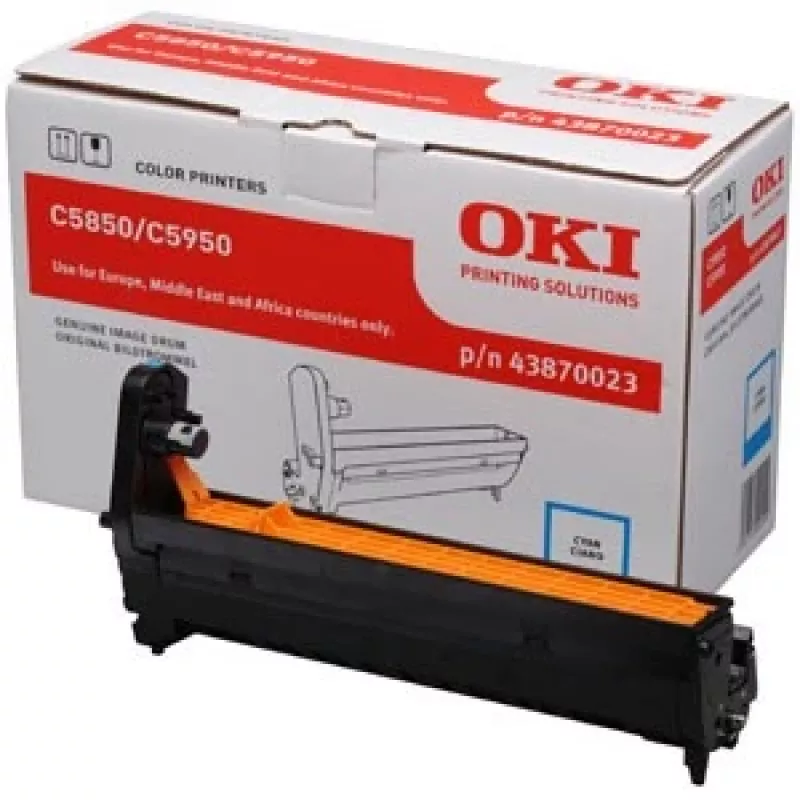
Original OKI Cyan Image Drum C5850/5950

Original OKI Cyan Image Drum C5850/5950
R2,260
The Original OKI Cyan Image Drum for C5850/5950 is a replacement imaging drum designed for colour laser printers. It delivers up to 20,000 pages and is compatible with OKI models MC560, MC560dn, C5850, C560N, C560DN and C5750DN. With dimensions of 372 mm x 149 mm x 231 mm, the drum is intended to ma... Read More
Stock 2 Code 1222543 Brand OKI Model 43870023 Warranty 2 Years

Shipping & Returns

Estimated delivery Tuesday, October 6
You will be kept updated through our detailed tracking system
Payment options
EFTPayFastBank CardSnapScanZapperGoogle PayApple PayMobicredMoreTymePay on Arrival

The Original OKI Cyan Image Drum for C5850/5950 is a replacement imaging drum designed for colour laser printers. It delivers up to 20,000 pages and is compatible with OKI models MC560, MC560dn, C5850, C560N, C560DN and C5750DN. With dimensions of 372 mm x 149 mm x 231 mm, the drum is intended to maintain consistent cyan reproduction and reliable print quality in professional environments.

Advantages

This OEM imaging drum provides predictable page yield and stable colour output for cyan prints. As an Original OKI part (MPN 43870023), it is manufactured to match printer specifications, ensuring proper fit, consistent colour density and dependable operation across high-volume print runs.

Suitable for (tasks / use cases)

  • High-volume office printing that requires consistent cyan colour
  • Graphic and marketing material production where accurate colour reproduction is important
  • Replacement during routine maintenance to restore print quality

Key specifications

  • Brand: OKI
  • Model compatibility: MC560, MC560dn, C5850, C560N, C560DN, C5750DN
  • MPN: 43870023
  • Page yield: 20,000 pages
  • Printing colour: Cyan
  • Product colour (outer casing): Black
  • Dimensions: 372 mm x 149 mm x 231 mm

How to use

Turn off and unplug the printer before replacing the drum. Open the printer access panel, remove the spent image drum according to the printer user guide, and install the Original OKI Cyan Image Drum (C5850/5950) in the correct orientation until it clicks into place. Reassemble the printer, plug in, and run the printer’s drum reset or calibration procedure if required to ensure correct recognition and optimal print quality.

Recommendations

Store the drum in a cool, dry place and avoid exposure to direct sunlight. Handle by the ends to prevent contact with the drum surface. Replace the drum at the indicated end-of-life to maintain consistent cyan density and avoid print defects.
Key Highlights
  • High-volume office printing that requires consistent cyan colour
  • Graphic and marketing material production where accurate colour reproduction is important
  • Replacement during routine maintenance to restore print quality
  • Brand: OKI
  • Model compatibility: MC560, MC560dn, C5850, C560N, C560DN, C5750DN
  • MPN: 43870023
  • Page yield: 20,000 pages
  • Printing colour: Cyan
  • Product colour (outer casing): Black
  • Dimensions: 372 mm x 149 mm x 231 mm
Specifications
Compatibility
OKI MC560, MC560dn, C5850, C560N, C560DN, C5750DN
Harmonized System (HS) code
84439990
Package depth
149 mm
Package height
231 mm
Package weight
1306 g
Package width
372 mm
Page yield
20000 pages
Print technology
Laser printing
Printing colours
Cyan
Product colour
Black
Type
Original
Price history over the last 6 months
Original OKI Cyan Image Drum C5850/5950
Current
R2,260
Lowest
R1,433
Highest
R2,272
Change 24H
+R415   +22%
Week
+R521   +30%
Month
+R515   +29%

Popular products in this category

WhatsApp
Hi, I’m DistriNode’s AI assistant. I can help you find products, compare options, create quote PDFs, or open support requests.