Account Contact
Your Cart
Pay the courier with no extra fees.
Need help? DistriNode AI can handle any task on our site.

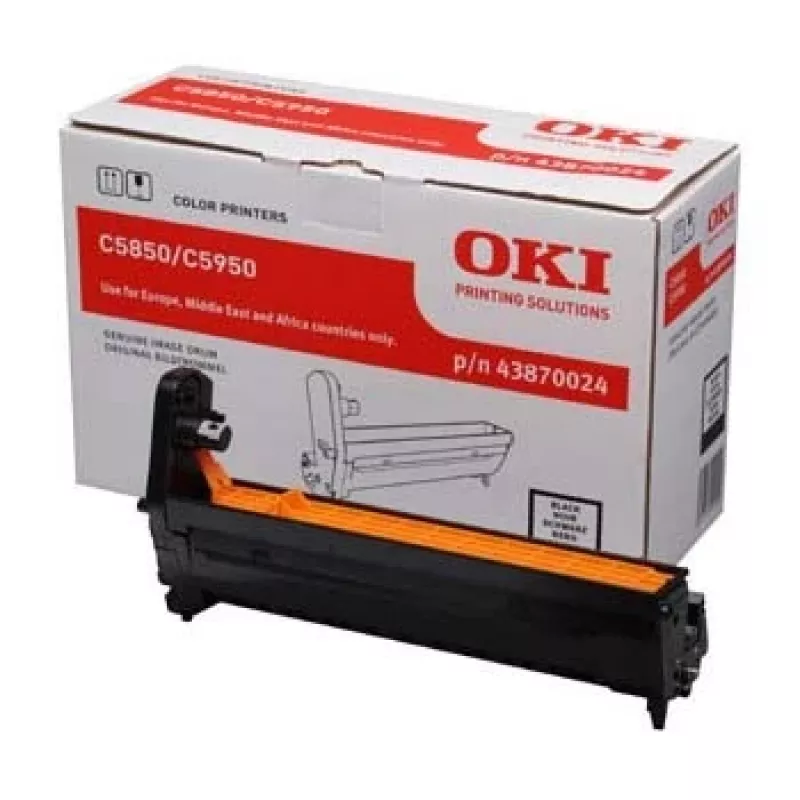
Original OKI Black Image Drum for C5850/5950

Original OKI Black Image Drum for C5850/5950
R2,879
The Original OKI Black Image Drum for C5850/5950 is a dedicated replacement drum unit designed to deliver consistent black image quality. Compatible with OKI MC560, MC560dn, C5850, C560N, C560DN and C5750DN models, the drum supports a high page yield of up to 20,000 pages and is supplied in black co... Read More
Stock 2 Code 1163087 Brand OKI Model 43870024 Warranty 2 Years

Shipping & Returns

Estimated delivery Wednesday, October 14
You will be kept updated through our detailed tracking system
Payment options
EFTPayFastBank CardSnapScanZapperGoogle PayApple PayMobicredMoreTymePay on Arrival

The Original OKI Black Image Drum for C5850/5950 is a dedicated replacement drum unit designed to deliver consistent black image quality. Compatible with OKI MC560, MC560dn, C5850, C560N, C560DN and C5750DN models, the drum supports a high page yield of up to 20,000 pages and is supplied in black colour. It is intended for use in colour multifunction printers where each colour uses a separate image drum.

Advantages

This Original OKI image drum provides stable print performance and reproducible black tones over a long service life. Factory-designed for OKI devices, it ensures correct fit and reliable operation, reducing the need for frequent replacements. The high page yield offers lower running costs per page in environments with significant black printing needs.

Suitable for (tasks / use cases)

  • High-volume black-and-white document printing
  • Office multifunction printers OKI MC560/MC560dn/C5850/C560N/C560DN/C5750DN
  • Replacement maintenance to restore image quality

Key specifications

  • Manufacturer: OKI
  • Model compatibility: MC560, MC560dn, C5850, C560N, C560DN, C5750DN
  • MPN: 43870024
  • EAN: 5031713040200
  • Page yield: up to 20,000 pages
  • Printing colour: Black
  • Product colour: Black

How to use

Turn off the printer and open the front cover according to the printer user manual. Remove the used black image drum carefully and dispose of it following local electronic waste regulations. Unpack the replacement drum, remove protective seals and insert it into the black drum slot until it clicks into place. Close the cover and turn the printer on. Perform any printer-recommended drum alignment or cleaning cycle if prompted.

Recommendations

Store the drum in its original packaging in a dry, cool place away from direct sunlight. Replace the drum when print density decreases or when the printer indicates drum replacement to maintain consistent black image quality.
Key Highlights
  • High-volume black-and-white document printing
  • Office multifunction printers OKI MC560/MC560dn/C5850/C560N/C560DN/C5750DN
  • Replacement maintenance to restore image quality
  • Manufacturer: OKI
  • Model compatibility: MC560, MC560dn, C5850, C560N, C560DN, C5750DN
  • MPN: 43870024
  • EAN: 5031713040200
  • Page yield: up to 20,000 pages
  • Printing colour: Black
  • Product colour: Black
Specifications
Approximate page yield (A4, black & white, ISO/IEC 19752)
2000 pages
Compatibility
OKI MC560, MC560dn, C5850, C560N, C560DN, C5750DN
Harmonized System (HS) code
84439990
Package depth
149 mm
Package height
231 mm
Package weight
1306 g
Package width
372 mm
Page yield
20000 pages
Print technology
Laser printing
Printing colours
Black
Product colour
Black
Type
Original
Price history over the last 6 months
Original OKI Black Image Drum for C5850/5950
Current
R2,879
Lowest
R1,642
Highest
R3,538
Change 24H
+R1,037   +56%
Week
+R693   +32%
Month
+R475   +20%

Popular products in this category

WhatsApp
Hi, I’m DistriNode’s AI assistant. I can help you find products, compare options, create quote PDFs, or open support requests.