Account Contact
Your Cart
Pay the courier with no extra fees.
Need help? DistriNode AI can handle any task on our site.

Mounting Kit GRAUGEAR G-CV-235T525 Black Plastic

Mounting Kit GRAUGEAR G-CV-235T525 Black Plastic
R501
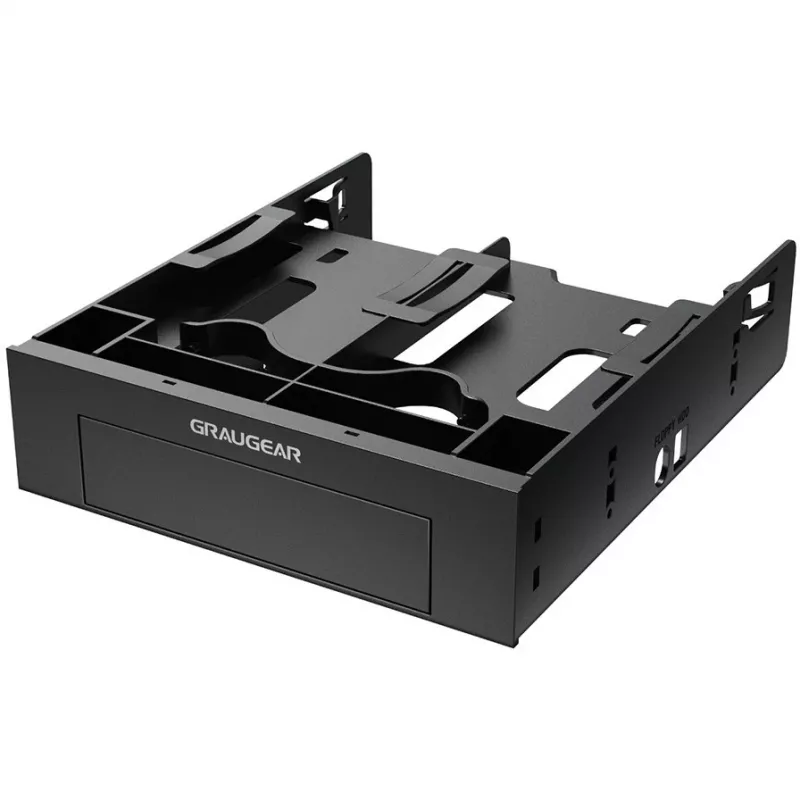
The GRAUGEAR mounting frame G-CV-235T525 is a black plastic kit designed to fit into a 5.25″ PC drive bay. It accepts one 3.5″ front panel or hard disk and two 2.5″ HDDs or SSDs, providing a compact solution for integrating multiple drives into systems that have a single 5.25″ bay.AdvantagesConstruc... Read More
Stock 4 Code 1728405 Brand GRAUGEAR Model G-CV-235T525 Warranty 2 Years

Shipping & Returns

Estimated delivery Thursday, October 8
You will be kept updated through our detailed tracking system
Payment options
EFTPayFastBank CardSnapScanZapperGoogle PayApple PayMobicredMoreTymePay on Arrival

The GRAUGEAR mounting frame G-CV-235T525 is a black plastic kit designed to fit into a 5.25″ PC drive bay. It accepts one 3.5″ front panel or hard disk and two 2.5″ HDDs or SSDs, providing a compact solution for integrating multiple drives into systems that have a single 5.25″ bay.

Advantages

Constructed from durable black plastic, the GRAUGEAR G-CV-235T525 offers a lightweight and corrosion-resistant mounting solution. It supports tool-free installation for 2.5″ drives without height restriction, simplifying drive installation and removal while maintaining stable positioning inside the 5.25″ bay.

Suitable for

  • Installing one 3.5″ front panel or hard disk into a 5.25″ bay
  • Mounting up to two 2.5″ HDDs or SSDs in systems with limited drive bays
  • Upgrading storage in desktop PCs, workstations, or small form-factor systems

Key specifications

  • Brand: GrauGear
  • Model: G-CV-235T525
  • Material: Black plastic
  • Fits into: 5.25″ PC mounting bay
  • Supports: one 3.5″ front panel or HDD, two 2.5″ HDDs/SSDs
  • Tool-free installation for 2.5″ drives
  • MPN: G-CV-235T525
  • EAN: 4260746550665

How to use

Insert the GRAUGEAR mounting frame into an available 5.25″ bay and secure it according to your chassis design (screws or bay latches depending on the case). Install the 3.5″ front panel or hard disk into the designated 3.5″ slot. Slide the 2.5″ HDDs/SSDs into the dedicated mounts; they install without tools and do not have a height restriction. Connect drive power and data cables to the motherboard and power supply, then verify detection in the system BIOS or operating system.

Recommendations

Ensure the case has adequate airflow and verify that installed drives are properly connected before powering on. Use appropriate screws or case latches to secure the mounting frame if your chassis requires them.
Key Highlights
  • Installing one 3.5″ front panel or hard disk into a 5.25″ bay
  • Mounting up to two 2.5″ HDDs or SSDs in systems with limited drive bays
  • Upgrading storage in desktop PCs, workstations, or small form-factor systems
  • Brand: GrauGear
  • Model: G-CV-235T525
  • Material: Black plastic
  • Fits into: 5.25″ PC mounting bay
  • Supports: one 3.5″ front panel or HDD, two 2.5″ HDDs/SSDs
  • Tool-free installation for 2.5″ drives
  • MPN: G-CV-235T525
  • EAN: 4260746550665
Specifications
Depth
147.5 mm
Height
41 mm
Material
Plastic
Product colour
Black
Weight
0.115 kg
Width
175 mm
Price history over the last 6 months
Mounting Kit GRAUGEAR G-CV-235T525 Black Plastic
Current
R501
Lowest
R450
Highest
R850
Change 24H
+R45   +10%
Week
+R50   +11%
Month
-R274   -35%

Popular products in this category

WhatsApp
Hi, I’m DistriNode’s AI assistant. I can help you find products, compare options, create quote PDFs, or open support requests.