Account Contact
Your Cart
Pay the courier with no extra fees.
Need help? DistriNode AI can handle any task on our site.

Interface adapter card InLine 33208F — InLine 33208F network/expansion interface

Interface adapter card InLine 33208F — InLine 33208F network/expansion interface
R161
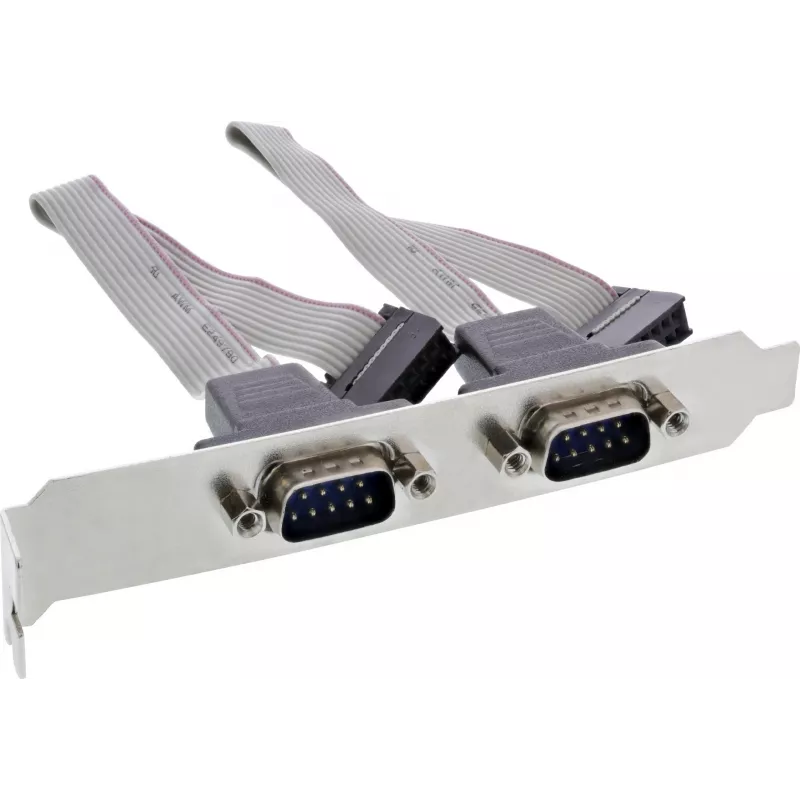
Slot cover with two 9‑pin Sub‑D male ports designed to provide external access to a serial connection from a motherboard. It allows connection of a 10‑pin serial header on the mainboard via an appropriate cable and adapter arrangement, exposing two standard DB9 male ports on the rear panel.Advantage... Read More
Stock 488 Code 1732295 Brand INLINE Model 33208F Warranty 2 Years

Shipping & Returns

Estimated delivery Tuesday, October 6
You will be kept updated through our detailed tracking system
Payment options
EFTPayFastBank CardSnapScanZapperGoogle PayApple PayMobicredMoreTymePay on Arrival

Slot cover with two 9‑pin Sub‑D male ports designed to provide external access to a serial connection from a motherboard. It allows connection of a 10‑pin serial header on the mainboard via an appropriate cable and adapter arrangement, exposing two standard DB9 male ports on the rear panel.

Advantages

The slot cover provides two standard 9‑pin Sub‑D male connectors in a compact rear‑panel bracket, enabling simple connection of serial devices without internal case access. A short 18 cm cable offers a direct 1:1 wiring between the motherboard header and the external ports, while the deliberate omission of pin 10 on the header side prevents miswiring where that contact is unused.

Suitable for

Key specifications

How to use

Install the bracket into an available PCI/IO slot on the computer chassis. Connect the internal cable to the motherboard’s 10‑pin serial header, ensuring orientation matches the header pinout; note that pin 10 on the header side is not wired. Secure the slot cover and connect external serial devices to the DB9 male ports using standard serial cables.

Recommendations

Use short, shielded serial cables for reliable communication and avoid forcing the connector orientation when attaching to the motherboard header. Verify motherboard documentation for the correct serial header pinout before connection.
Key Highlights
  • Connecting RS‑232 serial devices to a PC via motherboard serial header
  • Adding external DB9 ports to small form‑factor or server cases
  • Industrial or legacy equipment that uses 9‑pin serial connections
  • Cable length: 18 cm
  • Connector configuration: 1:1 wiring
  • External connectors: two 9‑pin Sub‑D (DB9) male ports
  • Header connector: 10‑pin serial header with pin 10 not connected
Price history over the last 6 months
Interface adapter card InLine 33208F — InLine 33208F network/expansion interface
Current
R161
Lowest
R150
Highest
R161
Change 24H
+R9   +6%
Week
+R11   +7%
Month
—   

Popular products in this category

WhatsApp
Hi, I’m DistriNode’s AI assistant. I can help you find products, compare options, create quote PDFs, or open support requests.