Account Contact
Your Cart
Pay the courier with no extra fees.
Need help? DistriNode AI can handle any task on our site.

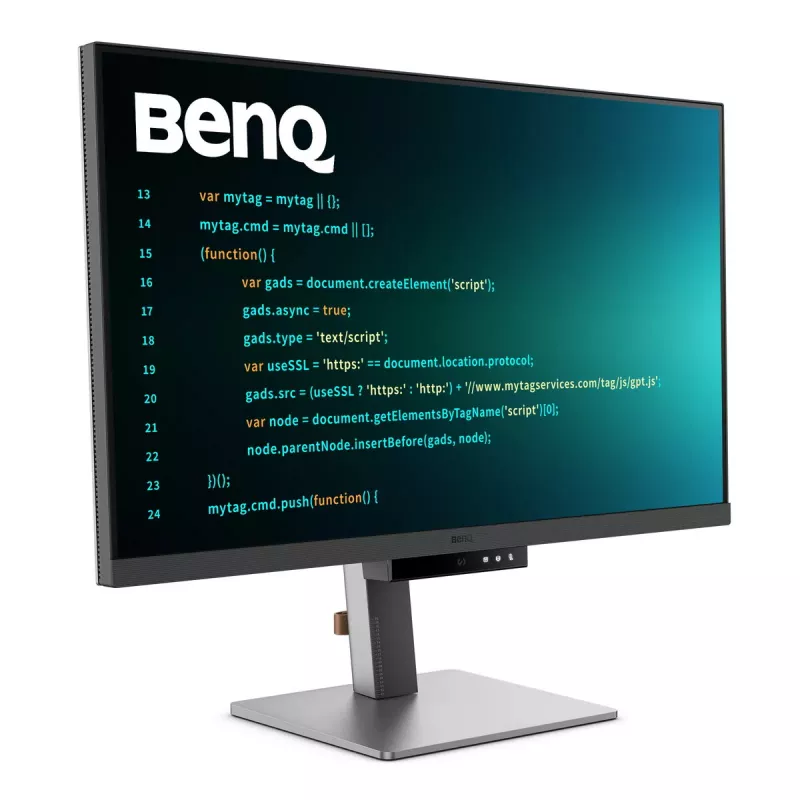
BenQ RD320U computer monitor 80 cm (31.5 inch) 3840 x 2160 pixels 4K Ultra HD LED Black

BenQ RD320U computer monitor 80 cm (31.5 inch) 3840 x 2160 pixels 4K Ultra HD LED Black
36 mo.
BenQ RD320U computer monitor 80 cm (31.5 inch) 3840 x 2160 pixels 4K Ultra HD LED Black
R21,796
RD320U|32” 4K BenQ Programming Monitor with BacklightAstonishing Clarity for the Ultimate Coding ExperienceCrystal Clear, Entirely FocusedEnter the Coding Flow in SecondsEnter the coding flow in seconds with BenQ Nano Matte Panel. Featuring a low reflection property to minimize distractions, this ad... Read More
Stock 12 Code 111611 Brand BENQ Model 9H.LMSLA.TBE Warranty 3 Years

Shipping & Returns

Estimated delivery Thursday, October 1
You will be kept updated through our detailed tracking system
Payment options
EFTPayFastBank CardSnapScanZapperGoogle PayApple PayMobicredMoreTymePay on Arrival
RD320U|32” 4K BenQ Programming Monitor with Backlight
Astonishing Clarity for the Ultimate Coding Experience

Crystal Clear, Entirely Focused
Enter the Coding Flow in Seconds
Enter the coding flow in seconds with BenQ Nano Matte Panel. Featuring a low reflection property to minimize distractions, this advanced technology enhances focus and boosts productivity, delivering unparalleled clarity for peak performance.

2000:1 Contrast Ratio for Clearer Code and Stunning Visuals
Experience unparalleled clarity with a 2000:1 contrast ratio. Enjoy deeper blacks and high contrast with a premium 4K display for coding, movies, and gaming, ensuring exceptional visual performance. This enhancement not only improves image quality but also increases overall immersion, providing a more engaging and captivating experience.

Ignite Night Coding Inspiration
Whether you prefer working in a soft, ambient glow, complete darkness during late-night hours, or complete darkness during late-night work, we've got you covered for long-lasting eye care.

Effortless Comfort with Night Hours Protection
Benefit from minimum brightness technology for reduced eye strain, discover enhanced eye protection during night hours and dark room usage with our Night Hours Protection. Its intelligent ambient light detection and auto-switch capabilities require minimal user intervention, ensuring effortless and consistent eye care.

Experience Focus Anytime with MoonHalo
Experience MoonHalo by BenQ – an illumination system built into the back of the monitor. With customizable color temperature, brightness, and light modes, along with Auto Dimming powered by B.I. Gen2, MoonHalo ensures optimal eye protection and focus anytime, whether you're working from home or the office.

Designed for Coding Excellence
Exclusive Coding Modes Boost Productivity
BenQ's advanced coding modes deliver clear fonts and better code differentiation, reducing eye strain. Choose from dark and light themes and easily adjust brightness, sharpness, and contrast for optimal coding conditions.

Instant Coding with Hotkey and Function Bar
Effortlessly boost productivity with our unique Coding HotKey and Function Bar. With a swift press of the Coding HotKey at the heart of the function bar you can immediately start coding.

Infinite Desk Flexibility for Programmers
Enhance your coding workspace with adjustable height, tilt, pivot, and swivel capabilities for optimal efficiency and comfort.

Optimal Posture, Superior Output
Relieve prolonged neck and body aches. BenQ Programming Monitors prioritize your comfort for long-term projects.
For a maximum ergonomic and flexible user experience, please consider the BenQ Ergo Arm version, the RD320UA.

Quick Connectivity with Easy Plug and Play
BenQ Programming Monitors offer ample port options, including USB Type-C for all-in-one connectivity, meeting your multitasking needs.

Unified Integration with KVM Switching
Maximum efficiency through unified integration with diverse devices and built-in KVM (keyboard, video, mouse) for seamless source switching.

Daisy Chain with the 90W USB Type-C
Multi-Stream Transport Technology allows you to extend screens across multiple displays using the USB Type-C. The 90W USB Type-C carries images, videos, and other data seamlessly and charges your mobile devices simultaneously with one cable.
Please note that Mac and MacBook devices only support daisy chaining via Thunderbolt. Daisy chaining is not supported via HDMI or using regular USB ports on any device. Also, you can only connect a single external display using a Mac device with the M1 or M2 chips. For more information about connecting different models of Mac devices to external displays, please refer to the Apple website.

Effortless Multi-Device Display with PIP/PBP and DualView Plus
DualView Plus simplifies multi-device displays by letting you customize color modes across applications or windows. With support for PIP and PBP, you can easily manage dual-source or single-source viewing.

Optimize Productivity with PIP and PBP
PIP (Picture-in-Picture) and PBP (Picture-by-Picture) efficiently optimize screen space. PIP overlays a secondary window for multitasking, while PBP splits the screen to display content from multiple sources, boosting productivity.

DualView Plus Displays Versatile Color Modes
DualView Plus with PIP/PBP not only displays dual sources simultaneously but also allows different color modes for each screen.

Set Displays with Mouse and Keyboard via Display Pilot 2
Display Pilot 2 caters to your needs, allowing easy arrangement of functions like MoonHalo, Night Hours Protection, and Auto Pivot. Display Pilot 2 for the BenQ programming series also offers software features specifically designed for programmers, including FloW, Shortcuts, Desktop Partition, Application Mode, Software Dimming, and Circadian Mode.

FloW Tailored Screen Performance for Your Day
We understand your need for precise planning. By learning your habits, BenQ RD320U’s FloW will seamlessly adapt to your needs, transitioning between different scenarios and based on preset schedules to support your busy day.

Easily Adjust Built-in MoonHalo Light
With Display Pilot 2, MoonHalo seamlessly syncs with your monitor for easy adjustments of switch, brightness, color temperature, light mode, and non-stop mode.

Circadian Mode for All-Day Comfort and Soothing Ambiance
BenQ Low Blue Light Plus includes Circadian Mode, which automatically adjusts your screen's color temperature throughout the day, mirroring the natural sunrise-to-sunset cycle. Enjoy eye comfort worry-free.

Assign Different Modes to Applications
Application Mode makes it easy to assign different color modes and remembers your frequently used settings for upcoming applications.

Customizable Desktop Partitions for Your Workspace
Launch Desktop Partition and drag the application you're working with into partitions by using preset templates or by customizing your own layouts.

Double Your Coding Speed with Shortcuts
Display Pilot 2 now stores an additional set of copy-and-paste functions, enhancing coding efficiency. Additionally, BenQ’s exclusive Shortcuts allow quick access to pre-set keyboard shortcuts for specific common functions.

Keep Your Eyes Fatigue-Free
Experience unmatched eye comfort with our Brightness Intelligence Gen2. BenQ Eye-Care Technology is dedicated to enhancing your visual comfort.

Brightness Intelligence Gen2
BenQ B.I. Gen2 automatically detects the brightness in your room and adjusts the screen brightness, while also providing the option to manually fine-tune the brightness.

TUV Reflection Free Certified for Refreshed Eyes
Being TUV Reflection Free Certificated ensures coding with minimized distractions, fostering a clearer and more efficient development process. Global safety authority TÜV Rheinland also certifies RD320U's Low Blue Light as truly friendly to the human eye. Eyesafe 2.0 certification ensures that the display reduces blue light while maintaining vivid color.

BenQ’s Green Commitment : A Vision of Sustainability
BenQ prioritizes eco-friendly practices in our product development, underlining our commitment to sustainability.

85% PCR
The housing of monitors is made with 85% PCR (Post-Consumer Recycled) materials, contributing to environmentally conscious production practices.

Recyclable Cardboard Packing
We package our monitors in recyclable cardboard, minimizing our environmental impact and promoting eco-friendliness.

Auto Power Off
The Auto Power Off feature allows users to automatically power down the screen after 10, 20, or 30 minutes of inactivity, conserving energy and further promoting sustainability.

EcoPrivacy
Save power and safeguard screen privacy effortlessly with our feature that automatically dims your monitor during inactivity.

How to use

Connect your primary computer using USB Type-C for video, data and up to 90W charging, or use HDMI/DisplayPort as alternatives. Use the Function Bar and Coding HotKey to switch to coding modes quickly. Configure MoonHalo, Night Hours Protection, Brightness Intelligence Gen2 and other features via Display Pilot 2 software to match your working schedule and lighting conditions. For multi-display setups, enable MST daisy chaining from the USB Type-C source or use PIP/PBP and DualView Plus to show multiple inputs simultaneously. For Mac devices, follow Apple guidance: daisy chaining is supported only via Thunderbolt and M1/M2 Macs support a single external display.

Recommendations

For prolonged coding sessions, enable Night Hours Protection or Circadian Mode and adjust MoonHalo brightness and color temperature to reduce eye strain. Use the ergonomic stand or VESA mount to position the screen so the top of the display is at or slightly below eye level and keep an arm’s length distance from the screen. When connecting multiple displays, prefer USB Type-C with MST-capable hosts or Thunderbolt for Mac to ensure reliable daisy chaining.

Key Highlights
  • Software development, coding and debugging
  • Multitasking with multiple devices and dual-source workflows
  • Office work and content review requiring clear text rendering
  • Late-night or low-light work with enhanced eye-care features
  • Display diagonal: 31.5" (80 cm)
  • Resolution: 3840 x 2160 (4K Ultra HD)
  • Panel type: IPS with Nano Matte surface
  • Contrast ratio (typical): 2000:1
  • Response time: 5 ms
  • Brightness (typical): 400 cd/m²
  • Viewing angles: 178° / 178°
  • USB Type-C with 90W power delivery and MST daisy chaining (Thunderbolt required for Mac daisy chain)
  • USB downstream ports: 2 (USB 3.2 Gen 2)
  • Built-in speakers and KVM switch
  • Ergonomic stand: height, tilt, pivot and swivel
  • VESA mounting: Yes
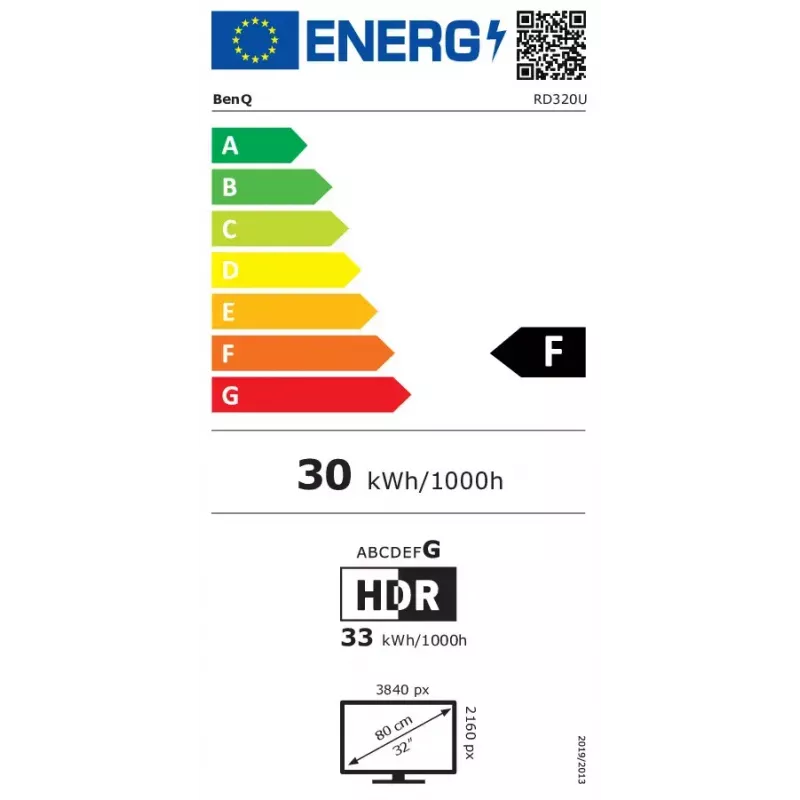
  • Energy classes (SDR/HDR): F / G
Specifications
AC input voltage
100 - 240 V
Adjustable height (max)
11 cm
Built-in speaker(s)
Yes
Colour gamut
98%
Contrast ratio (typical)
2000:1
Depth (with stand)
263.1 mm
Depth (without stand)
88.6 mm
Display brightness (typical)
400 cd/m²
Display diagonal
80 cm (31.5")
Display number of colours
1.07 billion colours
Display resolution
3840 x 2160 pixels
Display surface
Matt
Display technology
LED
DisplayPort version
1.4
DisplayPorts quantity
1
Energy consumption (HDR) per 1000 hours
33 kWh
Energy consumption (SDR) per 1000 hours
30 kWh
Energy efficiency class (HDR)
G
Energy efficiency class (SDR)
F
Energy efficiency scale
A to G
Flicker-free technology
Yes
HD type
4K Ultra HD
HDCP
Yes
HDCP version
2.2
HDMI
Yes
HDMI ports quantity
2
HDMI version
2.0
Headphone out
Yes
Height (with stand)
468.6 mm
Height (without stand)
425 mm
Height adjustment
Yes
High Dynamic Range (HDR) supported
Yes
High Dynamic Range (HDR) technology
DisplayHDR 400, High Dynamic Range 10 (HDR10)
LED backlight
Yes
Low Blue Light technology
Yes
Market positioning
Professional
Maximum refresh rate
60 Hz
Native aspect ratio
16:9
Number of speakers
3
Number of upstream ports
1
On Screen Display (OSD)
Yes
On Screen Display (OSD) languages
Multi
Panel mounting interface
100 x 100 mm
Panel type
IPS
Picture-in-Picture
Yes
Pivot
Yes
Pivot angle
0 - 90°
Plug and Play
Yes
Power consumption (max)
220 W
Power consumption (standby)
0.5 W
Power consumption (typical)
30 W
Product colour
Black
Quick start guide
Yes
Response time
5 ms
RMS rated power
6 W
Screen shape
Flat
Sustainability certificates
ENERGY STAR, EPEAT Bronze, TCO
Swivel angle range
-15 - 15°
Swivelling
Yes
Tilt adjustment
Yes
Tilt angle range
-5 - 20°
Touchscreen
No
USB hub version
3.2 Gen 2 (3.1 Gen 2)
USB Power Delivery (USB PD)
Yes
USB Power Delivery up to
90 W
USB Type-A downstream ports quantity
2
USB Type-C downstream ports quantity
2
USB upstream port type
USB Type-B
VESA mounting
Yes
Viewing angle, horizontal
178°
Viewing angle, vertical
178°
Weight (with stand)
10.8 kg
Weight (without stand)
7.3 kg
Width (with stand)
595.4 mm
Width (without stand)
714.6 mm

Energy label

Open Energy label

Manual

Open Manual

PDF

Open PDF

Leaflet

Open Leaflet
Price history over the last 6 months
BenQ RD320U computer monitor 80 cm (31.5 inch) 3840 x 2160 pixels 4K Ultra HD LED Black
Current
R21,796
Lowest
R12,383
Highest
R22,356
Change 24H
-R560   -3%
Week
+R9,279   +74%
Month
+R9,274   +74%

Popular products in this category

WhatsApp
Hi, I’m DistriNode’s AI assistant. I can help you find products, compare options, create quote PDFs, or open support requests.