Account Contact
Your Cart
Pay on delivery – no extra fees
Need help? Ask our AI

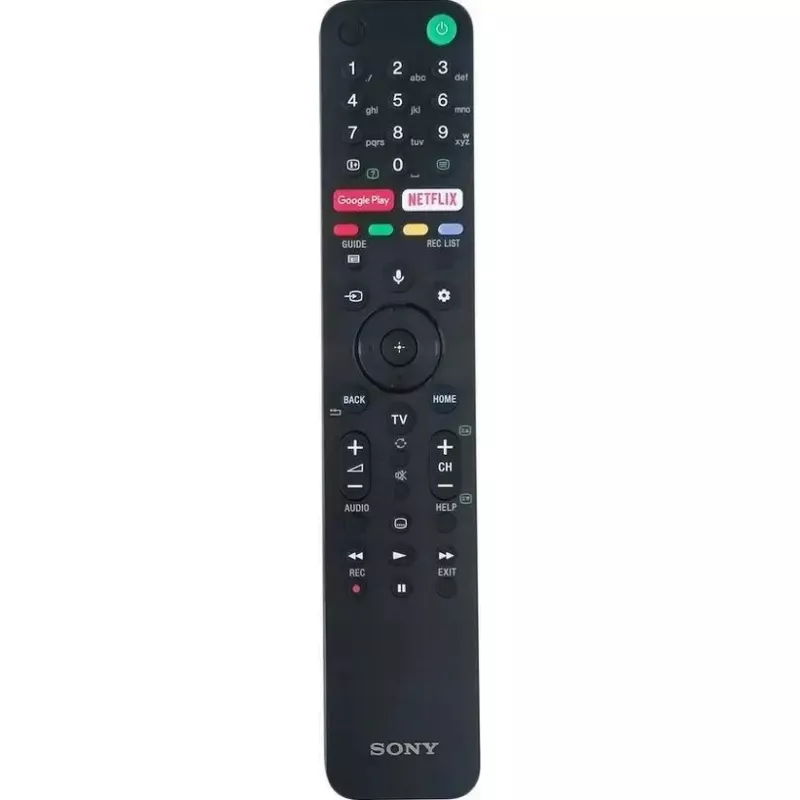
Remote control Sony RMF-TX500E — TV remote with backlit keys

Remote control Sony RMF-TX500E — TV remote with backlit keys
R1,676
PDF
PDF
Stock 4 Code 2573169 Model 149355414 Warranty 2 Years

Shipping & Returns

Estimated delivery Friday, December 4
You will be kept updated through our detailed tracking system
Payment options
EFTPayFastBank CardSnapScanZapperGoogle PayApple PayMobicredMoreTymePay on Arrival

Ask a question – the AI assistant answers instantly.

Description

Sony RMF-TX500E is a replacement TV remote control with backlit keys designed for operation with compatible Sony televisions. The remote provides standard navigation functions, channel and volume control, and dedicated shortcut keys for quick access to common TV features. An ergonomic button layout and illuminated keys make it easier to use the remote in dim lighting and during evening viewing sessions.

Advantages

The backlit keys allow visible operation in low-light conditions without needing external light sources. The remote’s ergonomic shape and logically arranged buttons reduce finger travel and make menu navigation more efficient. It supports basic multimedia and TV controls including transport, channel selection and volume adjustment, enabling straightforward interaction with TV menus and apps. The durable button surface and robust housing are intended for regular home use.

Suitable for

  • Replacing a lost or damaged Sony TV remote control
  • Home TV viewing in low-light or dark rooms
  • Controlling basic TV functions: power, channels, volume, navigation
  • Using quick-access keys to open TV apps and features

Key specifications

  • Backlit keys for illuminated input in low light
  • Ergonomic button layout for comfortable one-hand operation
  • Standard infrared wireless control compatible with supported Sony TVs
  • Dedicated playback and navigation buttons for media control
  • Compact, handheld form factor with tactile buttons

How to use

Install the required batteries according to the battery compartment markings and insert the remote within line of sight of the television’s IR receiver. Use the power button to switch the TV on or off, then navigate menus with the directional pad and select key. Adjust volume and change channels using the relevant buttons. Press the backlit keys to illuminate the layout when operating in dim lighting. For quick access to frequently used functions, use the dedicated shortcut keys provided on the remote.

Recommendations

Keep the remote at close range and within an unobstructed line of sight to the TV’s IR sensor for reliable operation. Replace batteries when backlight brightness or response time decreases. Avoid exposing the remote to moisture or extreme temperatures and clean the surface with a soft, dry cloth.

Key Highlights
  • Replacing a lost or damaged Sony TV remote control
  • Home TV viewing in low-light or dark rooms
  • Controlling basic TV functions: power, channels, volume, navigation
  • Using quick-access keys to open TV apps and features
  • Backlit keys for illuminated input in low light
  • Ergonomic button layout for comfortable one-hand operation
  • Standard infrared wireless control compatible with supported Sony TVs
  • Dedicated playback and navigation buttons for media control
  • Compact, handheld form factor with tactile buttons
Price history over the last 6 months
Remote control Sony RMF-TX500E — TV remote with backlit keys
Current
R1,676
Lowest 7d
R1,598
Highest 7d
R1,676
Change 24H
+R72   +5%
Change 7D
+R65   +4%
Change 30D
-R11   -1%

Write a review

Rating *
Your name will be shown publicly – you can use a nickname. We invite buyers to write reviews; we check reviews before publishing and publish critical ones too.

Same series and alternatives

4

Popular products in this category

8
WhatsApp
Messenger
Hi, I’m DistriNode’s AI assistant. I can help you find products, compare options, create quote PDFs, or open support requests.
All categories