Account Contact
Your Cart
Pay the courier with no extra fees.
Need help? DistriNode AI can handle any task on our site.

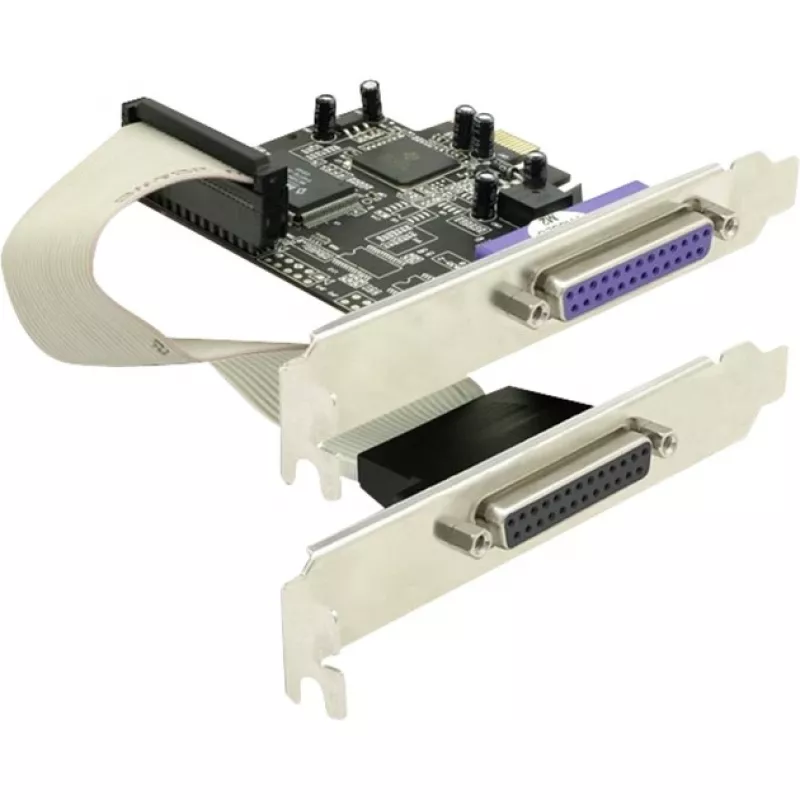
PCI Express card DeLOCK 89125 2 x parallel interface

PCI Express card DeLOCK 89125 2 x parallel interface
R1,000
The DeLOCK PCI Express card 89125 adds two external parallel ports to a desktop PC, enabling connection of legacy parallel devices such as printers and scanners. It uses a PCIe host interface and is compatible with Windows 2000, XP, 2003 and Vista, providing wired parallel connectivity for systems t... Read More
Stock 83 Code 1739833 Brand DELOCK Model 89125 Warranty 2 Years

Shipping & Returns

Estimated delivery Thursday, October 1
You will be kept updated through our detailed tracking system
Payment options
EFTPayFastBank CardSnapScanZapperGoogle PayApple PayMobicredMoreTymePay on Arrival

The DeLOCK PCI Express card 89125 adds two external parallel ports to a desktop PC, enabling connection of legacy parallel devices such as printers and scanners. It uses a PCIe host interface and is compatible with Windows 2000, XP, 2003 and Vista, providing wired parallel connectivity for systems that lack built-in parallel ports.

Advantages

This PCI Express card offers two independent external parallel interfaces on a single expansion card, allowing simultaneous connection of multiple parallel devices. Installation is straightforward in an available PCIe slot and the card provides reliable wired communication suitable for legacy peripherals. Compatibility with several older Windows versions ensures usability on legacy systems.

Suitable for

Key specifications

How to use

Power down the PC and open the case. Insert the DeLOCK PCI Express card into an available PCIe expansion slot and secure it with the slot screw. Reassemble the case and power on the system. Install the required drivers for the target Windows version if prompted, then connect parallel devices to the external ports using appropriate parallel cables. Verify device recognition and configure printer or scanner settings in the operating system as needed.

Recommendations

For stable operation, use quality DB-25 parallel cables and ensure the card is seated firmly in the PCIe slot. Because driver support is for older Windows versions, check compatibility with your OS before purchase and obtain the correct driver from the manufacturer if required.
Key Highlights
  • Connecting parallel printers
  • Connecting flatbed or sheet-fed scanners with parallel ports
  • Using other legacy parallel-interface devices in a modern PC
  • Brand: DELOCK
  • Model / MPN: 89125
  • Host interface: PCIe (PCI Express)
  • External ports: 2 × parallel (DB-25 style)
  • Compatible operating systems: Windows 2000, Windows XP, Windows Server 2003, Windows Vista
Specifications
Compatible operating systems
Windows 2000/XP, 2003, Vista
Connectivity technology
Wired
Harmonized System (HS) code
84733020
Host interface
PCIe
Parallel ports quantity
2
Price history over the last 6 months
PCI Express card DeLOCK 89125 2 x parallel interface
Current
R1,000
Lowest
R854
Highest
R1,000
Change 24H
+R42   +4%
Week
+R26   +3%
Month
+R141   +16%

Popular products in this category

WhatsApp
Hi, I’m DistriNode’s AI assistant. I can help you find products, compare options, create quote PDFs, or open support requests.