Account Contact
Your Cart
Pay on delivery – no extra fees
Need help? Ask our AI

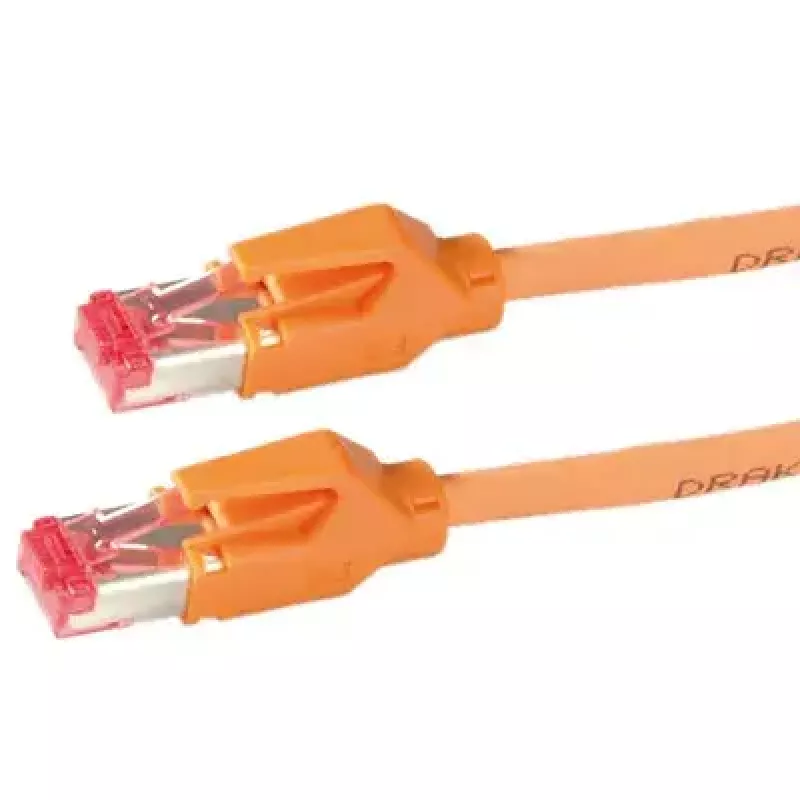
Networking Cable Draka Comteq 21.05.2105 Orange 10 m

Networking Cable Draka Comteq 21.05.2105 Orange 10 m
R969
PDF
PDF
Stock 3 Code 2576237 Model 21.05.2105 Warranty 2 Years

Shipping & Returns

Estimated delivery Wednesday, December 16
You will be kept updated through our detailed tracking system
Payment options
EFTPayFastBank CardSnapScanZapperGoogle PayApple PayMobicredMoreTymePay on Arrival

Ask a question – the AI assistant answers instantly.

Description

The Draka Comteq 21.05.2105 Orange 10 m networking cable is a 10‑meter patch cable with RJ‑45 connectors on both ends and a bright orange jacket for easy identification. It is designed for reliable data transmission in structured cabling, office networks, and temporary installations where a visible, durable cable is required. The cable supports standard Ethernet connections and is suitable for connecting switches, routers, patch panels, and network devices that use 8P8C (RJ‑45) connectors.

Advantages

The cable offers a clear visual advantage due to its orange color, simplifying cable management and fault tracing in complex setups. With factory‑fitted RJ‑45 connectors on both ends, it eliminates the need for termination on site and ensures consistent connector quality. The cable construction is intended to provide stable signal transmission and mechanical durability for everyday networking tasks.

Suitable for

  • Connecting network devices such as switches, routers, and computers
  • Patch panels and rack installations where color coding is helpful
  • Temporary setups, testing environments, and event networks
  • Home and small office Ethernet connections

Key specifications

  • Cable length: 10 m
  • Connector type: RJ-45 (8P8C) on both ends
  • Jacket color: Orange
  • Cable category: compatible with standard Ethernet networks (category depends on manufacturer's specification)
  • Cable use: patch/patching between network equipment

How to use

Connect one RJ‑45 connector to the network port of your switch, router, or computer and the other connector to the corresponding device or patch panel port. Ensure connectors are fully inserted until the retaining clip locks to establish a secure connection. Route the cable to avoid sharp bends and direct mechanical stress; secure it with cable ties or organizers where appropriate. For rack installations, follow standard patching practices and color‑coding schemes to maintain clarity in the cabinet.

Recommendations

For optimal performance, avoid running the cable parallel and close to high‑voltage power lines and keep bend radius greater than the cable diameter. Use the cable for standard Ethernet distances appropriate for the network category in use, and replace the cable if connector damage or severe jacket wear is observed.

Key Highlights
  • Connecting network devices such as switches, routers, and computers
  • Patch panels and rack installations where color coding is helpful
  • Temporary setups, testing environments, and event networks
  • Home and small office Ethernet connections
  • Cable length: 10 m
  • Connector type: RJ-45 (8P8C) on both ends
  • Jacket color: Orange
  • Cable category: compatible with standard Ethernet networks (category depends on manufacturer's specification)
  • Cable use: patch/patching between network equipment

Specifications

Specifications
Cable length
10 m
Connector 1
RJ-45
Connector 2
RJ-45
Product colour
Orange
Price history over the last 6 months
Networking Cable Draka Comteq 21.05.2105 Orange 10 m
Current
R969
Lowest 7d
R937
Highest 7d
R969
Change 24H
R0   0%
Change 7D
+R25   +3%
Change 30D
+R35   +4%

Write a review

Rating *
Your name will be shown publicly – you can use a nickname. We invite buyers to write reviews; we check reviews before publishing and publish critical ones too.

More DRAKA products in this category

12

Popular products in this category

8
WhatsApp
Messenger
Hi, I’m DistriNode’s AI assistant. I can help you find products, compare options, create quote PDFs, or open support requests.
All categories