Account Contact
Your Cart
Pay the courier with no extra fees.
Need help? DistriNode AI can handle any task on our site.

Managed Switch PLANET IGS-10020HPT-U L2+/L3 8x Gigabit Ethernet PoE

Managed Switch PLANET IGS-10020HPT-U L2+/L3 8x Gigabit Ethernet PoE
36 mo.
Managed Switch PLANET IGS-10020HPT-U L2+/L3 8x Gigabit Ethernet PoE
R11,148
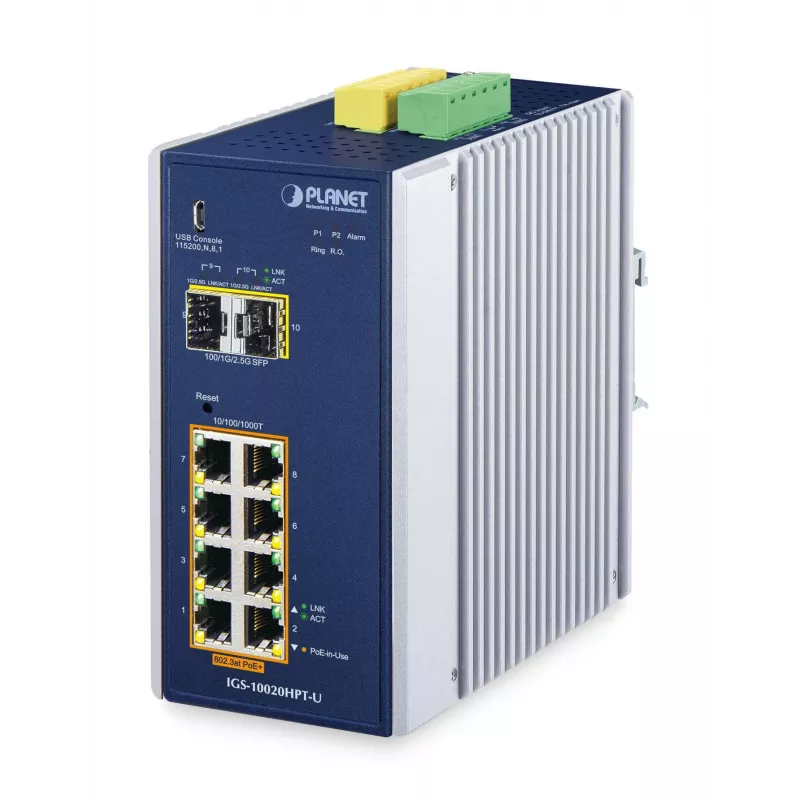
The PLANET IGS-10020HPT-U is a managed L2+/L3 industrial Ethernet switch with eight 10/100/1000 Mbps RJ45 ports that support IEEE 802.3at PoE+ and two mini-GBIC SFP slots for flexible fiber uplinks. Housed in an IP30 metal case, the switch is designed for stable operation in harsh environments, offe... Read More
Stock 3 Code 1206333 Brand PLANET Model IGS-10020HPT-U Warranty 3 Years

Shipping & Returns

Estimated delivery Tuesday, October 6
You will be kept updated through our detailed tracking system
Payment options
EFTPayFastBank CardSnapScanZapperGoogle PayApple PayMobicredMoreTymePay on Arrival

The PLANET IGS-10020HPT-U is a managed L2+/L3 industrial Ethernet switch with eight 10/100/1000 Mbps RJ45 ports that support IEEE 802.3at PoE+ and two mini-GBIC SFP slots for flexible fiber uplinks. Housed in an IP30 metal case, the switch is designed for stable operation in harsh environments, offering wide temperature operation from -40 to 75 °C, DIN-rail or wall mounting, redundant power inputs and a total PoE budget of 240 W. It provides advanced Layer 2 features, IPv4/IPv6 software VLAN routing, strong security controls and management interfaces suitable for industrial, transportation and surveillance deployments.

Advantages

The IGS-10020HPT-U combines high PoE power per port (up to 36 W) with Gigabit data throughput and robust industrial design to support power-hungry PDs such as PTZ cameras and wireless APs. It implements fast-recovery redundant ring technologies (ITU-T G.8032 ERPS, MSTP) and fault recovery under 50 ms for critical networks and offers cybersecurity features including SSHv2 and TLSv1.2. Management options include web GUI, CLI, SNMP, UNI-NMS and CloudViewer support, while SFP-DDM and Modbus TCP enable extended monitoring and integration with automation systems.

Suitable for

  • Industrial automation networks and factory floors
  • In-vehicle and intelligent transport systems (compliant with e-Mark)
  • Surveillance systems with PoE IP cameras and PTZ devices
  • Wireless access point deployments requiring high PoE power
  • Remote site and SCADA/HMI integration using Modbus TCP

Key specifications

  • Model: PLANET IGS-10020HPT-U (MPN: IGS-10020HPT-U, EAN: 4711605287135)
  • Ports: 8 × 10/100/1000 Mbps RJ45 (PoE+), 2 × mini-GBIC SFP (100/1000/2500BASE-X supported)
  • PoE: IEEE 802.3at PoE+ up to 36 W per port, total PoE budget 240 W
  • Switching capacity: 26 Gbit/s; MAC address table: 8,000 entries
  • Operating temperature: -40 to 75 °C; enclosure: IP30 metal
  • Redundancy & recovery: G.8032 ERPS, 802.1s MSTP, <50 ms recovery
  • Security & management: ACL (L2–L4), 802.1X, SSHv2, TLSv1.2, Web GUI, CLI, SNMP, UNI-NMS, CloudViewer
  • Other features: SFP-DDM, Modbus TCP, Digital Input/Output for external alarms, SMTP/SNMP trap alerts

How to use

Mount the IGS-10020HPT-U on a DIN rail or wall within its specified ambient temperature range and connect the DC power inputs according to the installation manual. Connect PoE devices and uplink fibers or copper cables to the appropriate ports. Use the web GUI, CLI or SNMP management tools to configure VLANs, PoE schedules, redundant ring topology (ERPS/MSTP) and security policies. For integration with SCADA or HMI, enable Modbus TCP and monitor SFP diagnostics via the management interface.

Recommendations

Use PoE schedule and scheduled power recycling to reduce device crashes and save energy; enable PD Alive Check to automatically reboot non-responsive PoE devices. Configure redundant ring and redundant power inputs for critical deployments, and monitor device status via UNI-NMS or CloudViewer for remote maintenance.

How to use

Mount the IGS-10020HPT-U on a DIN rail or wall within its specified ambient temperature range and connect the DC power inputs according to the installation manual. Connect PoE devices and uplink fibers or copper cables to the appropriate ports. Use the web GUI, CLI or SNMP management tools to configure VLANs, PoE schedules, redundant ring topology (ERPS/MSTP) and security policies. For integration with SCADA or HMI, enable Modbus TCP and monitor SFP diagnostics via the management interface.

Recommendations

Use PoE schedule and scheduled power recycling to reduce device crashes and save energy; enable PD Alive Check to automatically reboot non-responsive PoE devices. Configure redundant ring and redundant power inputs for critical deployments, and monitor device status via UNI-NMS or CloudViewer for remote maintenance.

Key Highlights
  • Industrial automation networks and factory floors
  • In-vehicle and intelligent transport systems (compliant with e-Mark)
  • Surveillance systems with PoE IP cameras and PTZ devices
  • Wireless access point deployments requiring high PoE power
  • Remote site and SCADA/HMI integration using Modbus TCP
  • Model: PLANET IGS-10020HPT-U (MPN: IGS-10020HPT-U, EAN: 4711605287135)
  • Ports: 8 × 10/100/1000 Mbps RJ45 (PoE+), 2 × mini-GBIC SFP (100/1000/2500BASE-X supported)
  • PoE: IEEE 802.3at PoE+ up to 36 W per port, total PoE budget 240 W
  • Switching capacity: 26 Gbit/s; MAC address table: 8,000 entries
  • Operating temperature: -40 to 75 °C; enclosure: IP30 metal
  • Redundancy & recovery: G.8032 ERPS, 802.1s MSTP,
  • Security & management: ACL (L2–L4), 802.1X, SSHv2, TLSv1.2, Web GUI, CLI, SNMP, UNI-NMS, CloudViewer
  • Other features: SFP-DDM, Modbus TCP, Digital Input/Output for external alarms, SMTP/SNMP trap alerts
Price history over the last 6 months
Managed Switch PLANET IGS-10020HPT-U L2+/L3 8x Gigabit Ethernet PoE
Current
R11,148
Lowest
R5,778
Highest
R11,661
Change 24H
+R29   +0%
Week
-R191   -2%
Month
-R206   -2%

Popular products in this category

WhatsApp
Hi, I’m DistriNode’s AI assistant. I can help you find products, compare options, create quote PDFs, or open support requests.