Account Contact
Your Cart
Pay the courier with no extra fees.
Need help? DistriNode AI can handle any task on our site.

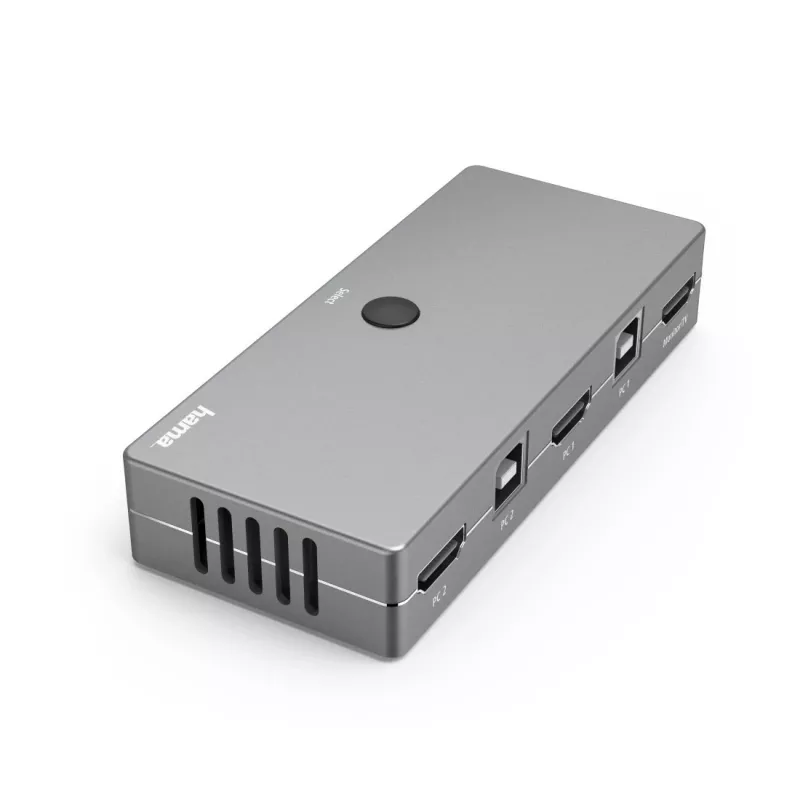
KVM switch Hama 00200135 USB HDMI 4K Ultra HD

KVM switch Hama 00200135 USB HDMI 4K Ultra HD
R1,215
Make space on your desk with the Hama 00200135 KVM switch, a compact device that lets you control two computers using one keyboard, one mouse and one monitor. It supports HDMI video output up to 4096 x 2160 (4K) and USB for keyboard and mouse connections. The switch features a sturdy metal housing a... Read More
Stock 7 Code 2232211 Brand HAMA Model 00200135 Warranty 2 Years

Shipping & Returns

Estimated delivery Tuesday, October 6
You will be kept updated through our detailed tracking system
Payment options
EFTPayFastBank CardSnapScanZapperGoogle PayApple PayMobicredMoreTymePay on Arrival

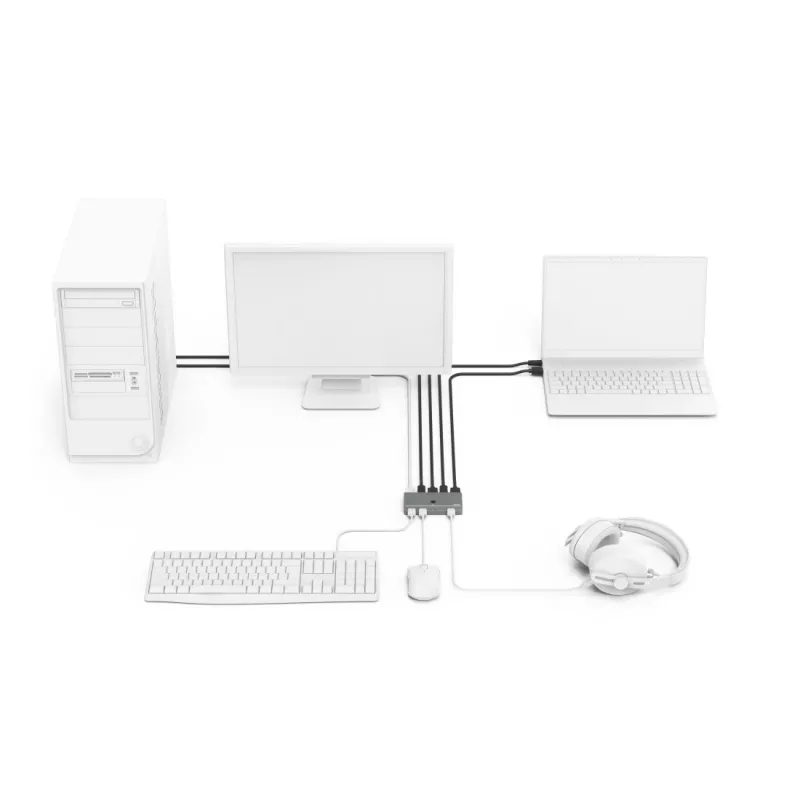
Make space on your desk with the Hama 00200135 KVM switch, a compact device that lets you control two computers using one keyboard, one mouse and one monitor. It supports HDMI video output up to 4096 x 2160 (4K) and USB for keyboard and mouse connections. The switch features a sturdy metal housing and is powered via USB, offering a simple way to switch between Windows and Mac systems without reconnecting cables.

Advantages

The Hama KVM switch delivers high-speed data transfer up to 480 Mbps and reliable 4K Ultra HD video quality via HDMI. Its metal housing provides durability and a neat appearance, while large socket spacing accommodates wider plugs without difficulty. Flexible cable materials improve kink protection and reduce the risk of cable breakage, and overall build quality ensures stable transmission for keyboard, mouse and video signals.

Suitable for

Key specifications

How to use

Connect the HDMI and USB cables from each computer to the corresponding ports on the KVM switch, then connect your monitor, keyboard and mouse to the switch outputs. Power the device via its USB power input. Use the switch button to toggle control between the two connected computers. No additional software is required for basic switching between Windows and Mac systems; ensure each connected computer is set to output video via HDMI and to accept USB keyboard and mouse input.

Recommendations

Place the KVM switch on a stable surface near your monitor and ensure cables are not sharply bent. For consistent 4K output, use high-quality HDMI cables and verify that both computers support the target resolution. If you encounter connectivity issues, check USB power and cable connections before changing device settings.
Key Highlights
  • Home offices where two PCs share a single workstation
  • Small offices requiring quick switching between computers
  • Multimedia setups that need 4K HDMI output
  • Users who want to reduce cable clutter on their desk
  • Brand: HAMA
  • Model: 00200135
  • Controls: 2 computers
  • Video port type: HDMI, up to 4096 x 2160 (4K)
  • Keyboard/Mouse: USB
  • Data transfer rate: up to 480 Mbps
  • Power: USB powered
  • Housing: metallic colour, metal housing
Specifications
Built-in display
No
Cables included
HDMI, USB
Data transfer rate (max)
0.48 Gbit/s
HD type
4K Ultra HD
HDMI ports quantity
1
Housing material
Metal
Keyboard port type
USB
Mac operating systems supported
Mac OS X 10.8 Mountain Lion
Manual
Yes
Maximum resolution
4096 x 2160 pixels
Mouse port type
USB
Number of computers controlled
2
Plug and Play
Yes
Power source
USB
Product colour
Metallic
USB 2.0 Type-A hub ports quantity
3
USB connector type
USB Type-A
Video port type
HDMI
Windows operating systems supported
Windows 10, Windows 7, Windows 8

Leaflet

Open Leaflet
Price history over the last 6 months
KVM switch Hama 00200135 USB HDMI 4K Ultra HD
Current
R1,215
Lowest
R1,132
Highest
R1,215
Change 24H
+R68   +6%
Week
—   
Month
—   

Popular products in this category

WhatsApp
Hi, I’m DistriNode’s AI assistant. I can help you find products, compare options, create quote PDFs, or open support requests.