Account Contact
Your Cart
Pay on delivery – no extra fees
Need help? Ask our AI

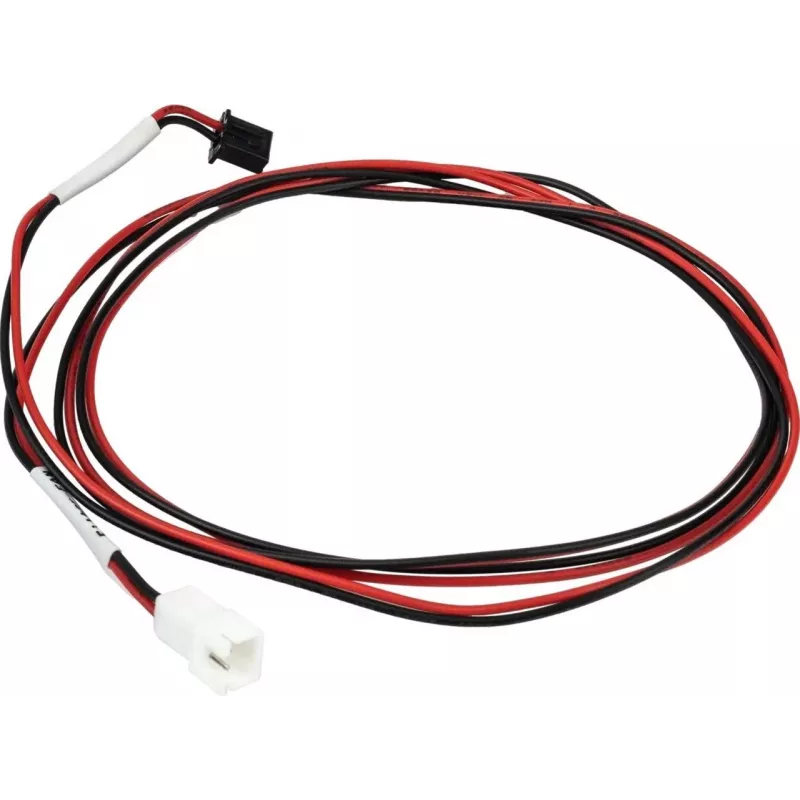
Filter fan cable for Flashforge GUIDER3 PLUS (model 40001886002) external accessory

Filter fan cable for Flashforge GUIDER3 PLUS (model 40001886002) external accessory
R401
PDF
PDF

Shipping & Returns

Estimated delivery Wednesday, December 16
You will be kept updated through our detailed tracking system
Payment options
EFTPayFastBank CardSnapScanZapperGoogle PayApple PayMobicredMoreTymePay on Arrival

Description

Replacement cable for the Flashforge GUIDER3 PLUS filter fan, designed to connect an external filter fan to the GUIDER3 PLUS 3D printer. This cable provides the electrical connection required for power and signal transfer between the printer and an external filter fan, enabling consistent ventilation control and improved printing environment management during maintenance, repair, or upgrades.

Advantages

The cable is manufactured to match the connector layout and electrical requirements of the GUIDER3 PLUS, ensuring a stable connection and minimizing intermittent power loss or signal errors. Its construction focuses on reliable conductivity and insulation for long-term use in a 3D printing environment. Using the correct cable reduces the need to modify the printer or fan and preserves original equipment compatibility.

Suitable for

  • Replacing a damaged or worn filter fan cable on Flashforge GUIDER3 PLUS
  • Connecting an external filter fan to improve enclosure ventilation
  • Maintenance and repair of GUIDER3 PLUS ventilation systems
  • Upgrading filtration or airflow control without altering printer electronics

Key specifications

  • Cable type: external filter fan connection cable compatible with GUIDER3 PLUS
  • Function: power and signal transmission for an external fan
  • Compatibility: designed for use with GUIDER3 PLUS 3D printer filter fan setup
  • Construction: insulated multi-conductor cable for use in printer enclosures
  • Typical operating environment: indoor 3D printing enclosures and workspaces

How to use

Power the printer off and disconnect it from mains before connecting or replacing the cable. Access the printer's fan connection point according to the manufacturer's service instructions, disconnect the old cable if present, and attach the replacement cable ensuring correct orientation and firm seating of the connectors. After installation, verify that the fan receives power and that the printer recognizes the external fan during startup. Restore power and run a test print or fan operation check to confirm proper function.

Recommendations

Use the cable only with compatible Flashforge GUIDER3 PLUS filter fan configurations and follow Flashforge service guidance for safe installation. Avoid routing the cable across moving parts, hot surfaces, or sharp edges. Inspect the cable periodically for wear or damage and replace if insulation or conductors are compromised.

Key Highlights
  • Replacing a damaged or worn filter fan cable on Flashforge GUIDER3 PLUS
  • Connecting an external filter fan to improve enclosure ventilation
  • Maintenance and repair of GUIDER3 PLUS ventilation systems
  • Upgrading filtration or airflow control without altering printer electronics
  • Cable type: external filter fan connection cable compatible with GUIDER3 PLUS
  • Function: power and signal transmission for an external fan
  • Compatibility: designed for use with GUIDER3 PLUS 3D printer filter fan setup
  • Construction: insulated multi-conductor cable for use in printer enclosures
  • Typical operating environment: indoor 3D printing enclosures and workspaces
Price history over the last 6 months
Filter fan cable for Flashforge GUIDER3 PLUS (model 40001886002) external accessory
Current
R401
Lowest 7d
R389
Highest 7d
R410
Change 24H
-R5   -1%
Change 7D
+R1   +0%
Change 30D
+R8   +2%

Write a review

Rating *
Your name will be shown publicly – you can use a nickname. We invite buyers to write reviews; we check reviews before publishing and publish critical ones too.

Same series and alternatives

12

Popular products in this category

8
WhatsApp
Messenger
Hi, I’m DistriNode’s AI assistant. I can help you find products, compare options, create quote PDFs, or open support requests.
All categories