Account Contact
Your Cart
Pay the courier with no extra fees.
Need help? DistriNode AI can handle any task on our site.

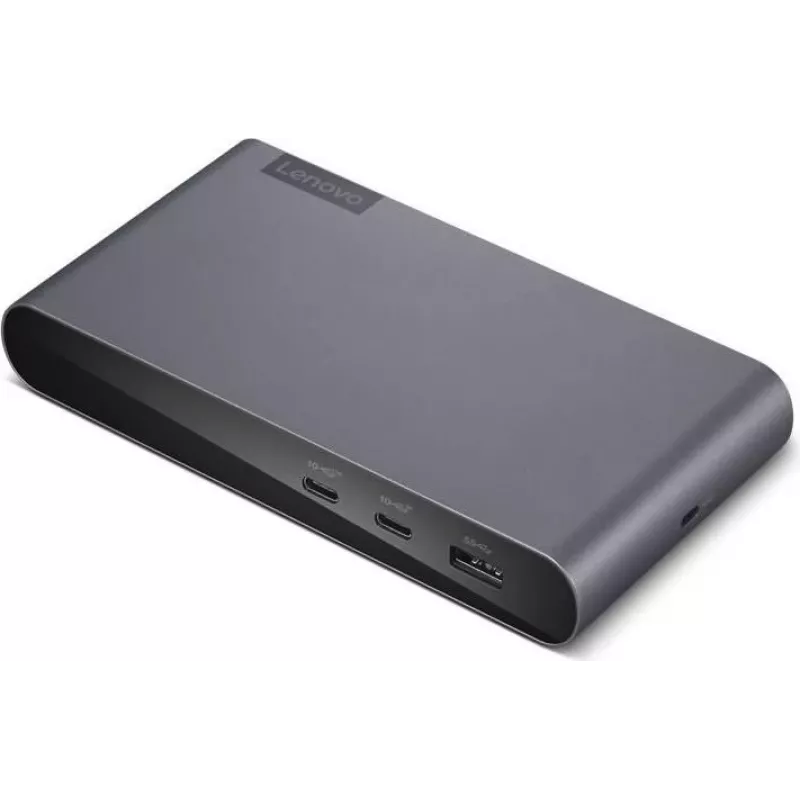
Docking Station Lenovo Notebook Dock Port Replicator 40B30090DE — compatible Lenovo notebooks, port replication

Docking Station Lenovo Notebook Dock Port Replicator 40B30090DE — compatible Lenovo notebooks, port replication
R1,719
Docking Station Lenovo Notebook Dock Port Replicator 40B30090DE provides a centralized docking solution for compatible Lenovo notebooks, consolidating laptop ports into a single connection to simplify desktop setups. Intended for use on desks, the dock enables quick attachment of external monitors, ... Read More
Stock 18 Code 2244414 Brand LENOVO Model 40B30090DE Warranty 2 Years

Shipping & Returns

Estimated delivery Tuesday, October 6
You will be kept updated through our detailed tracking system
Payment options
EFTPayFastBank CardSnapScanZapperGoogle PayApple PayMobicredMoreTymePay on Arrival

Docking Station Lenovo Notebook Dock Port Replicator 40B30090DE provides a centralized docking solution for compatible Lenovo notebooks, consolidating laptop ports into a single connection to simplify desktop setups. Intended for use on desks, the dock enables quick attachment of external monitors, wired network, USB peripherals and, where supported by the laptop, power delivery through the dock interface. The device helps streamline transitions between mobile and stationary work by keeping essential connections available at a fixed workstation.

Advantages

The dock reduces cable clutter and saves time by allowing one-cable connection to multiple devices. It supports common desktop peripherals—external displays, Ethernet, keyboards, mice and storage devices—through replicated ports, making it easier to switch from mobile to desk-based work. Its design is aimed at stable, everyday desk use and compatibility with a range of Lenovo notebook models that support the docking interface.

Suitable for

  • Office workstations that require frequent laptop docking and undocking
  • Home offices where external monitor(s) and wired network access are needed
  • Shared desks or hot-desking environments to provide a consistent workstation connection
  • Users who connect multiple USB peripherals—keyboard, mouse, external drives, printers

Key specifications

  • Function: port replication for compatible Lenovo notebooks
  • Connectivity: replicated ports for external displays, USB devices and wired network (exact port types depend on dock model and notebook compatibility)
  • Form factor: desk-mounted port replicator designed for stable workstation use
  • Compatibility: designed to work with Lenovo notebooks that support the dock interface; check notebook compatibility before purchase
  • Power: may provide power delivery through the docking interface when supported by the connected notebook

How to use

Place the docking station on a stable desk surface and connect the dock to your notebook using the laptop-side connector or docking mechanism specific to your notebook model. Attach external peripherals—monitors, Ethernet cable, USB devices and power adapter if required—to the corresponding ports on the dock. After connecting the notebook, the operating system should recognize attached devices and external displays; install any vendor-recommended drivers if prompted. To undock, close active applications as needed and disconnect the notebook using the notebook’s undock procedure or the physical release mechanism of the dock.

Recommendations

Verify notebook compatibility with the dock interface before use and install any recommended drivers or firmware updates from the notebook or dock manufacturer. For stable display performance, use certified display cables and confirm display resolutions supported by both the dock and the notebook. If the dock provides power delivery, use the original or manufacturer-approved power adapter and verify power settings in the notebook to ensure proper charging and operation.

Key Highlights
  • Office workstations that require frequent laptop docking and undocking
  • Home offices where external monitor(s) and wired network access are needed
  • Shared desks or hot-desking environments to provide a consistent workstation connection
  • Users who connect multiple USB peripherals—keyboard, mouse, external drives, printers
  • Function: port replication for compatible Lenovo notebooks
  • Connectivity: replicated ports for external displays, USB devices and wired network (exact port types depend on dock model and notebook compatibility)
  • Form factor: desk-mounted port replicator designed for stable workstation use
  • Compatibility: designed to work with Lenovo notebooks that support the dock interface; check notebook compatibility before purchase
  • Power: may provide power delivery through the docking interface when supported by the connected notebook
Price history over the last 6 months
Docking Station Lenovo Notebook Dock Port Replicator 40B30090DE — compatible Lenovo notebooks, port replication
Current
R1,719
Lowest
R1,699
Highest
R1,719
Change 24H
+R14   +1%
Week
—   
Month
—   

Popular products in this category

WhatsApp
Hi, I’m DistriNode’s AI assistant. I can help you find products, compare options, create quote PDFs, or open support requests.