Account Contact
Your Cart
Pay the courier with no extra fees.
Need help? DistriNode AI can handle any task on our site.

Coaxial Connector IEC ShiverPeaks BS83110

Coaxial Connector IEC ShiverPeaks BS83110
R316
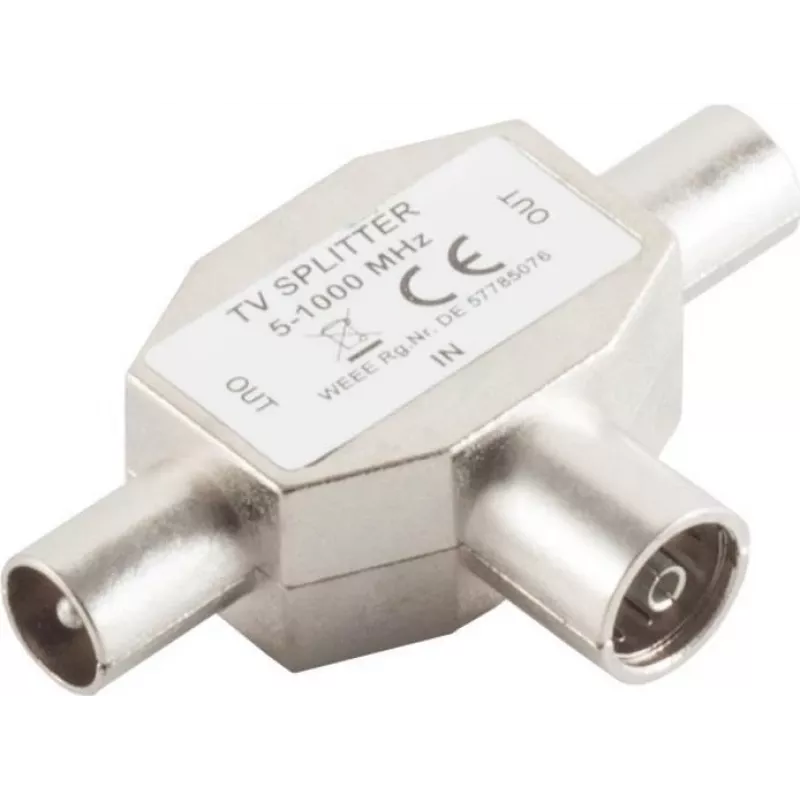
The ShiverPeaks BS83110 is a compact IEC coaxial connector with two IEC connections in a single unit. Designed for audio and video equipment, this connector provides a reliable physical connection for coaxial cables used in antenna, TV and set-top box installations. The single-pack item is intended ... Read More
Stock 1373 Code 2251686 Brand SHIVERPEAKS Model BS83110 Warranty 2 Years

Shipping & Returns

Estimated delivery Tuesday, October 6
You will be kept updated through our detailed tracking system
Payment options
EFTPayFastBank CardSnapScanZapperGoogle PayApple PayMobicredMoreTymePay on Arrival

The ShiverPeaks BS83110 is a compact IEC coaxial connector with two IEC connections in a single unit. Designed for audio and video equipment, this connector provides a reliable physical connection for coaxial cables used in antenna, TV and set-top box installations. The single-pack item is intended for straightforward replacement or initial installation where two IEC ports are required in a small, durable housing.

Advantages

The dual IEC design allows connection of two coaxial devices or daisy-chaining without additional adapters, reducing cable clutter and preserving signal path integrity. The connector’s construction emphasizes mechanical stability and secure mating to standard IEC plugs, helping to maintain consistent RF contact. Its compact footprint makes it suitable for installations where space is limited while retaining compatibility with common coaxial cable types.

Suitable for

  • Antenna and terrestrial TV connections
  • Set-top boxes and satellite receivers
  • Home AV systems and TV wall outlets
  • Temporary installations, repairs, and replacements

Key specifications

  • Connector type: IEC coaxial, dual output
  • Number of outputs: 2 IEC ports
  • Mounting: compact inline housing for cable connection or panel integration
  • Compatibility: standard IEC male/female coaxial plugs
  • Construction: durable mechanical housing designed for repeated mating cycles

How to use

Connect the incoming coaxial cable to the input side of the IEC connector and attach the receiving devices to the two IEC output ports. Ensure plugs are fully seated to achieve stable RF contact. For panel or wall outlet installations, position the connector in the desired cutout or mounting location and secure it according to the fixture’s requirements; for inline cable use, follow standard coaxial termination procedures and verify polarity and shielding continuity after installation.

Recommendations

Use good-quality coaxial cables and verify connections after installation to minimize signal loss. Avoid excessive bending or strain on the cables and connector housing to prolong service life. If used outdoors or in humid environments, provide appropriate protection against moisture and corrosion.

Key Highlights
  • Antenna and terrestrial TV connections
  • Set-top boxes and satellite receivers
  • Home AV systems and TV wall outlets
  • Temporary installations, repairs, and replacements
  • Connector type: IEC coaxial, dual output
  • Number of outputs: 2 IEC ports
  • Mounting: compact inline housing for cable connection or panel integration
  • Compatibility: standard IEC male/female coaxial plugs
  • Construction: durable mechanical housing designed for repeated mating cycles
Specifications
Connector 1
IEC
Connector 1 gender
Female
Connector 2
2 x IEC
Connector 2 gender
Male
Connector contacts plating
Nickel
Connector type
IEC
Housing material
Iron
Product colour
Stainless steel
Quantity per pack
1 pc(s)
Price history over the last 6 months
Coaxial Connector IEC ShiverPeaks BS83110
Current
R316
Lowest
R306
Highest
R316
Change 24H
+R9   +3%
Week
—   
Month
—   

Popular products in this category

WhatsApp
Hi, I’m DistriNode’s AI assistant. I can help you find products, compare options, create quote PDFs, or open support requests.