Account Contact
Your Cart
Pay the courier with no extra fees.
Need help? DistriNode AI can handle any task on our site.

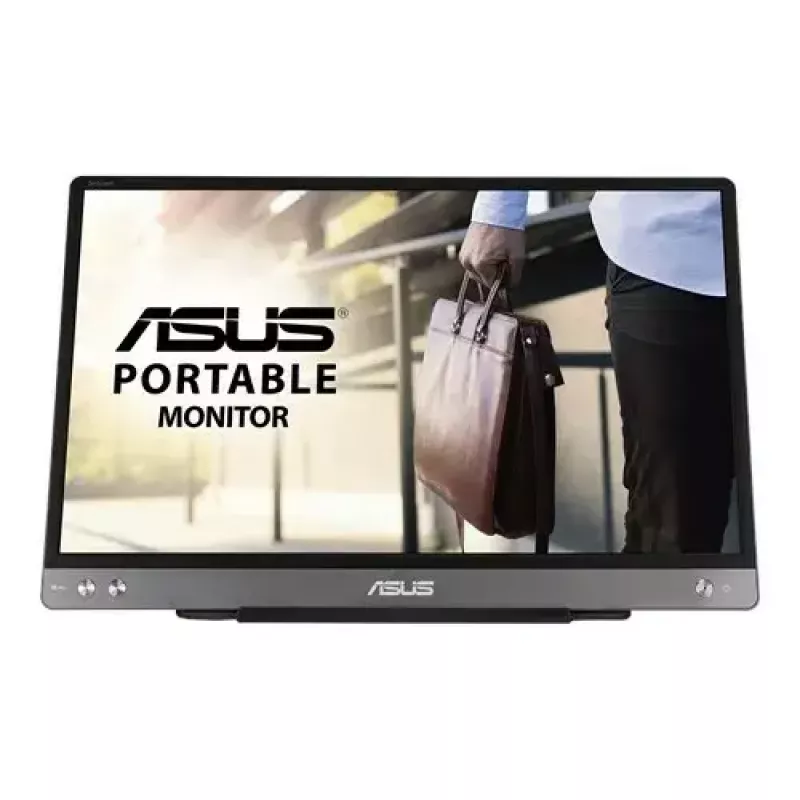
ASUS MB14AC computer monitor 35.6 cm (14 inch) 1920 x 1080 pixels Full HD Grey

ASUS MB14AC computer monitor 35.6 cm (14 inch) 1920 x 1080 pixels Full HD Grey
36 mo.
ASUS MB14AC computer monitor 35.6 cm (14 inch) 1920 x 1080 pixels Full HD Grey
R3,596
Extend your vision. Free your world.ASUS ZenScreen™ MB14AC is designed to keep you productive, wherever you are. It‘s the portable monitor with a hybrid USB-C signal solution(DP Alt mode+ USB 3.0), which means that it only needs a single USB-C cable for both power and video transmission. With a slim... Read More
Stock 43 Code 4277 Brand ASUS Model 90LM0631-B01170 Warranty 3 Years

Shipping & Returns

Estimated delivery Tuesday, September 29
You will be kept updated through our detailed tracking system
Payment options
EFTPayFastBank CardSnapScanZapperGoogle PayApple PayMobicredMoreTymePay on Arrival
Extend your vision. Free your world.
ASUS ZenScreen™ MB14AC is designed to keep you productive, wherever you are. It‘s the portable monitor with a hybrid USB-C signal solution(DP Alt mode+ USB 3.0), which means that it only needs a single USB-C cable for both power and video transmission. With a slim 9mm profile, and weighing just 0.59kg, ZenScreen MB14AC is also a compact 14-inch companion monitor to meet different needs for laptop users.

Hybrid-signal solution: USB Type-A and Type-C support
ZenScreen™ MB14AC only requires a single USB connection for both power and video transmission from your host device. It features an innovative hybrid-signal solution with native support for USB Type-C™ (USB-C™) connections, and uses an installed driver* to support USB Type-A connectors for full compatibility. The reversible, any-way-up USB-C design enables quick, hassle-free connection to any device.
*DisplayLink driver required for hybrid-signal connections via USB Type-A. Please visit the Support site to get the download information.

Slim and stylish ultraportable design
ZenScreen™ MB14AC is ideal for use as a secondary monitor for dual-monitor presentations, and its versatility helps you get things done more efficiently when you're on the go. It barely tips the scales at a lightweight 590g, and with its ultra-slim 9mm profile it fits easily in any travel bag.

Wide viewing angles
ZenScreen™ MB14AC features a Full HD panel that delivers stunning 1920 x 1080 resolution visuals with outstanding color reproduction. It uses IPS technology to give you more flexibility when extending your screen, so you still get superb color and contrast - even from extreme viewing positions.

Designed with versatility
The new foldable smart case protects ZenScreen™ MB14AC from dust and scratches with lighter weight. The case can be folded into a stand to prop the monitor up in either portrait or landscape orientation. Besides, the exclusively designed mounting hole on the rear cover, which supports standard 1/4 “ screw thread, lets you assemble a conventional tripod or tabletop mounting system with ease.

Protect your eyes with ASUS Eye Care technology

ASUS blue light filter
Exclusive ASUS Ultra-Low Blue Light technology protects you from harmful blue light. It offers four blue-light filter settings that are easily accessed through the onscreen display menu via the hotkey.

ASUS Flicker-free technology
It's time to say goodbye to those tired, strained eyes. ZenScreen MB14AC features TÜV Rheinland-certified ASUS Flicker-free technology to reduce flicker for a comfortable viewing experience. This technology helps minimize instances of eyestrain and other damaging ailments, especially when you spend long, countless hours in front of a display watching favorite videos.

How to use

Connect the ZenScreen MB14AC to your laptop using the supplied USB-C cable. When your device supports DP Alt Mode, the single cable carries both video and power; otherwise use the hybrid cable and an additional USB 3.0 connection as required. Open the foldable smart case and position it to act as a stand in portrait or landscape orientation. Use your operating system’s display settings to choose orientation, extended or mirrored display mode, and adjust brightness or color settings as needed.

Recommendations

For the best experience, use a laptop that supports DisplayPort Alt Mode over USB-C for single-cable video and power. Keep the screen clean and avoid direct sunlight to reduce glare; if you frequently switch orientations enable automatic rotation in your OS to use portrait mode smoothly.

Key Highlights
  • Business travel and remote work where a second screen is needed
  • Presentations and meetings for expanding display area
  • Creators and office users who need additional screen space for documents and toolbars
  • Students who require a portable external monitor for study and multitasking
  • Display diagonal: 14"
  • Resolution: 1920 x 1080 (Full HD)
  • Panel type: IPS, 178° viewing angle
  • Refresh / response: 5 ms response time
  • Brightness: 250 cd/m² (typical)
  • Contrast ratio: 700:1 (typical)
  • Connectivity: Hybrid USB-C (DP Alt Mode + USB 3.0); USB Type-C downstream port x1; built-in USB hub
  • HDCP: 1.4
  • Dimensions: 324.94 x 208.03 x 11.2 mm
  • Weight: 1.265 kg
  • Colour: Grey
Specifications
Aspect ratio
16:9
Audio input
No
Built-in camera
No
Built-in speaker(s)
No
Cable lock slot
No
Cables included
USB Type-C to USB Type-C
Certification
BSMI, CB, CCC, CU, FCC, J-MOSS, KCC, UkrSEPRO, UL/cUL, VCCI, WEEE, WHQL (Windows 10, Windows 8.1, Windows 7), TUV Flicker-free, TUV Low Blue Light, RCM
Contrast ratio (typical)
700:1
Depth (with stand)
11.2 mm
Display brightness (typical)
250 cd/m²
Display diagonal
35.6 cm (14")
Display number of colours
16.78 million colours
Display resolution
1920 x 1080 pixels
DisplayPorts quantity
0
DVI port
No
Energy consumption (SDR) per 1000 hours
5 kWh
Energy efficiency class (SDR)
B
Energy efficiency scale
A to G
Flicker-free technology
Yes
Harmonized System (HS) code
85285210
HD type
Full HD
HDCP
Yes
HDMI
No
HDMI ports quantity
0
Headphone out
No
Height (with stand)
208 mm
Height adjustment
No
LED indicators
Yes
Low Blue Light technology
Yes
Market positioning
Business
Maximum refresh rate
60 Hz
Native aspect ratio
16:9
Operating temperature (T-T)
0 - 40 °C
Package depth
77 mm
Package height
257 mm
Package weight
1.3 kg
Package width
392 mm
Panel type
IPS
Pixel pitch
0.16 x 0.16 mm
Power consumption (off)
0 W
Power consumption (PowerSave)
0 W
Power consumption (typical)
7 W
Product colour
Grey
Response time
5 ms
Screen shape
Flat
Supported graphics resolutions
640 x 480 (VGA), 800 x 600 (SVGA), 1024 x 768 (XGA), 1280 x 1024 (SXGA), 1280 x 960, 1440 x 900 (WXGA+), 1680 x 1050 (WSXGA+), 1920 x 1080 (HD 1080)
Touchscreen
No
VESA mounting
No
VGA (D-Sub) ports quantity
0
Viewable size diagonal
35.6 cm
Viewable size, horizontal
30.9 cm
Viewable size, vertical
17.4 cm
Viewing angle, horizontal
178°
Viewing angle, vertical
178°
Weight (with stand)
590 g
Wi-Fi
No
Width (with stand)
324.9 mm

Energy label

Open Energy label

Manual

Open Manual

PDF

Open PDF

Leaflet

Open Leaflet
Price history over the last 6 months
ASUS MB14AC computer monitor 35.6 cm (14 inch) 1920 x 1080 pixels Full HD Grey
Current
R3,596
Lowest
R2,994
Highest
R3,619
Change 24H
+R588   +20%
Week
+R594   +20%
Month
+R396   +12%

Popular products in this category

WhatsApp
Hi, I’m DistriNode’s AI assistant. I can help you find products, compare options, create quote PDFs, or open support requests.