Account Contact
Your Cart
Pay on delivery – no extra fees
Need help? Ask our AI

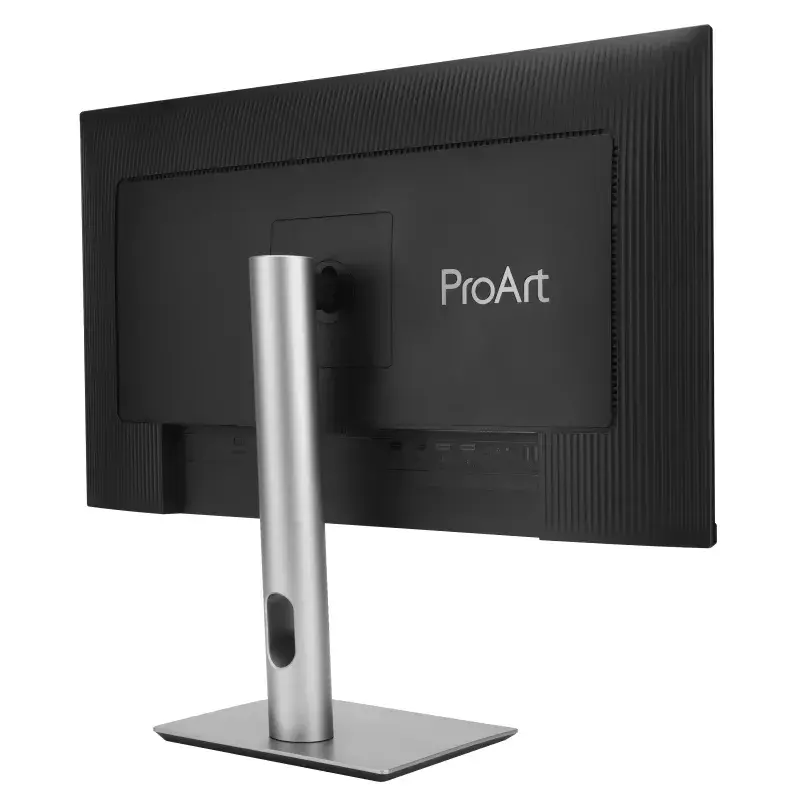
ASUS ProArt PA329CRV computer monitor 80 cm (31.5 inch) 3840 x 2160 pixels 4K Ultra HD LCD Black

ASUS ProArt PA329CRV computer monitor 80 cm (31.5 inch) 3840 x 2160 pixels 4K Ultra HD LCD Black
36 mo.
ASUS ProArt PA329CRV computer monitor 80 cm (31.5 inch) 3840 x 2160 pixels 4K Ultra HD LCD Black
R19,582
ASUS ProArt Display PA329CRV Professional Monitor – 32-inch (31.5-inch viewable), IPS, 4K UHD (3840 x 2160), 98% DCI-P3, Color Accuracy ΔE < 2, Calman Verified, USB-C PD 96W, VESA DisplayHDR 400, VESA MediaSync, Ergonomic Stand, Green Sustainability All the Essentials for Pros ... Read More
Stock 1 Code 4226 Brand ASUS Model 90LM02C0-B01K70 Warranty 3 Years

Shipping & Returns

Estimated delivery Friday, October 30
You will be kept updated through our detailed tracking system
Payment options
EFTPayFastBank CardSnapScanZapperGoogle PayApple PayMobicredMoreTymePay on Arrival
ASUS ProArt Display PA329CRV Professional Monitor – 32-inch (31.5-inch viewable), IPS, 4K UHD (3840 x 2160), 98% DCI-P3, Color Accuracy ΔE < 2, Calman Verified, USB-C PD 96W, VESA DisplayHDR 400, VESA MediaSync, Ergonomic Stand, Green Sustainability
All the Essentials for Pros

All the Essentials for Pros

ProArt DisplayProArt Display PA329CRV is a 31.5-inch 4K HDR monitor designed for professional video editors. This Calman Verified display boasts a wide colour gamut with 98% DCI-P3 coverage and is factory pre-calibrated to Delta E < 2 for exceptional colour accuracy. For added convenience, the built-in USB-C® port offers DisplayPort™ support, superfast data transfers, and 96-watt power delivery via a single cable.

ASUS Ultra-Low Blue Light Technology

The new hardware-based ASUS Ultra-Low Blue Light technology reduces potentially harmful high-energy blue light emissions while offering colour performance that’s better than monitors with software-only filtering solutions.
ASUS Ultra-Low Blue Light Technology
ASUS Flicker-Free Technology

ASUS Flicker-Free Technology

The new hardware-based ASUS Ultra-Low Blue Light technology reduces potentially harmful high-energy blue light emissions while offering colour performance that’s better than monitors with software-only filtering solutions.

Environmental Certification*

ProArt Display PA329CRV​ is stringently tested to meet the requirements of world-leading sustainability certifications. These tests include a comprehensive database of up-to-date criteria, independent verification, and a structured system for continuous improvement.​
Environmental Certification*
Eco-friendly Packaging

Eco-friendly Packaging

ProArt Display PA329CRV packaging are made of at least 80% recycled cardboard. ASUS has designed the packaging to minimise weight and volume, which helps conserve natural resources and allows more devices to be transported in a single shipping container.​

Energy-Efficient Features

ProArt Display PA329CRV has a power-saving Eco-mode, and achieve zero-watt power consumption with hard-switch off.​
Energy-Efficient Features
Eco-friendly Materials

Eco-friendly Materials

Extensive research and development ensure ProArt Display PA329CRV is made from eco-friendly materials like 85% post-consumer recycled (PCR) plastics and components like mercury-free panels

How to use

Place the monitor on a stable surface or mount it using a compatible VESA arm. Connect your source via USB‑C to transmit video, data and power through a single cable, or use DisplayPort/HDMI as available. Adjust the height for an ergonomic viewing angle, and use the built‑in menu to fine‑tune brightness, colour temperature and other display settings. For colour‑critical work, verify calibration with your preferred colour‑management workflow or profile.

Recommendations

For the most accurate colour results, allow the monitor to warm up for 30 minutes before colour grading and perform a verification check with a hardware calibrator periodically. Use the USB‑C connection for a tidier workstation and to power compatible laptops while transferring data and video over a single cable.

Key Highlights
  • Professional video editing and colour grading
  • Photo editing and digital retouching
  • Multimedia production and post‑production review
  • Office work requiring large, high‑resolution displays
  • Display diagonal: 31.5"
  • Resolution: 3840 x 2160 (4K Ultra HD)
  • Panel type: IPS, LCD
  • Colour gamut: 98% DCI‑P3; Calman Verified; factory calibrated to Delta E < 2
  • Response time: 5 ms
  • Viewing angles: 178° / 178°
  • Brightness (typical): 350 cd/m²
  • Contrast ratio (typical): 1000:1
  • USB Type‑C with DisplayPort support and up to 96 W power delivery
  • Built‑in USB 3.2 Gen 1 hub and speakers
  • VESA mounting; height adjustable; flat screen
  • Product colour: Black
Specifications
AC input frequency
50 - 60
AC input voltage
100 - 240
Adjustable height (max)
130 mm
Anti-glare screen
Yes
Backlight type
LED
Built-in camera
No
Built-in speaker(s)
Yes
Built-in USB hub
Yes
Cable lock slot
Yes
Cable lock slot type
Kensington
Charging port type
USB Type-C
Colour gamut
98 %
Colour gamut standard
DCI-P3
Contrast ratio (dynamic)
3000:1
Contrast ratio (typical)
1000:1
Depth (with stand)
240 mm
Depth (without stand)
44.7 mm
Digital horizontal frequency
15 - 135
Digital vertical frequency
48 - 60
Display brightness (peak)
400 cd/m²
Display brightness (typical)
350 cd/m²
Display diagonal
31.5 "
Display number of colours
1.073 billion colours
Display resolution
3840 x 2160
Display technology
LCD
DisplayPort version
1.4
DisplayPorts quantity
2
Energy consumption (HDR) per 1000 hours
40 kWh
Energy consumption (SDR) per 1000 hours
25 kWh
Energy efficiency class (HDR)
G
Energy efficiency class (SDR)
E
Energy efficiency scale
A to G
European Product Registry for Energy Labelling (EPREL) code
1445296
Feet colour
Silver
Flicker-free technology
Yes
HD type
4K Ultra HD
HDCP
Yes
HDCP version
2.2
HDMI
Yes
HDMI ports quantity
2
HDMI version
2.0
Headphone out
Yes
Headphone outputs
1
Height (with stand)
617.67 mm
Height (without stand)
419.3 mm
Height adjustment
Yes
High Dynamic Range (HDR) supported
Yes
High Dynamic Range (HDR) technology
High Dynamic Range 10 (HDR10)
Low Blue Light technology
Yes
Market positioning
Photo editing
Maximum refresh rate
60 Hz
Native aspect ratio
16:9
Number of speakers
2
Package depth
142 mm
Package height
509 mm
Package type
Box
Package weight
14200 g
Package width
828 mm
Panel mounting interface
100 x 100
Panel type
IPS
Pivot
Yes
Pivot angle
-90 - 90
Pixel density
140 ppi
Pixel pitch
0.182 x 0.182
Power consumption (off)
0 W
Power consumption (PowerSave)
0.5 W
Power consumption (typical)
26.22 W
Product colour
Black
Response time
5 ms
RMS rated power
4 W
Screen shape
Flat
sRGB coverage (typical)
100 %
Swivel angle range
-30 - 30
Swivelling
Yes
Tilt adjustment
Yes
Tilt angle range
-5 - 23
Touchscreen
No
USB hub version
3.2 Gen 1 (3.1 Gen 1)
USB Power Delivery (USB PD)
Yes
USB Power Delivery up to
96 W
USB Type-A downstream ports quantity
3
USB Type-C DisplayPort Alternate Mode
Yes
USB Type-C downstream ports quantity
1
USB upstream port type
USB Type-C
VESA mounting
Yes
Viewable size, horizontal
697.3 mm
Viewable size, vertical
392.23 mm
Viewing angle, horizontal
178 °
Viewing angle, vertical
178 °
Wall mountable
Yes
Weight (with stand)
9900 g
Weight (without stand)
6700 g
Width (with stand)
713.8 mm
Width (without stand)
713.8 mm

Energy label

Open Energy label

Manual

Open Manual

PDF

Open PDF

Leaflet

Open Leaflet
Price history over the last 6 months
ASUS ProArt PA329CRV computer monitor 80 cm (31.5 inch) 3840 x 2160 pixels 4K Ultra HD LCD Black
Current
R19,582
Lowest
R11,902
Highest
R22,575
Change 24H
+R5,364   +38%
Week
+R7,368   +60%
Month
+R7,546   +63%

Popular products in this category

WhatsApp
Hi, I’m DistriNode’s AI assistant. I can help you find products, compare options, create quote PDFs, or open support requests.