Account Contact
Your Cart
Pay the courier with no extra fees.
Need help? DistriNode AI can handle any task on our site.

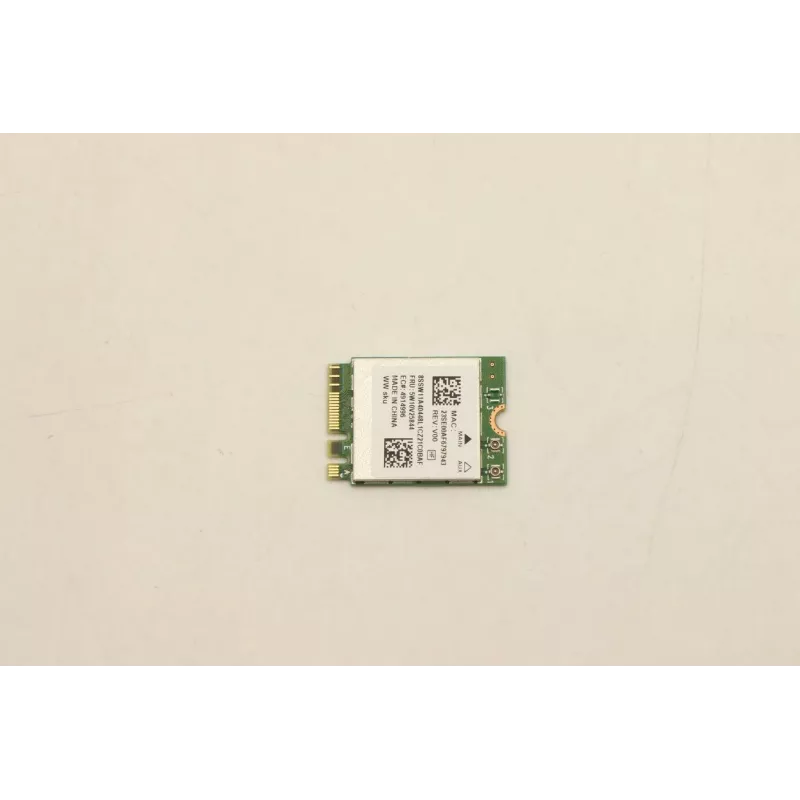
Wireless adapter Lenovo WirelessWLANLTN8852BE Dual Band 802.11ac

Wireless adapter Lenovo WirelessWLANLTN8852BE Dual Band 802.11ac
R1,506
The Lenovo WirelessWLANLTN8852BE Dual Band 802.11ac wireless adapter is an internal network card for compatible Lenovo notebooks and desktop systems. It supports both 2.4 GHz and 5 GHz bands to deliver faster throughput and reduced interference compared with single‑band solutions. The adapter is int... Read More
Stock 5 Code 2364152 Brand LENOVO Model 5W10V25844 Warranty 2 Years

Shipping & Returns

Estimated delivery Tuesday, October 6
You will be kept updated through our detailed tracking system
Payment options
EFTPayFastBank CardSnapScanZapperGoogle PayApple PayMobicredMoreTymePay on Arrival

The Lenovo WirelessWLANLTN8852BE Dual Band 802.11ac wireless adapter is an internal network card for compatible Lenovo notebooks and desktop systems. It supports both 2.4 GHz and 5 GHz bands to deliver faster throughput and reduced interference compared with single‑band solutions. The adapter is intended to provide reliable Wi‑Fi connectivity for everyday tasks such as web browsing, video streaming and business applications that require stable wireless performance.

Advantages

This Dual Band 802.11ac card offers higher theoretical data rates on compatible networks and better performance in crowded Wi‑Fi environments by using the 5 GHz band when available. The internal design preserves a slim device profile and avoids external dongles. Built to fit Lenovo systems, the adapter integrates with standard wireless stacks and drivers to simplify setup and ongoing use.

Suitable for

  • General web browsing and email
  • High‑definition video streaming and online meetings
  • Office and business applications requiring steady wireless access
  • Multi‑device home networks with mixed 2.4 GHz/5 GHz equipment

Key specifications

  • Wireless standard: IEEE 802.11ac (Dual Band)
  • Frequency bands: 2.4 GHz and 5 GHz
  • Form factor: internal PCIe/mini PCIe or M.2 variant compatible with Lenovo notebooks (check device compatibility before purchase)
  • Typical use: client‑side Wi‑Fi adapter for notebooks and small form‑factor PCs

How to use

Install the adapter into a compatible internal slot following the manufacturer’s service manual for your Lenovo system. After physical installation, boot the device and install the appropriate driver package for your operating system, either from the preinstalled OS update mechanism or from Lenovo support pages. Use the operating system’s network settings to select the desired SSID and configure security (WPA2/WPA3 as supported) to connect to the wireless network.

Recommendations

For optimal performance, connect to the 5 GHz band when available for higher throughput and reduced interference; reserve the 2.4 GHz band for longer range or legacy devices. Keep drivers up to date and ensure antenna connections inside the device are secure. Verify compatibility with your specific Lenovo model and operating system before installation.

Key Highlights
  • General web browsing and email
  • High‑definition video streaming and online meetings
  • Office and business applications requiring steady wireless access
  • Multi‑device home networks with mixed 2.4 GHz/5 GHz equipment
  • Wireless standard: IEEE 802.11ac (Dual Band)
  • Frequency bands: 2.4 GHz and 5 GHz
  • Form factor: internal PCIe/mini PCIe or M.2 variant compatible with Lenovo notebooks (check device compatibility before purchase)
  • Typical use: client‑side Wi‑Fi adapter for notebooks and small form‑factor PCs
Price history over the last 6 months
Wireless adapter Lenovo WirelessWLANLTN8852BE Dual Band 802.11ac
Current
R1,506
Lowest
R1,490
Highest
R1,506
Change 24H
+R13   +1%
Week
—   
Month
—   

Popular products in this category

WhatsApp
Hi, I’m DistriNode’s AI assistant. I can help you find products, compare options, create quote PDFs, or open support requests.