Account Contact
Your Cart
Pay the courier with no extra fees.
Need help? DistriNode AI can handle any task on our site.

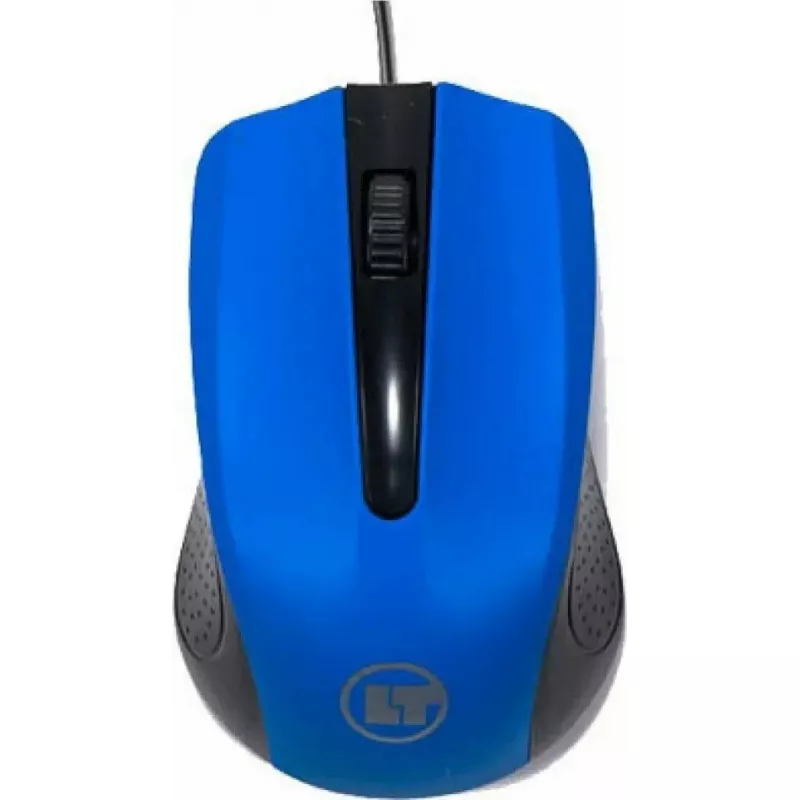
Wired optical mouse Dell 011D3V, USB connection, wired USB optical mouse

Wired optical mouse Dell 011D3V, USB connection, wired USB optical mouse
R384
Wired optical mouse Dell 011D3V connects via USB-A for immediate plug-and-play use with desktops and laptops. The mouse uses an optical sensor to provide steady cursor tracking across common desk surfaces, and includes standard left and right buttons plus a scroll wheel for basic navigation tasks. I... Read More
Stock 102 Code 2574199 Brand DELL Model 011D3V Warranty 2 Years

Shipping & Returns

Estimated delivery Tuesday, October 6
You will be kept updated through our detailed tracking system
Payment options
EFTPayFastBank CardSnapScanZapperGoogle PayApple PayMobicredMoreTymePay on Arrival

Wired optical mouse Dell 011D3V connects via USB-A for immediate plug-and-play use with desktops and laptops. The mouse uses an optical sensor to provide steady cursor tracking across common desk surfaces, and includes standard left and right buttons plus a scroll wheel for basic navigation tasks. Its wired design ensures continuous power and stable data transmission without the need for batteries or wireless pairing.

Advantages

The wired USB connection delivers consistent responsiveness and low latency suitable for everyday office and home computing. The optical sensor offers reliable tracking on typical surfaces, reducing the need for a mouse pad. The simple three-button layout (left, right, scroll wheel) supports familiar control and straightforward operation. Cable-powered operation eliminates battery replacement and wireless connectivity setup, and the compact shape is compatible with most workspaces.

Suitable for

  • Office productivity software and data entry
  • Web browsing and online research
  • Everyday home computing and email
  • Basic graphic navigation and document editing

Key specifications

  • Connection type: wired USB-A
  • Sensor type: optical sensor
  • Buttons: left, right, scroll wheel (middle click)
  • Power: bus-powered via USB (no batteries required)
  • Form factor: compact, right/left-hand friendly ambidextrous shape
  • Compatibility: standard USB ports on Windows, macOS, and most Linux distributions (plug-and-play)

How to use

Connect the mouse to an available USB-A port on your computer and wait for the operating system to recognize the device. No additional drivers are typically required for basic pointer and scroll functions. Place the mouse on a flat surface or mouse pad and move it to control the on-screen cursor; use the left and right buttons for selection and the scroll wheel to navigate documents and web pages. For macOS or Linux systems, verify system settings for pointer speed if adjustments are needed.

Recommendations

For consistent tracking, keep the optical sensor area clean and avoid glossy or highly reflective surfaces. When transporting the mouse, secure the cable to prevent strain near the connector. If pointer speed or scroll behavior needs adjustment, change mouse settings in the operating system to match personal preference.

Key Highlights
  • Office productivity software and data entry
  • Web browsing and online research
  • Everyday home computing and email
  • Basic graphic navigation and document editing
  • Connection type: wired USB-A
  • Sensor type: optical sensor
  • Buttons: left, right, scroll wheel (middle click)
  • Power: bus-powered via USB (no batteries required)
  • Form factor: compact, right/left-hand friendly ambidextrous shape
  • Compatibility: standard USB ports on Windows, macOS, and most Linux distributions (plug-and-play)
Price history over the last 6 months
Wired optical mouse Dell 011D3V, USB connection, wired USB optical mouse
Current
R384
Lowest
R337
Highest
R528
Change 24H
+R9   +2%
Week
+R15   +4%
Month
+R14   +4%

Popular products in this category

WhatsApp
Hi, I’m DistriNode’s AI assistant. I can help you find products, compare options, create quote PDFs, or open support requests.