Account Contact
Your Cart
Pay on delivery – no extra fees
Need help? Ask our AI

Video Switch BNC DeLOCK 87669

Video Switch BNC DeLOCK 87669
R773
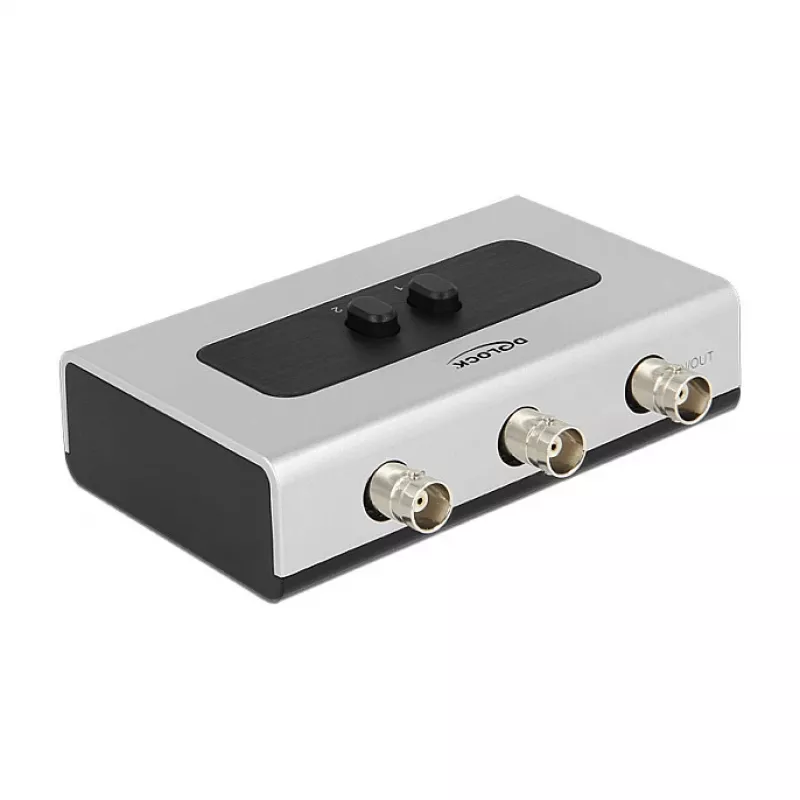
The DeLOCK 87669 video switch is a manual bidirectional BNC switch designed to connect video devices with BNC ports. Housed in a black and grey plastic enclosure and measuring 68 mm × 29 mm × 112 mm, it provides a compact solution for routing analogue video signals between equipment.AdvantagesThe sw... Read More
Stock 91 Code 1739427 Brand DELOCK Model 87669 Warranty 2 Years
CategoryVideo Switches

Shipping & Returns

Estimated delivery Thursday, November 12
You will be kept updated through our detailed tracking system
Payment options
EFTPayFastBank CardSnapScanZapperGoogle PayApple PayMobicredMoreTymePay on Arrival

The DeLOCK 87669 video switch is a manual bidirectional BNC switch designed to connect video devices with BNC ports. Housed in a black and grey plastic enclosure and measuring 68 mm × 29 mm × 112 mm, it provides a compact solution for routing analogue video signals between equipment.

Advantages

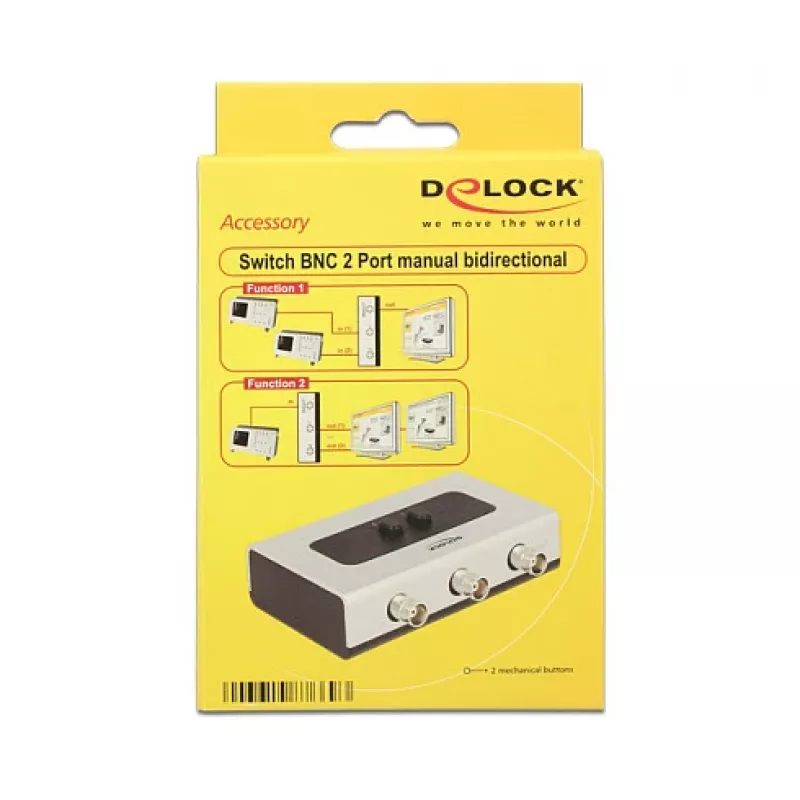
The switch supports two modes of operation: selecting one of two BNC sources to feed a single display, or selecting one of two displays to receive signal from a single BNC source. Manual push-button control makes selection simple and reliable. The unit uses standard BNC connectors for compatibility with professional and consumer video equipment.

Suitable for

  • Switching between two BNC-equipped computers or video sources to a single monitor or TV
  • Selecting which of two BNC-equipped displays receives signal from one video source
  • Small broadcast, surveillance or AV setups requiring manual source/display selection

Key specifications

  • Model: DeLOCK 87669
  • Connector type: BNC (input and output)
  • Operation: Manual bidirectional switch with push-button
  • Colour: Black, Grey
  • Housing material: Plastic
  • Dimensions (W×H×L): 68 mm × 29 mm × 112 mm
  • Simultaneous output to multiple screens: Not supported

How to use

Connect BNC cables from your video sources and displays to the corresponding BNC ports on the switch. Use the push-button to toggle which input is routed to the output, or which output receives the connected input, depending on your chosen configuration. Ensure cables are securely fastened to prevent signal loss. Power is not required for switching since the device operates mechanically.

Recommendations

Use short, high-quality coaxial BNC cables for best signal integrity and keep cable runs as short as practical. Do not attempt to output the same signal to multiple displays simultaneously with this model; use a dedicated distribution amplifier for split outputs.
Key Highlights
  • Switching between two BNC-equipped computers or video sources to a single monitor or TV
  • Selecting which of two BNC-equipped displays receives signal from one video source
  • Small broadcast, surveillance or AV setups requiring manual source/display selection
  • Model: DeLOCK 87669
  • Connector type: BNC (input and output)
  • Operation: Manual bidirectional switch with push-button
  • Colour: Black, Grey
  • Housing material: Plastic
  • Dimensions (W×H×L): 68 mm × 29 mm × 112 mm
  • Simultaneous output to multiple screens: Not supported
Specifications
Connector type
3x BNC female
Harmonized System (HS) code
85176990
Height
29 mm
Length
112 mm
Manual
Yes
Material
Plastic
Product colour
Black, Grey
Quantity per pack
1 pc(s)
Video in
BNC
Video out
BNC
Video port type
BNC
Width
68 mm
Price history over the last 6 months
Video Switch BNC DeLOCK 87669
Current
R773
Lowest
R766
Highest
R773
Change 24H
-R1   0%
Week
+R5   +1%
Month
R0   0%

Write a review

Rating *
Your name will be shown publicly – you can use a nickname. We invite buyers to write reviews; we check reviews before publishing and publish critical ones too.

More DELOCK products in this category

Popular products in this category

WhatsApp
Messenger
Hi, I’m DistriNode’s AI assistant. I can help you find products, compare options, create quote PDFs, or open support requests.
All categories