Account Contact
Your Cart
Pay on delivery – no extra fees
Need help? Ask our AI

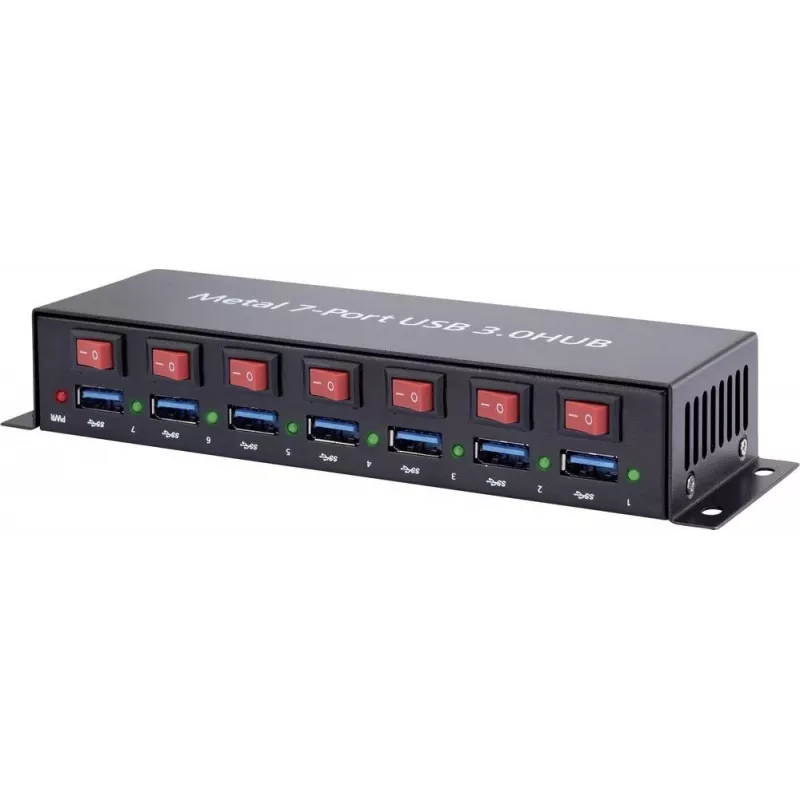
USB hub Renkforce 1089874 — 7-port USB 3.0, metal housing, wall-mountable

USB hub Renkforce 1089874 — 7-port USB 3.0, metal housing, wall-mountable
R1,954
Renkforce 1089874 USB hub is a 7-port USB 3.0 hub designed to increase the number of available high-speed USB connections on a desktop or laptop. The hub is housed in a metal enclosure for mechanical stability and improved heat dissipation and can be mounted on a wall or other vertical surface to sa... Read More
Stock Out Of StockNo Stock Code 2249846 Brand RENKFORCE Model 1089874 Warranty 2 Years

Shipping & Returns

Renkforce 1089874 USB hub is a 7-port USB 3.0 hub designed to increase the number of available high-speed USB connections on a desktop or laptop. The hub is housed in a metal enclosure for mechanical stability and improved heat dissipation and can be mounted on a wall or other vertical surface to save desk space. It provides multiple USB 3.0 ports for connecting external drives, printers, input devices and other USB peripherals while maintaining backward compatibility with USB 2.0 and USB 1.1 devices.

Advantages

The metal housing provides robust protection and aids passive cooling during extended operation. Seven USB 3.0 ports deliver high data transfer rates for external SSDs and HDDs, reducing file transfer time compared with USB 2.0. Wall-mountable design enables tidy cable routing and saves workspace. The hub supports plug-and-play operation on standard operating systems and is compatible with a wide range of USB devices.

Suitable for

  • Expanding USB connectivity on desktops and laptops in home offices
  • Connecting multiple external storage devices for backups and file transfer
  • Attaching peripherals such as keyboards, mice, webcams and printers
  • Organising workstation setups where space-saving mounting is required

Key specifications

  • Number of ports: 7 USB Type-A ports
  • Interface standard: USB 3.0 (backward compatible with USB 2.0 / 1.1)
  • Form factor: compact metal enclosure
  • Mounting: wall-mountable design with mounting slots
  • Power: bus-powered from host (external power option depends on connected devices)
  • Compatibility: supports common operating systems with USB host controllers

How to use

Connect the hub to an available USB port on your computer using the included host cable. Place or mount the hub on a wall or under a shelf using the built-in mounting slots, or set it on a flat surface. Attach USB devices to the available Type-A ports. For power-hungry devices such as multiple external hard drives, consider using a powered USB hub or a host port with sufficient current to ensure stable operation. No additional drivers are normally required for modern operating systems; devices should be recognised automatically.

Recommendations

For reliable performance with multiple high-current devices, use a powered USB port or an externally powered hub. When mounting on a wall, ensure proper ventilation around the metal housing and avoid placing heavy loads on connected cables.

Key Highlights
  • Expanding USB connectivity on desktops and laptops in home offices
  • Connecting multiple external storage devices for backups and file transfer
  • Attaching peripherals such as keyboards, mice, webcams and printers
  • Organising workstation setups where space-saving mounting is required
  • Number of ports: 7 USB Type-A ports
  • Interface standard: USB 3.0 (backward compatible with USB 2.0 / 1.1)
  • Form factor: compact metal enclosure
  • Mounting: wall-mountable design with mounting slots
  • Power: bus-powered from host (external power option depends on connected devices)
  • Compatibility: supports common operating systems with USB host controllers
Price history is not available yet
We are still collecting enough daily price data for this product.

Popular products in this category

WhatsApp
Hi, I’m DistriNode’s AI assistant. I can help you find products, compare options, create quote PDFs, or open support requests.