Account Contact
Your Cart
Pay on delivery – no extra fees
Need help? Ask our AI

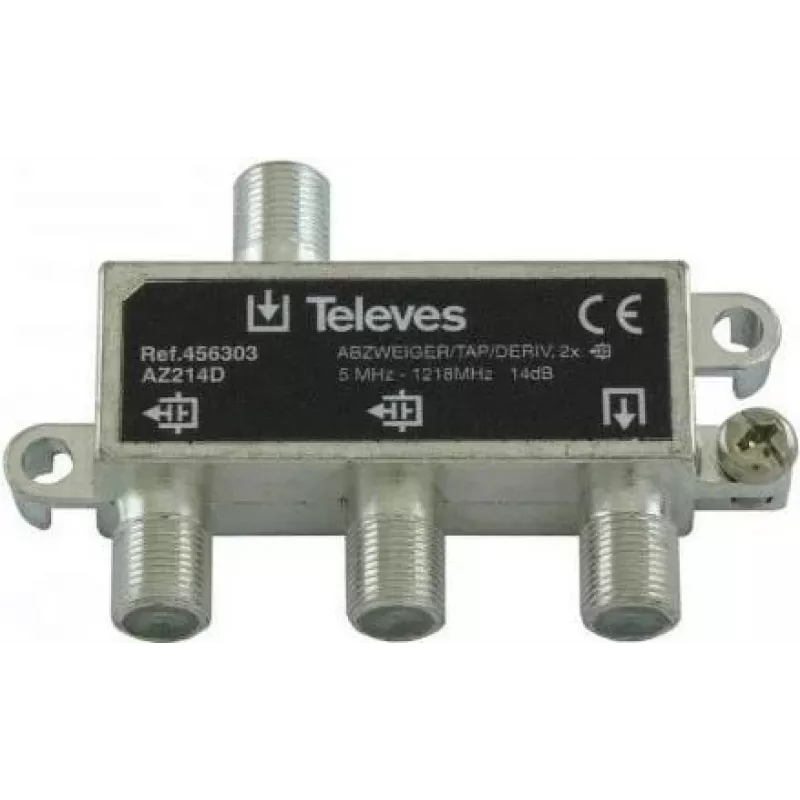
Splitter Televes AZ214D 2-way 5–1218 MHz, 14 dB attenuation

Splitter Televes AZ214D 2-way 5–1218 MHz, 14 dB attenuation
R477
Televes AZ214D is a passive 2-way RF splitter designed for distribution of antenna or cable signals across the 5–1218 MHz band with a nominal attenuation of 14 dB. The device routes a single input to two outputs while maintaining balanced frequency response and isolation suitable for TV, DVB-T/T2 an... Read More
Stock Out Of StockNo Stock Code 2210173 Brand TELEVES Model AZ214D Warranty 2 Years

Shipping & Returns

Televes AZ214D is a passive 2-way RF splitter designed for distribution of antenna or cable signals across the 5–1218 MHz band with a nominal attenuation of 14 dB. The device routes a single input to two outputs while maintaining balanced frequency response and isolation suitable for TV, DVB-T/T2 and cable installations. Its compact form factor and metal housing make it appropriate for indoor or equipment-rack mounting where a simple, reliable split of RF signals is required.

Advantages

The splitter provides consistent attenuation across the specified frequency range, offering predictable signal levels at each output. Built with shielding and a metal enclosure, it reduces interference and maintains signal integrity in shared distribution environments. The unit is passive and requires no power, which simplifies installation and reduces maintenance. Its two-output configuration allows straightforward routing to two receivers or onward distribution points without active amplification.

Suitable for

  • Home TV and set-top box connections using antenna or cable signals
  • DVB-T and DVB-T2 terrestrial television installations
  • Small multi-room or multi-receiver setups where passive splitting is acceptable
  • Signal routing in equipment racks or media cabinets

Key specifications

  • Frequency range: 5–1218 MHz
  • Nominal attenuation: 14 dB per output
  • Number of outputs: 2
  • Type: Passive RF splitter
  • Connector type: F-type compatible (female/male as applicable for installation)
  • Housing: Metal shielded enclosure
  • Intended use: TV, DVB-T/T2 and cable signal distribution

How to use

Connect the incoming antenna or cable feed to the splitter input, then connect each of the two outputs to the respective receiver or distribution cable using appropriate coaxial cables and F-type connectors. Ensure all connectors are tightened to provide good electrical contact and minimize ingress of moisture. Because the splitter introduces about 14 dB of passive loss to each output, verify signal levels at the receivers and, if necessary, use amplification upstream of the splitter or choose a different distribution topology for longer cable runs or weak signals.

Recommendations

Install the splitter in a dry, ventilated location and avoid placing it near strong sources of electrical interference. For installations with low incoming signal strength, consider a powered distribution amplifier before the splitter rather than amplifying after splitting. Periodically inspect connectors and shielding for corrosion or looseness to maintain reliable signal quality.

Key Highlights
  • Home TV and set-top box connections using antenna or cable signals
  • DVB-T and DVB-T2 terrestrial television installations
  • Small multi-room or multi-receiver setups where passive splitting is acceptable
  • Signal routing in equipment racks or media cabinets
  • Frequency range: 5–1218 MHz
  • Nominal attenuation: 14 dB per output
  • Number of outputs: 2
  • Type: Passive RF splitter
  • Connector type: F-type compatible (female/male as applicable for installation)
  • Housing: Metal shielded enclosure
  • Intended use: TV, DVB-T/T2 and cable signal distribution
Price history is not available yet
We are still collecting enough daily price data for this product.

Popular products in this category

WhatsApp
Hi, I’m DistriNode’s AI assistant. I can help you find products, compare options, create quote PDFs, or open support requests.