Account Contact
Your Cart
Pay the courier with no extra fees.
Need help? DistriNode AI can handle any task on our site.

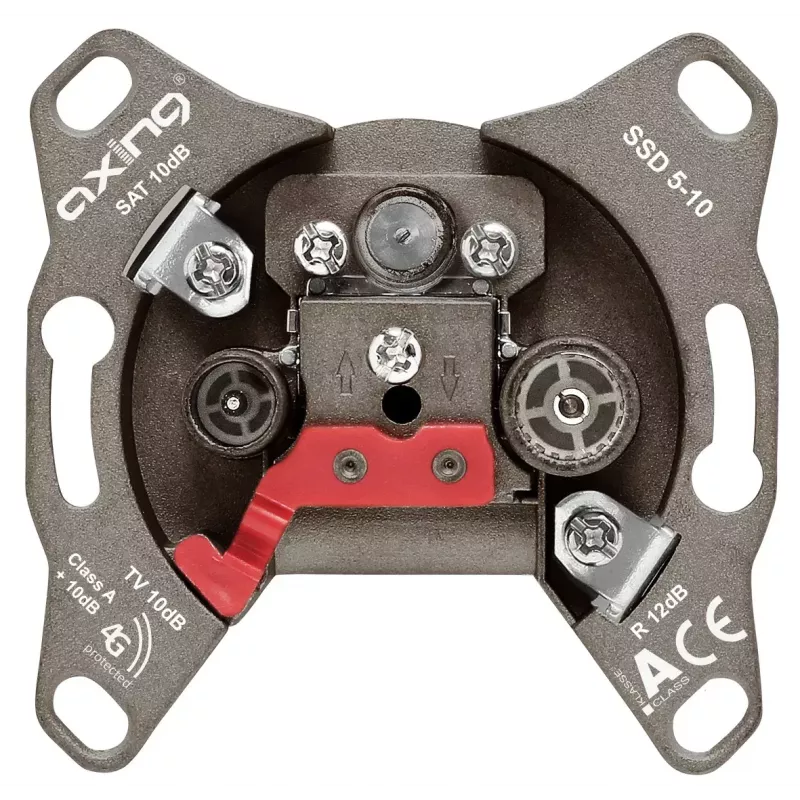
Socket outlet SAT + TV + Radio Axing SSD 5-10

Socket outlet SAT + TV + Radio Axing SSD 5-10
R504
The Axing SSD 5-10 socket outlet provides combined SAT, TV and radio connections in a compact, wall-mounted unit. Designed for in-wall installation, the outlet measures 68 mm wide, 39 mm deep and 68 mm high and is finished in brown to blend with interior fittings. The unit delivers standard coaxial ... Read More
Stock 28 Code 2576193 Brand AXING Model SSD00510 Warranty 2 Years

Shipping & Returns

Estimated delivery Tuesday, October 6
You will be kept updated through our detailed tracking system
Payment options
EFTPayFastBank CardSnapScanZapperGoogle PayApple PayMobicredMoreTymePay on Arrival

The Axing SSD 5-10 socket outlet provides combined SAT, TV and radio connections in a compact, wall-mounted unit. Designed for in-wall installation, the outlet measures 68 mm wide, 39 mm deep and 68 mm high and is finished in brown to blend with interior fittings. The unit delivers standard coaxial termination for satellite, terrestrial television and FM/DAB radio signals, offering a streamlined connection point for residential or light-commercial AV setups.

Advantages

The compact footprint and straightforward coaxial interfaces make the outlet space-efficient and easy to integrate into existing distribution systems. Its neutral brown housing reduces visual impact in rooms with darker decor. The unit is manufactured to provide stable signal paths for SAT, TV and radio sources and facilitates tidy cabling and single-point access to multiple broadcast services.

Suitable for

  • Home living rooms and bedrooms requiring SAT, TV and FM/DAB radio outlets
  • Apartment installations where a compact outlet is needed
  • Small offices or reception areas with coaxial broadcast requirements
  • Retrofit projects replacing single-function wall plates with a combined outlet

Key specifications

  • Functions: Satellite (SAT), Terrestrial TV, Radio
  • Dimensions: 68 mm (width) × 39 mm (depth) × 68 mm (height)
  • Colour: Brown
  • Mounting type: Wall/in-wall socket outlet
  • Connector type: Coaxial termination for SAT, TV and radio

How to use

Install the Axing SSD 5-10 into a compatible in-wall mounting box following local electrical and building regulations. Connect the incoming satellite feed to the SAT coaxial connector and terrestrial antenna and radio feeds to the respective TV and radio terminations. Ensure all coaxial connections are tightened and that cable impedances match the system (typically 75 Ω). After secure mounting and connection, test each service (satellite receiver, TV tuner and radio) to confirm signal levels and proper operation.

Recommendations

Use shielded, 75 Ω coaxial cable and appropriate connectors for best signal integrity. When integrating into a multi-device distribution system, verify that any amplifiers, splitters or multiswitches are compatible with combined SAT/TV/radio outlets to avoid signal loss or interference.

Key Highlights
  • Home living rooms and bedrooms requiring SAT, TV and FM/DAB radio outlets
  • Apartment installations where a compact outlet is needed
  • Small offices or reception areas with coaxial broadcast requirements
  • Retrofit projects replacing single-function wall plates with a combined outlet
  • Functions: Satellite (SAT), Terrestrial TV, Radio
  • Dimensions: 68 mm (width) × 39 mm (depth) × 68 mm (height)
  • Colour: Brown
  • Mounting type: Wall/in-wall socket outlet
  • Connector type: Coaxial termination for SAT, TV and radio
Specifications
Depth
39 mm
Frame
No
Height
68 mm
Product colour
Brown
Socket type
SAT + TV + Radio
Width
68 mm
Price history over the last 6 months
Socket outlet SAT + TV + Radio Axing SSD 5-10
Current
R504
Lowest
R492
Highest
R504
Change 24H
+R9   +2%
Week
—   
Month
—   

Popular products in this category

WhatsApp
Hi, I’m DistriNode’s AI assistant. I can help you find products, compare options, create quote PDFs, or open support requests.