Account Contact
Your Cart
Pay the courier with no extra fees.
Need help? DistriNode AI can handle any task on our site.

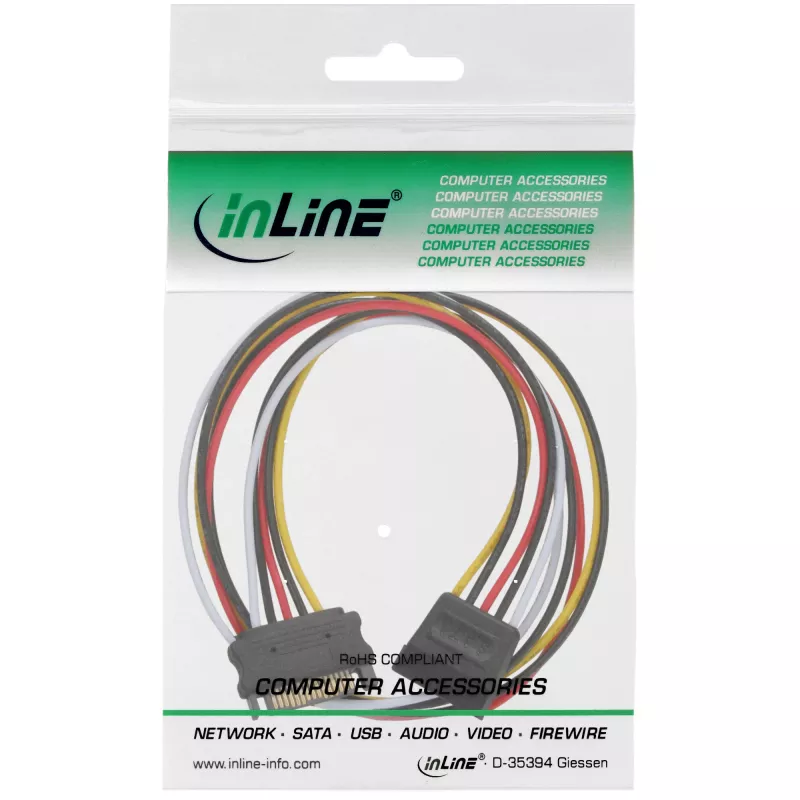
SATA Power Supply Extension Cable male/female 0.30m InLine 29651A

SATA Power Supply Extension Cable male/female 0.30m InLine 29651A
R190
The InLine SATA Power Supply Extension Cable male/female 0.30m (29651A) provides a short, reliable extension for SATA power connections in desktop PCs. With a male connector on one end and a female connector on the other, this 0.30 m cable lets you extend the reach of an existing SATA power lead to ... Read More
Stock 2276 Code 1430569 Brand INLINE Model 29651A Warranty 2 Years

Shipping & Returns

Estimated delivery Tuesday, October 6
You will be kept updated through our detailed tracking system
Payment options
EFTPayFastBank CardSnapScanZapperGoogle PayApple PayMobicredMoreTymePay on Arrival

The InLine SATA Power Supply Extension Cable male/female 0.30m (29651A) provides a short, reliable extension for SATA power connections in desktop PCs. With a male connector on one end and a female connector on the other, this 0.30 m cable lets you extend the reach of an existing SATA power lead to connect hard drives or SSDs in confined spaces. Its compact length reduces cable clutter while maintaining a stable power link between the PSU and storage devices.

Advantages

This InLine SATA power extension offers a straightforward and compatible connection for SATA power ports without altering the original cable routing. The short 0.3 m length gives flexibility to place drives in tight locations or behind drive cages while avoiding excess slack. The male/female configuration ensures plug-and-play compatibility with standard SATA power connectors and supports secure seating to reduce risk of accidental disconnection.

Suitable for

  • Extending SATA power cables to reach hard disk drives (HDD) or solid-state drives (SSD)
  • Improving cable management in compact PC cases or server chassis
  • Connecting drives behind brackets, drive cages, or in tight mounting positions

Key specifications

  • Cable length: 0.3 m
  • Connector type: SATA power male to SATA power female
  • Product colour: Multicolour
  • Application: Internal PC SATA power extension for storage devices

How to use

Disconnect power from the system before handling internal cables. Insert the male end of the extension into an available SATA power socket from the power supply or an existing SATA power lead, then plug the female end into the power input of the SATA drive. Ensure both connectors are fully seated and aligned to avoid bent pins or loose contact. After installation, restore power and verify that the connected drive is detected by the system.

Recommendations

Use this short extension where a small increase in reach is required; avoid chaining multiple extensions to prevent connection instability. Keep the cable clear of moving parts and high-temperature components, and route it to minimise interference with airflow inside the case.

Key Highlights
  • Power extension internal, SATA male to SATA female plug
  • to extend the SATA power connector in the PC case
  • 5-wire pin assignment1:1 (including 12V, 5V and 3.3V)
  • AWG 18 strands
  • in a resealable polybag with EAN code
  • 0.3 m
  • Male
  • Female
  • Multicolour
Specifications
AWG wire size
18
Cable length
0.3 m
Connector 1 gender
Male
Connector 2 gender
Female
Package depth
140 mm
Package height
8 mm
Package volume
100 cm³
Package weight
25 g
Package width
100 mm
Product colour
Multicolour
Weight
18 g

Leaflet

Open Leaflet
Price history over the last 6 months
SATA Power Supply Extension Cable male/female 0.30m InLine 29651A
Current
R190
Lowest
R121
Highest
R190
Change 24H
+R13   +7%
Week
+R69   +57%
Month
+R14   +8%

Popular products in this category

WhatsApp
Hi, I’m DistriNode’s AI assistant. I can help you find products, compare options, create quote PDFs, or open support requests.