Account Contact
Your Cart
Pay the courier with no extra fees.
Need help? DistriNode AI can handle any task on our site.

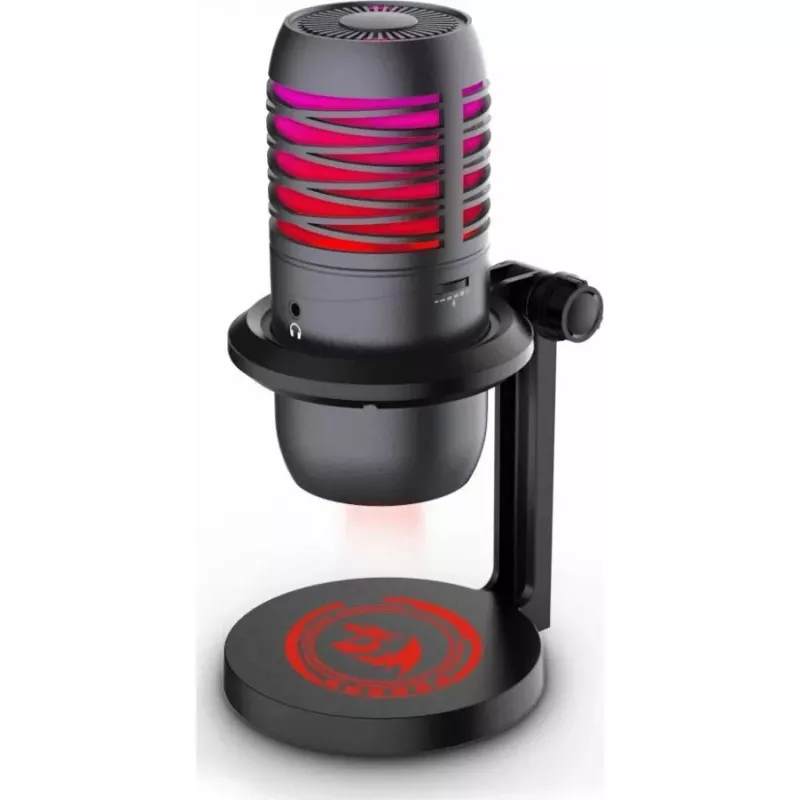
Microphone Redragon GM211 Nebula

Microphone Redragon GM211 Nebula
R984
The Redragon GM211 Nebula microphone is a USB condenser microphone with a cardioid pickup pattern designed to capture clear vocal audio while reducing ambient noise. It offers a frequency response of 20 Hz to 20 kHz and comes with an adjustable desktop stand for flexible positioning. The plug-and-pl... Read More
Stock 2 Code 2575242 Brand REDRAGON Model GM211 Warranty 2 Years

Shipping & Returns

Estimated delivery Tuesday, September 29
You will be kept updated through our detailed tracking system
Payment options
EFTPayFastBank CardSnapScanZapperGoogle PayApple PayMobicredMoreTymePay on Arrival

The Redragon GM211 Nebula microphone is a USB condenser microphone with a cardioid pickup pattern designed to capture clear vocal audio while reducing ambient noise. It offers a frequency response of 20 Hz to 20 kHz and comes with an adjustable desktop stand for flexible positioning. The plug-and-play USB connection enables direct use with computers and compatible devices without additional drivers, making it suitable for streaming, gaming, podcasting and voiceovers. The microphone’s clean, compact design integrates well with gaming setups and home studios.

Advantages

The cardioid pickup pattern focuses on sound from the front of the microphone, improving vocal clarity and minimizing background noise from the sides and rear. A full-range frequency response from 20 Hz to 20 kHz ensures accurate reproduction of both low and high tones. The included adjustable stand provides simple positioning and stability on a desk. Plug-and-play USB connectivity removes the need for complex installation, allowing quick setup on Windows, macOS and other compatible systems. The microphone’s design balances functionality and aesthetics for use in streaming and content creation environments.

Suitable for

  • Live streaming and game commentary
  • Voiceovers and narration
  • Podcasting and online meetings
  • Home studio recording and content creation

Key specifications

  • Pickup pattern: Cardioid
  • Frequency response: 20 Hz – 20 kHz
  • Connection: USB plug-and-play
  • Mounting: Adjustable desktop stand included
  • Intended use: Streaming, gaming, voice recording

How to use

Place the Redragon GM211 Nebula on a stable surface using the adjustable stand and position the microphone so the front faces the speaker. Connect the USB cable to a free USB port on your computer; the device should be recognized automatically. Select the microphone as the input device in your operating system or recording software. Adjust distance and angle to balance proximity effect and ambient pickup—typically 10–20 cm from the mouth yields clear vocals while avoiding plosive sounds. Use software controls or mixer settings to set input level and apply any desired processing such as noise reduction or equalization.

Recommendations

For best results, use a pop filter to reduce plosives, enable noise suppression in your recording or streaming software if background noise is present, and position the microphone slightly off-axis from your mouth to minimize breath noise. Ensure the USB connection is secure and avoid placing the microphone near noisy equipment or reflective surfaces to maintain clear recordings.

Key Highlights
  • Live streaming and game commentary
  • Voiceovers and narration
  • Podcasting and online meetings
  • Home studio recording and content creation
  • Pickup pattern: Cardioid
  • Frequency response: 20 Hz – 20 kHz
  • Connection: USB plug-and-play
  • Mounting: Adjustable desktop stand included
  • Intended use: Streaming, gaming, voice recording
Price history over the last 6 months
Microphone Redragon GM211 Nebula
Current
R984
Lowest
R955
Highest
R994
Change 24H
+R9   +1%
Week
+R23   +2%
Month
+R13   +1%

Popular products in this category

WhatsApp
Hi, I’m DistriNode’s AI assistant. I can help you find products, compare options, create quote PDFs, or open support requests.