Account Contact
Your Cart
Pay the courier with no extra fees.
Need help? DistriNode AI can handle any task on our site.

Microconnect USB3.1CCOM2 USB graphics adapter White

Microconnect USB3.1CCOM2 USB graphics adapter White
R929
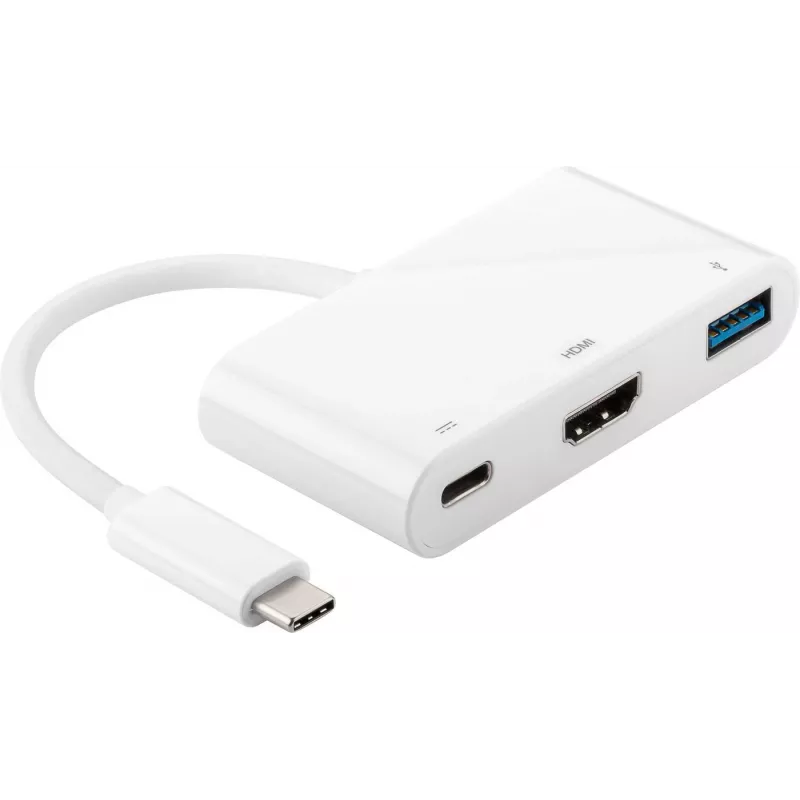
The MicroConnect USB3.1CCOM2 White USB graphics adapter enables connection of an additional display via a USB-C port. This compact multiport adapter includes USB-C, HDMI and USB 3.0 Type-A interfaces in a single device and is designed to extend or duplicate video output from a compatible host. The a... Read More
Stock 50 Code 1188725 Brand MICROCONNECT Model USB3.1CCOM2 Warranty 2 Years

Shipping & Returns

Estimated delivery Tuesday, October 6
You will be kept updated through our detailed tracking system
Payment options
EFTPayFastBank CardSnapScanZapperGoogle PayApple PayMobicredMoreTymePay on Arrival

The MicroConnect USB3.1CCOM2 White USB graphics adapter enables connection of an additional display via a USB-C port. This compact multiport adapter includes USB-C, HDMI and USB 3.0 Type-A interfaces in a single device and is designed to extend or duplicate video output from a compatible host. The adapter is lightweight (0.03 kg) and portable, facilitating easy transport and setup for multi-display workspaces.

Advantages

The adapter provides a simple plug-and-play way to add an external monitor using USB 3.1, supporting common HDMI displays while also offering a USB 3.0 Type-A port for peripherals. Its small size and low weight make it convenient for mobile use and for saving desk space. The single-cable connection reduces clutter and simplifies adding an extra screen to laptops or systems with limited video outputs.

Suitable for

  • Expanding a laptop display to a second monitor
  • Setting up a temporary dual-screen workstation
  • Connecting HDMI projectors or external monitors via USB-C
  • Using USB 3.0 peripherals alongside an additional display

Key specifications

  • Model: MicroConnect USB3.1CCOM2
  • Interfaces: USB-C (host), HDMI (display), USB 3.0 Type-A
  • Colour: White
  • Weight: 0.03 kg
  • MPN: USB3.1CCOM2
  • EAN: 5712505644881

How to use

Connect the adapter's USB-C plug to a compatible USB-C port on your computer. Attach an HDMI cable from the adapter to an external monitor or projector, and optionally connect USB 3.0 Type-A devices to the adapter's USB port. Configure display settings on the host computer to extend or duplicate the desktop as needed. No external power supply is required unless the connected devices demand additional power from the host.

Recommendations

For best results, use with a host computer that supports USB 3.1 video output or DisplayLink-compatible drivers when required. Use high-quality HDMI and USB cables and ensure the computer's display drivers are up to date to maintain stable video performance.
Key Highlights
  • Expanding a laptop display to a second monitor
  • Setting up a temporary dual-screen workstation
  • Connecting HDMI projectors or external monitors via USB-C
  • Using USB 3.0 peripherals alongside an additional display
  • Model: MicroConnect USB3.1CCOM2
  • Interfaces: USB-C (host), HDMI (display), USB 3.0 Type-A
  • Colour: White
  • Weight: 0.03 kg
  • MPN: USB3.1CCOM2
  • EAN: 5712505644881
Specifications
Harmonized System (HS) code
84733020
HDMI ports quantity
1
Package depth
99 mm
Package height
48 mm
Package weight
40 g
Package width
282 mm
Product colour
White
USB 3.2 Gen 1 (3.1 Gen 1) Type-A ports quantity
1
USB 3.2 Gen 1 (3.1 Gen 1) Type-C ports quantity
1
Weight
30 g

Manual

Open Manual

Leaflet

Open Leaflet
Price history over the last 6 months
Microconnect USB3.1CCOM2 USB graphics adapter White
Current
R929
Lowest
R869
Highest
R929
Change 24H
+R57   +7%
Week
—   
Month
—   

Popular products in this category

WhatsApp
Hi, I’m DistriNode’s AI assistant. I can help you find products, compare options, create quote PDFs, or open support requests.