Account Contact
Your Cart
Pay on delivery – no extra fees
Need help? Ask our AI

Laptop Dock VALUE 12.99.1042

Laptop Dock VALUE 12.99.1042
R1,045
PDF
PDF
Stock 200 Code 1461543 Model 12.99.1042 Warranty 2 Years

Shipping & Returns

Estimated delivery Tuesday, November 17
You will be kept updated through our detailed tracking system
Payment options
EFTPayFastBank CardSnapScanZapperGoogle PayApple PayMobicredMoreTymePay on Arrival

Ask a question – the AI assistant answers instantly.

Description

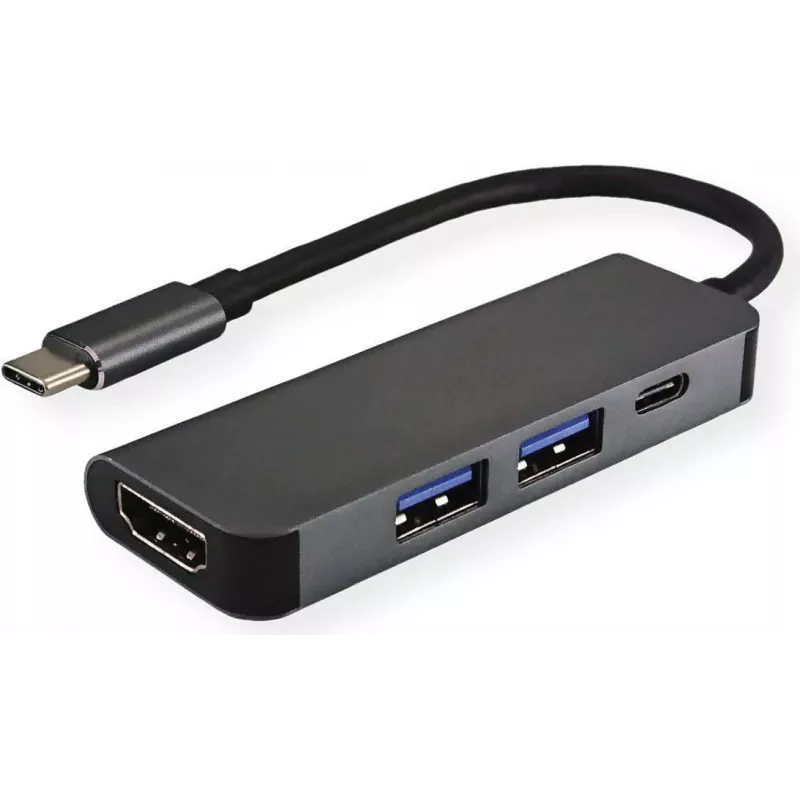
Connect your MacBook, Ultrabook, notebook or PC with a USB Type‑C port to an HDMI display or projector with up to 3840x2160 @ 60Hz resolution while also connecting an additional USB device via the Type‑A port and charging your computer through the Type‑C PD port. The VALUE 12.99.1042 Laptop Dock is a compact, bus‑powered adapter in black with a short integrated cable (0.1 m) that expands a single USB‑C port into HDMI and USB 3.2 Gen 1 Type‑A interfaces.

Advantages

The dock provides simultaneous video output at up to 4K@60Hz, a USB 3.2 Gen 1 Type‑A port for peripherals or external storage, and Power Delivery passthrough to charge your host device while other connections are in use. Its bus‑powered design and compact cable make it portable and easy to integrate with laptops and PCs that support USB‑C video output.

Suitable for

  • Connecting a laptop to an HDMI monitor or projector for presentations or extended desktop
  • Attaching external hard drives, flash drives or USB peripherals via the USB 3.2 Gen 1 Type‑A port
  • Using while charging the host device through the Type‑C PD port

Key specifications

  • Model: VALUE 12.99.1042
  • Host interface: USB 3.2 Gen 1 Type‑C
  • Output: HDMI up to 3840x2160 @ 60Hz
  • Hub port: USB 3.2 Gen 1 Type‑A
  • Power: Bus‑powered with Type‑C PD passthrough
  • Cable length: 0.1 m
  • Colour: Black
  • Brand: VALUE
  • MPN: 12.99.1042
  • EAN: 7630049614581

How to use

Plug the integrated USB‑C connector into your laptop or PC USB‑C port that supports DisplayPort Alt Mode. Connect an HDMI cable from the dock to your display or projector. Attach a USB device to the Type‑A port as needed. If charging is required, connect your USB‑C PD power adapter to the host PD input (if applicable) so the dock can pass power to the computer while maintaining video and data connections.

Recommendations

For reliable 4K@60Hz output make sure the host device USB‑C port supports DisplayPort Alt Mode and use high‑quality HDMI and power cables. Avoid forcing connectors and disconnect when not in use to reduce wear.
Key Highlights
  • Connecting a laptop to an HDMI monitor or projector for presentations or extended desktop
  • Attaching external hard drives, flash drives or USB peripherals via the USB 3.2 Gen 1 Type‑A port
  • Using while charging the host device through the Type‑C PD port
  • Model: VALUE 12.99.1042
  • Host interface: USB 3.2 Gen 1 Type‑C
  • Output: HDMI up to 3840x2160 @ 60Hz
  • Hub port: USB 3.2 Gen 1 Type‑A
  • Power: Bus‑powered with Type‑C PD passthrough
  • Cable length: 0.1 m
  • Colour: Black
  • Brand: VALUE
  • MPN: 12.99.1042
  • EAN: 7630049614581

Specifications

Specifications
Cable length
0.1 m
HDMI ports quantity
1
Host interface
USB 3.2 Gen 1 (3.1 Gen 1) Type-C
Hub interfaces
HDMI, USB 3.2 Gen 1 (3.1 Gen 1) Type-A
Plug and Play
Yes
Power supply type
USB
Product colour
Black
Quantity per pack
1 pc(s)
USB 3.2 Gen 1 (3.1 Gen 1) Type-A ports quantity
2
USB 3.2 Gen 1 (3.1 Gen 1) Type-C ports quantity
1
USB Power Delivery (USB PD)
Yes

Leaflet

Open Leaflet
Price history over the last 6 months
Laptop Dock VALUE 12.99.1042
Current
R1,045
Lowest
R1,030
Highest
R1,416
Change 24H
R0   0%
Week
+R4   +0%
Month
+R2   +0%

Write a review

Rating *
Your name will be shown publicly – you can use a nickname. We invite buyers to write reviews; we check reviews before publishing and publish critical ones too.

More VALUE products in this category

Popular products in this category

WhatsApp
Messenger
Hi, I’m DistriNode’s AI assistant. I can help you find products, compare options, create quote PDFs, or open support requests.
All categories