Account Contact
Your Cart
Pay the courier with no extra fees.
Need help? DistriNode AI can handle any task on our site.

KVM switch EFB Elektronik EB977

KVM switch EFB Elektronik EB977
R305
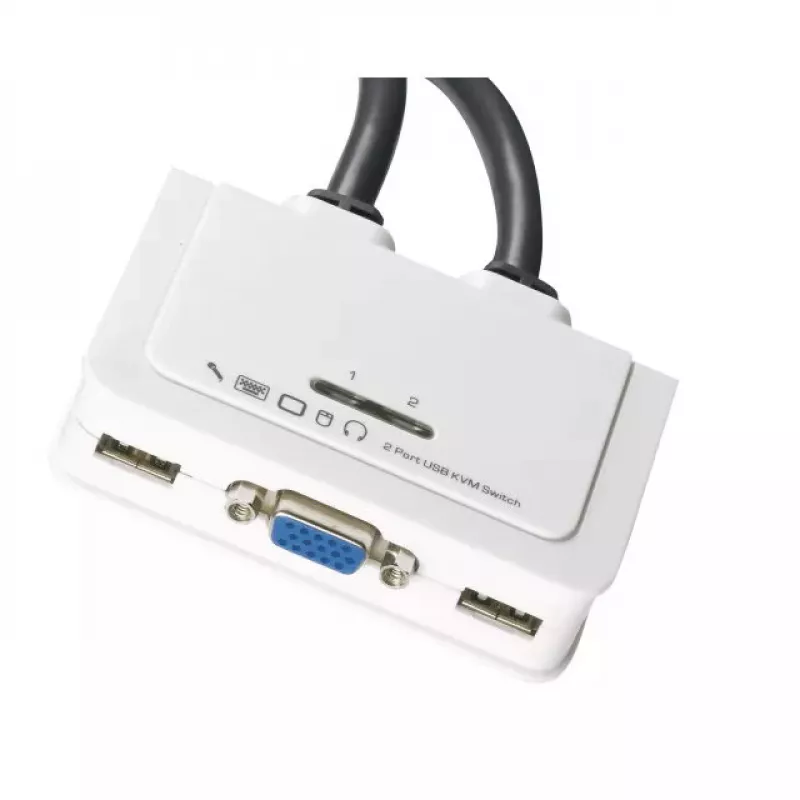
The EFB Elektronik EB977 is a 2-port KVM switch that lets you control two VGA-equipped PCs using a single USB keyboard, USB mouse and one monitor. It includes full audio support, a 0.9 m KVM cable for easy connection and a white housing. The switch also provides an additional USB 2.0 port to connect... Read More
Stock 100 Code 2567122 Brand EFB Model EB977 Warranty 2 Years

Shipping & Returns

Estimated delivery Thursday, October 1
You will be kept updated through our detailed tracking system
Payment options
EFTPayFastBank CardSnapScanZapperGoogle PayApple PayMobicredMoreTymePay on Arrival

The EFB Elektronik EB977 is a 2-port KVM switch that lets you control two VGA-equipped PCs using a single USB keyboard, USB mouse and one monitor. It includes full audio support, a 0.9 m KVM cable for easy connection and a white housing. The switch also provides an additional USB 2.0 port to connect one extra USB device and front-panel LEDs that indicate status.

Advantages

The EB977 saves desk space and reduces cable clutter by sharing one keyboard, mouse and monitor between two computers. It supports full audio switching and offers a dedicated USB 2.0 port for peripherals. Port selection can be done via a remote button and an auto-scan mode is available for automatic cycling between connected systems.

Suitable for

  • Home office setups with two PCs
  • Small workstations requiring quick switching between machines
  • Environments where VGA video and USB input devices are used

Key specifications

  • Controls: 2 computers
  • Keyboard port: USB
  • Mouse port: USB
  • Video port: VGA
  • Audio: Full audio support
  • Additional ports: 1 × USB 2.0 device port
  • Included cable: 0.9 m KVM cable
  • Colour: White
  • Brand / Model: EFB Elektronik EB977

How to use

Connect the KVM cables from the EB977 to each computer’s VGA and USB ports, attach the keyboard, mouse and monitor to the switch’s console ports, and if required plug an extra USB device into the USB 2.0 port. Use the remote button to switch between computers or enable auto-scan mode to cycle through systems automatically. Observe the front-panel LEDs to confirm the active port.

Recommendations

For reliable operation, use standard USB keyboards and mice and VGA-compatible monitors. Ensure proper seating of all connectors and avoid using damaged cables. If audio switching is required, connect audio cables according to your system configuration and verify audio routing after switching ports.
Key Highlights
  • Home office setups with two PCs
  • Small workstations requiring quick switching between machines
  • Environments where VGA video and USB input devices are used
  • Controls: 2 computers
  • Keyboard port: USB
  • Mouse port: USB
  • Video port: VGA
  • Audio: Full audio support
  • Additional ports: 1 × USB 2.0 device port
  • Included cable: 0.9 m KVM cable
  • Colour: White
  • Brand / Model: EFB Elektronik EB977
Specifications
Audio connections
Yes
Built-in display
No
Cable length
0.9 m
Cables included
KVM
Ethernet LAN
No
Harmonized System (HS) code
85176200
Keyboard port type
USB
LED indicators
Y
Mouse port type
USB
Number of computers controlled
2
Product colour
White
Rack mounting
No
USB version
2.0
Video port type
VGA
Price history over the last 6 months
KVM switch EFB Elektronik EB977
Current
R305
Lowest
R223
Highest
R339
Change 24H
+R79   +35%
Week
+R82   +37%
Month
+R81   +36%

Popular products in this category

WhatsApp
Hi, I’m DistriNode’s AI assistant. I can help you find products, compare options, create quote PDFs, or open support requests.