Account Contact
Your Cart
Pay the courier with no extra fees.
Need help? DistriNode AI can handle any task on our site.

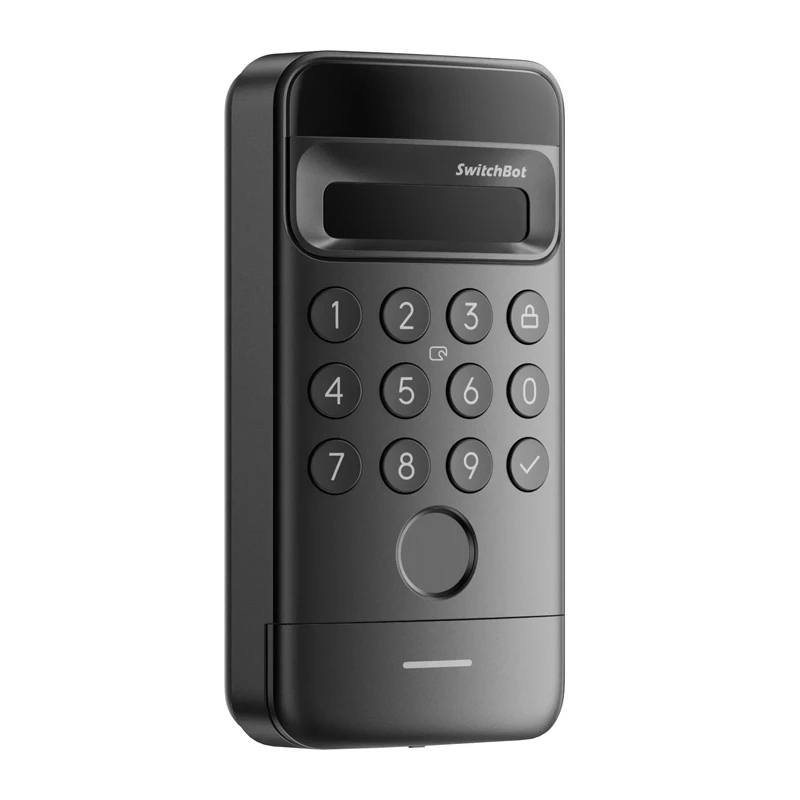
Keypad Lock SwitchBot W7300500 Facial Recognition — keypad smart lock with facial ID

Keypad Lock SwitchBot W7300500 Facial Recognition — keypad smart lock with facial ID
R1,793
SwitchBot Keypad Vision lock keypad combines fast facial recognition with multiple access options and wireless installation. Using iPhone-grade 3D scanning technology, the device recognizes a face in about 1 second and protects against spoofing attempts with photos or recordings. The compact unit is... Read More
Stock 30 Code 876990 Brand SWITCHBOT Model W7300500 Warranty 2 Years

Shipping & Returns

Estimated delivery Thursday, October 1
You will be kept updated through our detailed tracking system
Payment options
EFTPayFastBank CardSnapScanZapperGoogle PayApple PayMobicredMoreTymePay on Arrival

SwitchBot Keypad Vision lock keypad combines fast facial recognition with multiple access options and wireless installation. Using iPhone-grade 3D scanning technology, the device recognizes a face in about 1 second and protects against spoofing attempts with photos or recordings. The compact unit is suitable for indoor and outdoor doors thanks to an IP65-rated housing and a long-lasting 5000 mAh battery that typically requires charging only once a year.

Advantages

Face recognition works reliably day and night due to built-in infrared backlighting and dual light sensors, while an intelligent power-saving system activates the face sensor only when someone approaches. The lock operates quietly at under 20 dB. It supports up to nine unlocking methods including face, fingerprint, password, NFC, card, key, voice command, Bluetooth and smartwatch, and allows four password types (permanent, one-time, temporary and masked). Wireless mounting with adhesive tape avoids drilling, and the device includes tamper alerts and app connectivity for remote monitoring (SwitchBot Hub required for full remote access).

Key specifications

How to use

Stick the Keypad Vision to a clean, flat area on the door using the provided mounting tape or fix it with screws from the mounting kit. Charge the device with the supplied USB-C cable before first use. Follow the SwitchBot app instructions to register faces, fingerprints and other access methods; Bluetooth connection and a SwitchBot Hub are required for remote access and app-based monitoring. The face sensor and infrared backlight activate automatically when someone approaches, while the power-saving system reduces standby consumption.

Recommendations

For reliable operation, install the keypad at eye level on a clean, sheltered part of the door and ensure regular brief charging once yearly or as notified by the app. Use the SwitchBot app and Hub for remote monitoring and enable tamper alerts to receive notifications if the device is tampered with or removed.
Key Highlights
  • Manufacturer: SwitchBot
  • Model: Keypad Vision
  • Dimensions: 131 × 65 × 30 mm
  • Weight: 205 g
  • Power supply: 5000 mAh battery (charging approximately once a year)
  • Face recognition time: 1 s
  • Recognition accuracy: 99%
  • Operating noise:
  • Unlocking methods: Face, fingerprint, password, NFC, card, key, voice, Bluetooth, smartwatch
  • Types of passwords: Permanent, one-time, temporary, masked
  • Connectivity: Bluetooth (remote access requires SwitchBot Hub)
  • Resistance: IP65 (waterproof and dustproof)
  • Installation: Wireless, no drilling (mounting tape included)
  • Included: Keypad Vision lock keypad, mounting kit (adhesive tape + screws), USB-C cable for charging, user manual
Price history over the last 6 months
Keypad Lock SwitchBot W7300500 Facial Recognition — keypad smart lock with facial ID
Current
R1,793
Lowest
R1,739
Highest
R1,828
Change 24H
+R35   +2%
Week
+R54   +3%
Month
+R47   +3%

Popular products in this category

WhatsApp
Hi, I’m DistriNode’s AI assistant. I can help you find products, compare options, create quote PDFs, or open support requests.