Account Contact
Your Cart
Pay on delivery – no extra fees
Need help? Ask our AI

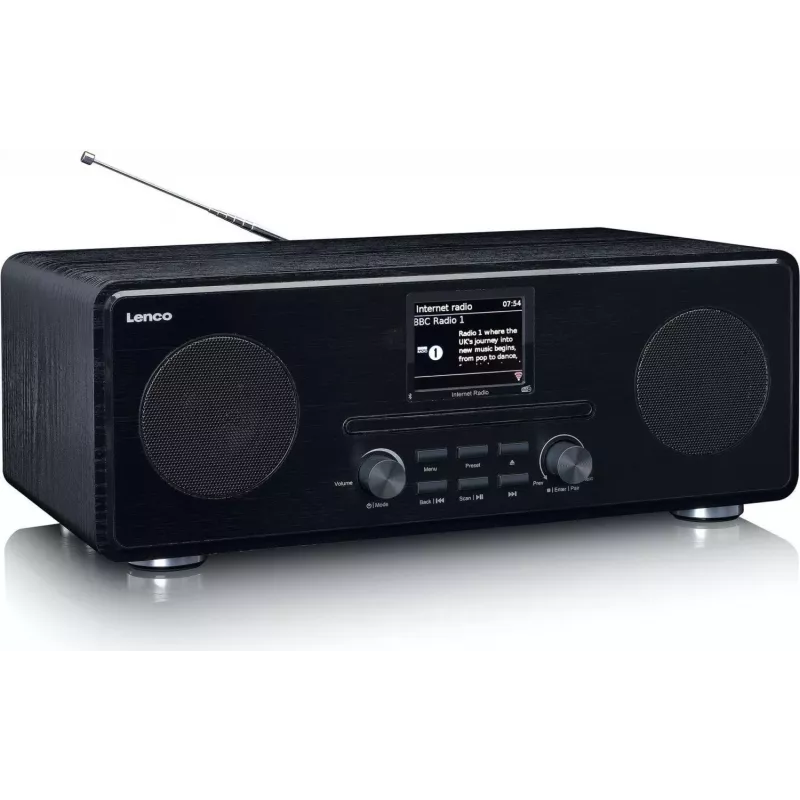
Internet Radio Lenco DIR-260

Internet Radio Lenco DIR-260
R6,045
PDF
PDF
Stock Out Of StockNo Stock Code 1212547 Model A004141 Warranty 2 Years

Shipping & Returns

Ask a question – the AI assistant answers instantly.

Description

The Lenco DIR-260 is a compact internet radio with a 2.8 inch color LCD screen and a black wooden-style housing. It supports internet radio stations, DAB+ and FM bands, and offers Bluetooth streaming and CD/MP3 playback. The device also functions as a clock radio with dual alarm and snooze, controlled from the unit or the included remote control.

Advantages

The radio combines multiple reception options — internet radio, DAB+ and FM — with wireless Bluetooth playback from smartphones or tablets. A 2.8" color display simplifies station navigation and menus, while CD/MP3 support preserves playback of physical media. The black wooden-look design fits a range of interiors, and the dual alarm plus snooze provides practical bedside use.

Suitable for

  • Listening to online stations from different countries
  • Receiving local FM and DAB+ broadcasts
  • Streaming music from a smartphone or tablet via Bluetooth
  • Playing CDs or MP3 discs
  • Using as a bedside clock radio with dual alarm

Key specifications

  • Radio type: Internet
  • Supported bands: FM, DAB+
  • Display: 2.8" color LCD
  • Connectivity: Bluetooth (approx. 10 m range)
  • Media playback: CD / MP3
  • Design / colour: Black, wooden-look housing
  • Alarm: Dual alarm and snooze function

How to use

Place the Lenco DIR-260 on a stable surface and connect it to mains power. Use the 2.8" display and buttons or the supplied remote control to navigate menus and select internet stations, DAB+ or FM. To stream from a smartphone or tablet, enable Bluetooth on your mobile device, search for the DIR-260 and pair the devices. Insert a CD to play discs or MP3 files from a CD. Set the dual alarm and snooze via the clock settings on the display.

Recommendations

For best reception of FM and DAB+ signals, position the radio away from large metal objects and electronics that may cause interference. When streaming via Bluetooth, keep the source device within the typical 10 m range and avoid obstacles between devices for stable playback.
Key Highlights
  • Listening to online stations from different countries
  • Receiving local FM and DAB+ broadcasts
  • Streaming music from a smartphone or tablet via Bluetooth
  • Playing CDs or MP3 discs
  • Using as a bedside clock radio with dual alarm
  • Radio type: Internet
  • Supported bands: FM, DAB+
  • Display: 2.8" color LCD
  • Connectivity: Bluetooth (approx. 10 m range)
  • Media playback: CD / MP3
  • Design / colour: Black, wooden-look housing
  • Alarm: Dual alarm and snooze function

Specifications

Specifications
AC adapter included
Yes
Alarm clock
Yes
Bluetooth
Yes
Bluetooth range
10 m
Bluetooth version
5.0
Built-in display
Yes
Built-in speaker(s)
Yes
Coloration
Monochromatic
Display diagonal
2.8 "
Display type
LCD
Headphone connectivity
Bluetooth
Material
Wood
MP3 playback
Yes
Number of built-in speakers
2
On/off switch
Yes
Power consumption (standby)
1 W
Power consumption (typical)
24 W
Power source
AC
Product colour
Black
Radio type
Internet
Sleep timer
Yes
Snooze function
Yes
Supported radio bands
FM, DAB+

Leaflet

Open Leaflet
Price history over the last 6 months
Internet Radio Lenco DIR-260
Current
R6,045
Lowest 7d
R5,876
Highest 7d
R6,094
Change 24H
+R155   +3%
Change 7D
-R248   -4%
Change 30D
+R311   +5%

Write a review

Rating *
Your name will be shown publicly – you can use a nickname. We invite buyers to write reviews; we check reviews before publishing and publish critical ones too.

More LENCO products in this category

12

Popular products in this category

8
WhatsApp
Messenger
Hi, I’m DistriNode’s AI assistant. I can help you find products, compare options, create quote PDFs, or open support requests.
All categories