Account Contact
Your Cart
Pay the courier with no extra fees.
Need help? DistriNode AI can handle any task on our site.

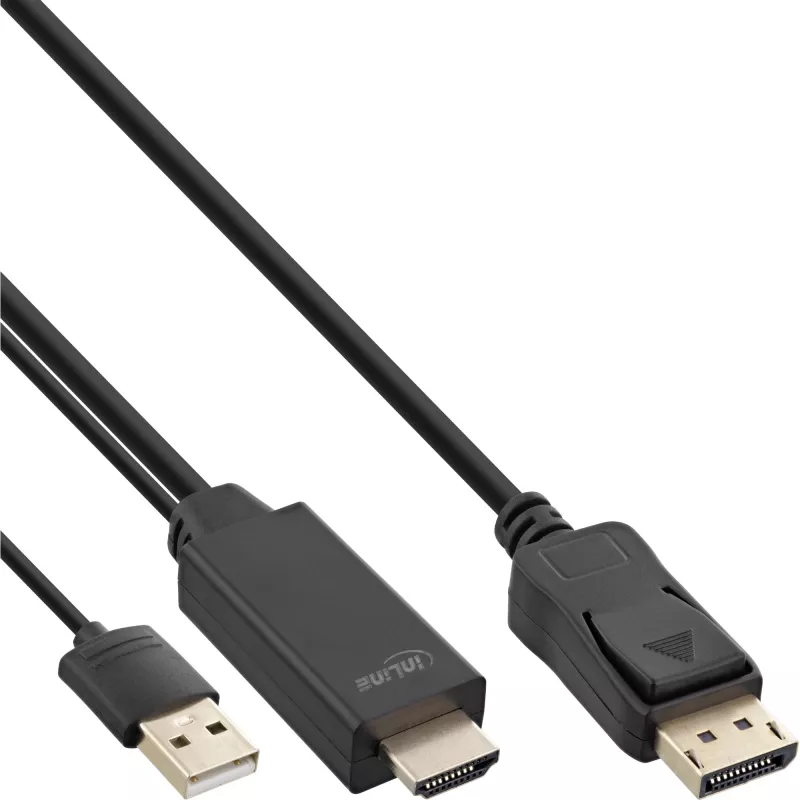
InLine HDMI to DisplayPort Converter Cable, 4K, black/gold, 2m

InLine HDMI to DisplayPort Converter Cable, 4K, black/gold, 2m
R813
This InLine HDMI to DisplayPort Converter Cable lets you connect DisplayPort monitors to a computer or device with an HDMI graphics output. The cable performs electronic signal conversion and supports a maximum resolution of 3840 x 2160 pixels. It is 2 m long, UL certified, and comes in a black fini... Read More
Stock 218 Code 2354362 Brand INLINE Model 17162P Warranty 2 Years

Shipping & Returns

Estimated delivery Tuesday, October 6
You will be kept updated through our detailed tracking system
Payment options
EFTPayFastBank CardSnapScanZapperGoogle PayApple PayMobicredMoreTymePay on Arrival

This InLine HDMI to DisplayPort Converter Cable lets you connect DisplayPort monitors to a computer or device with an HDMI graphics output. The cable performs electronic signal conversion and supports a maximum resolution of 3840 x 2160 pixels. It is 2 m long, UL certified, and comes in a black finish with gold-coloured contacts.

Advantages

The cable provides active HDMI-to-DisplayPort conversion so a DisplayPort monitor can receive a signal from an HDMI source. Its 2 m length offers flexible placement, and UL certification indicates compliance with safety standards. The integrated gold-coloured contacts and black jacket improve durability and reduce corrosion risk. An additional 5V/500mA USB power supply on the HDMI side is required for the converter to operate.

Suitable for

  • Connecting an HDMI-equipped laptop or PC to a DisplayPort monitor
  • Extending desktop workspace on a DisplayPort display
  • Home office and professional workstations requiring 4K output

Key specifications

  • Model: InLine HDMI to DisplayPort Converter Cable InLine 4K 2m (MPN 17162P)
  • Maximum resolution: 3840 x 2160 pixels
  • Cable length: 2 m
  • Product colour: Black
  • Power requirement: external USB 5V/500mA on HDMI side
  • Certification: UL
  • EAN: 4043718292615

How to use

Connect the HDMI end of the cable to the HDMI output on your computer or media device, and plug the DisplayPort end into the monitor's DisplayPort input. Provide power to the converter by connecting a USB cable (5V/500mA) to the USB power input on the HDMI side and to a suitable USB power source. After connections are made, power on both devices and select the DisplayPort input on the monitor. Adjust resolution settings on the source device if necessary to match 3840 x 2160 or a supported resolution.

Recommendations

Use a stable USB power source capable of supplying 5V/500mA; insufficient USB power may prevent image transmission. For optimal performance at 4K resolution, use compatible HDMI output settings and ensure the monitor supports the target resolution.
Key Highlights
  • Active HDMI to DisplayPort converter cable
  • HDMI plug to DisplayPort plug
  • USB cable 0.3m with USB A plug on HDMI side
  • Signal source HDMI to signal receiver DisplayPort
  • Supports display resolutions up to UHD 3840x2160 @30Hz
  • Colour: Black
  • gold-plated contacts
  • in a resealable PE bag with EAN code
  • 2 m
  • 3840 x 2160 pixels 30 Hz
  • Black
Specifications
Cable length
2 m
Certification
UL
Converter type
Active video converter
Depth
2000 mm
Dimensions (WxDxH)
21 x 2000 x 14 mm
Height
14 mm
Maximum refresh rate
30 Hz
Maximum resolution
3840 x 2160 pixels
Package depth
125 mm
Package height
20 mm
Package weight
120 g
Package width
125 mm
Product colour
Black
Supported graphics resolutions
3840 x 2160
Supported video modes
2160p
Weight
113 g
Width
21 mm

Leaflet

Open Leaflet
Price history over the last 6 months
InLine HDMI to DisplayPort Converter Cable, 4K, black/gold, 2m
Current
R813
Lowest
R772
Highest
R830
Change 24H
+R19   +2%
Week
+R19   +2%
Month
+R9   +1%

Popular products in this category

WhatsApp
Hi, I’m DistriNode’s AI assistant. I can help you find products, compare options, create quote PDFs, or open support requests.