Account Contact
Your Cart
Pay the courier with no extra fees.
Need help? DistriNode AI can handle any task on our site.

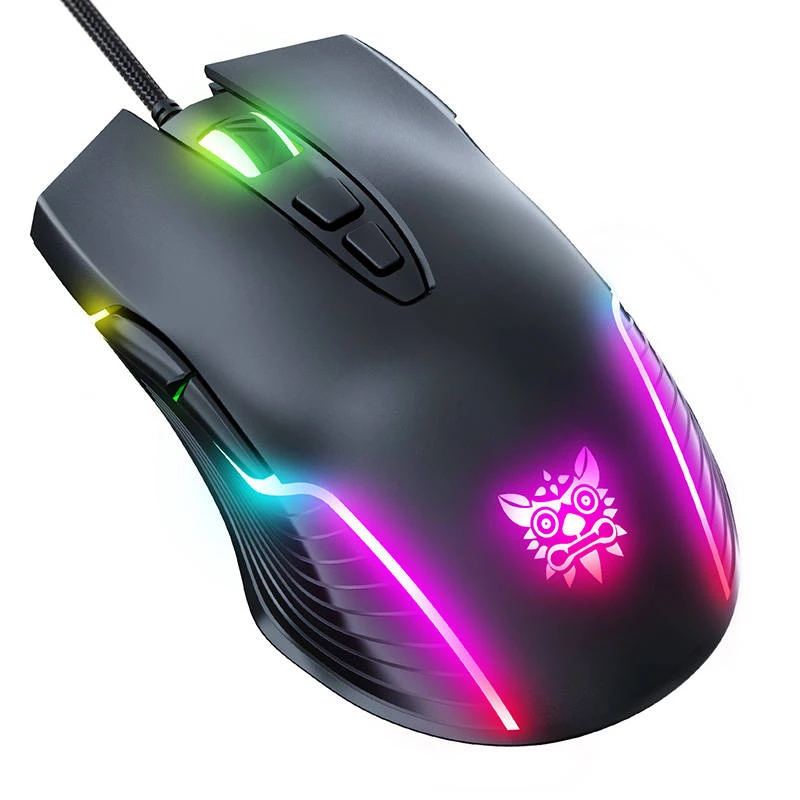
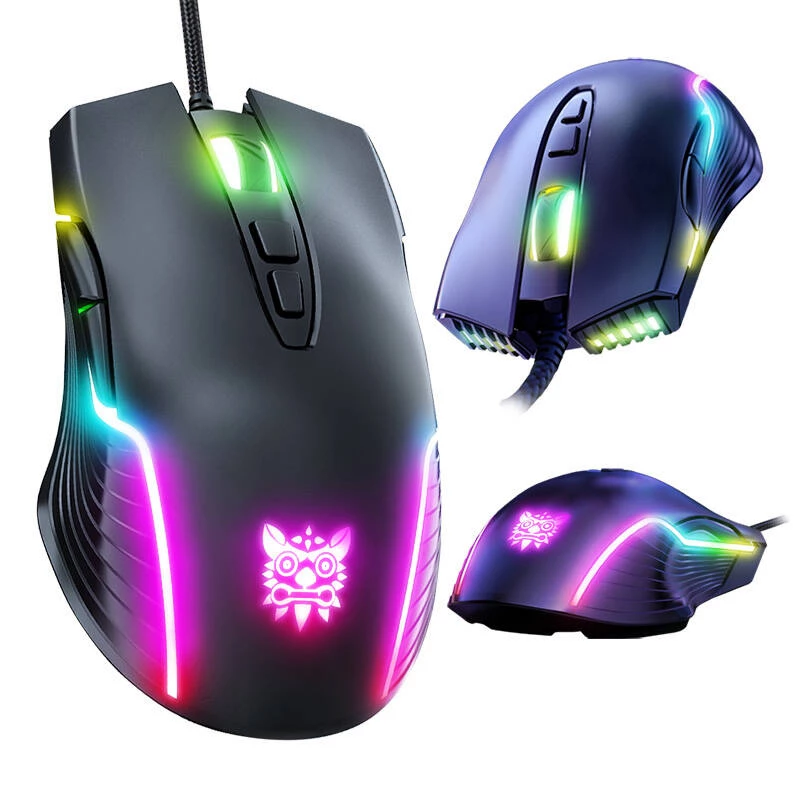
Gaming mouse Onikuma CW905 USB

Gaming mouse Onikuma CW905 USB
R344
The ONIKUMA CW905 gaming mouse is a wired USB mouse designed for gaming and precise everyday use. It offers six DPI levels for adjustable sensitivity and RGB lighting in six colors. The mouse has an ergonomic shape, easy-to-clean surface and comes with a user manual.AdvantagesThe ONIKUMA CW905 provi... Read More
Stock 619 Code 976708 Brand ONIKUMA Model CW905B Warranty 2 Years

Shipping & Returns

Estimated delivery Thursday, October 1
You will be kept updated through our detailed tracking system
Payment options
EFTPayFastBank CardSnapScanZapperGoogle PayApple PayMobicredMoreTymePay on Arrival

The ONIKUMA CW905 gaming mouse is a wired USB mouse designed for gaming and precise everyday use. It offers six DPI levels for adjustable sensitivity and RGB lighting in six colors. The mouse has an ergonomic shape, easy-to-clean surface and comes with a user manual.

Advantages

The ONIKUMA CW905 provides adjustable sensitivity across six DPI presets to match different play styles and tasks, a total of seven buttons for quick access to common functions, and dynamic RGB backlighting in six selectable colors. Its ergonomic form and fingerprint- and sweat-resistant surface support extended use, while a standard USB interface and approximately 1.5 m cable length ensure simple plug-and-play connectivity.

Suitable for

  • Casual and competitive PC gaming
  • Office work requiring precise cursor control
  • Multimedia navigation and web browsing

Key specifications

  • Default resolutions (DPI/color): 800 (green), 1600 (pink), 2400 (blue), 3200 (red), 4800 (cyan), 6400 (yellow)
  • Lighting: RGB with 6 colors (green, pink, blue, red, cyan, yellow)
  • Buttons: 7 (left, right, wheel/middle, forward, back, DPI+, DPI-)
  • Interface: USB
  • Operating voltage: 5 V
  • Operating current: <100 mA
  • Cable length: approx. 1.5 m
  • Weight: approx. 132 g
  • Dimensions: 127 mm x 71 mm x 40 mm

How to use

Connect the ONIKUMA CW905 to a PC using the USB cable; the mouse is plug-and-play and does not require additional drivers for basic operation. Switch DPI levels using the dedicated DPI buttons to adjust cursor sensitivity; use the forward and back buttons for quick navigation in browsers or compatible applications. Change the lighting by cycling through the RGB options if supported by the device controls.

Recommendations

For reliable performance, connect the mouse directly to a PC USB port rather than through an unpowered hub. Keep the surface clean and free of debris and avoid exposing the braided cable to sharp edges. If you need programmable macros or advanced customization, verify software compatibility with your system.

How to use

Connect the ONIKUMA CW905 to a PC using the USB cable; the mouse is plug-and-play and does not require additional drivers for basic operation. Switch DPI levels using the dedicated DPI buttons to adjust cursor sensitivity; use the forward and back buttons for quick navigation in browsers or compatible applications. Change the lighting by cycling through the RGB options if supported by the device controls.

Recommendations

For reliable performance, connect the mouse directly to a PC USB port rather than through an unpowered hub. Keep the surface clean and free of debris and avoid exposing the braided cable to sharp edges. If you need programmable macros or advanced customization, verify software compatibility with your system.

Key Highlights
  • Casual and competitive PC gaming
  • Office work requiring precise cursor control
  • Multimedia navigation and web browsing
  • Default resolutions (DPI/color): 800 (green), 1600 (pink), 2400 (blue), 3200 (red), 4800 (cyan), 6400 (yellow)
  • Lighting: RGB with 6 colors (green, pink, blue, red, cyan, yellow)
  • Buttons: 7 (left, right, wheel/middle, forward, back, DPI+, DPI-)
  • Interface: USB
  • Operating voltage: 5 V
  • Operating current:
  • Cable length: approx. 1.5 m
  • Weight: approx. 132 g
  • Dimensions: 127 mm x 71 mm x 40 mm
Price history over the last 6 months
Gaming mouse Onikuma CW905 USB
Current
R344
Lowest
R313
Highest
R344
Change 24H
+R25   +8%
Week
+R28   +9%
Month
+R27   +9%

Popular products in this category

WhatsApp
Hi, I’m DistriNode’s AI assistant. I can help you find products, compare options, create quote PDFs, or open support requests.