

Ask a Question About This Product
Shipping & Returns


-90x90h.webp "Build-Your-Own Gaming PC — Ryzen 7 7700 + RTX 5070, 32GB DDR5 | DistriNode")


-90x90w.webp "DistriNode Ryzen 5 8500G Office PC (Radeon Integrated Graphics) — Build Your Own")


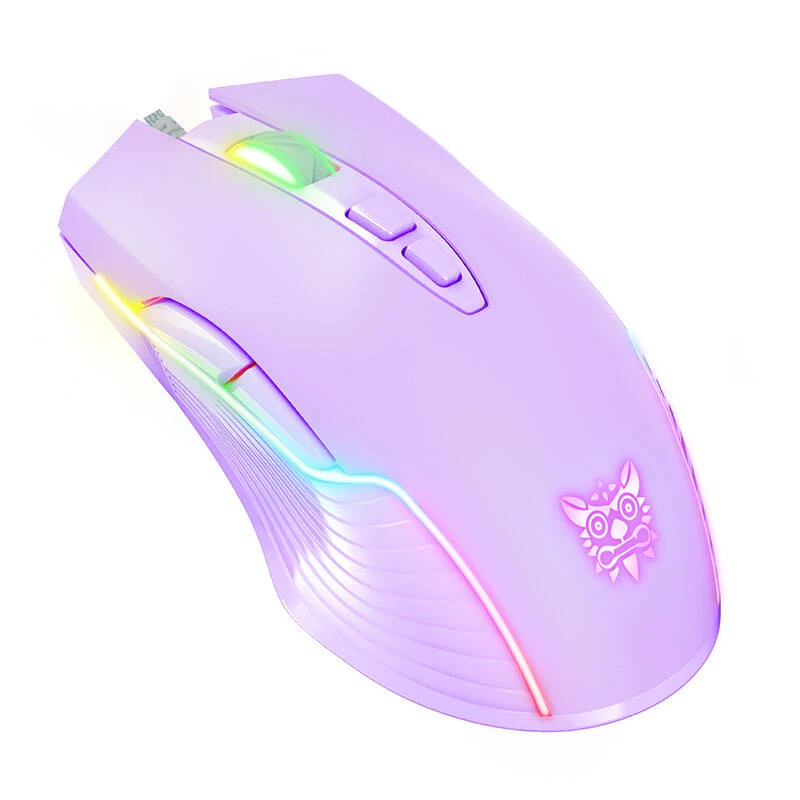
ONIKUMA RGB Gaming Mouse CW905 Purple
The ONIKUMA CW905 represents a range of mice designed for gaming, offering users a range of customization options. The ability to choose from six different DPI levels allows for increased precision in reading hand movements, which in turn translates into smoother cursor movement. It also comes with a set of seven buttons, including a left and right mouse button, a middle mouse button/wheel, a forward button, a back button and two DPI buttons, which provide quick access to key functions during gaming. Interestingly, the device emits light in six different colors, giving users the ability to customize the mouse to their visual preferences. An added bonus is the ergonomic design, created with easy-to-clean materials.

Advanced control
ONIKUMA CW905 is a gaming mouse that fully combines functionality with precision. The leading value of this mouse is the option to choose from six DPI levels, which opens the door to meticulous calibration of the device according to personal preferences. Each of these levels guarantees even more accurate reading of hand movements, which in turn affects the smoothness of cursor movement.

Ergonomic functionality at your fingertips
The ONIKUMA CW905 is equipped with a set of seven buttons, including left and right mouse buttons, mouse wheel/center button, forward and back buttons, and DPI+ and DPI- buttons. This smart configuration creates instant access to key functions without the need for separate movements. Thus, it provides lightning-fast responses and efficient operation both during gameplay and when performing various tasks.

Variable lighting
The ONIKUMA CW905 is further distinguished by its dynamic LED backlighting, which presents a palette of six varied colors: green, pink, blue, red, cyan and yellow. This is much more than just a retail aspect - it is a feature that allows you to personalize the mouse and create a unique style.

Comfortable to use
The ONIKUMA CW905 mouse also impresses with its ergonomic design, created from easy-to-clean materials. The surface is resistant to fingerprints, sweat, etc. This ensures comfort even during long gaming or work sessions. All these features add up to the comprehensive quality of the ONIKUMA CW905, which meets the needs of even the most demanding gamers.

Contents of the set
- Mouse
- Manual
| Default resolution | 800 green/1600 pink/2400 blue/3200 red/4800 cyan/6400 yellow |
|---|---|
| Light color | RGB |
| Operating voltage | 5V |
| Interface | USB |
| Operating current | |
| Cable length | approx. 1,5m |
| Weight | approx. 132g |
| Product dimensions | 127mm x 71mm x 40mm |
How to use
Connect the ONIKUMA CW905 to a free USB port on your computer. Use the DPI+ and DPI- buttons to cycle through the six sensitivity presets until you find the setting that matches your needs. The forward and back buttons operate in supported applications and browsers without additional drivers; advanced button mapping may be available through third‑party software if required. Change lighting by using the designated lighting control (if present) or by cycling through modes as described in the manual.
Recommendations
For stable performance, connect the mouse directly to a computer USB port rather than a hub. Keep the cable free of tight bends and periodically clean the surface with a soft, dry cloth to preserve the finish and sensor accuracy.
How to use
Recommendations
For stable performance, connect the mouse directly to a computer USB port rather than a hub. Keep the cable free of tight bends and periodically clean the surface with a soft, dry cloth to preserve the finish and sensor accuracy.
Popular products in this category
- Gaming mouse Razer Basilisk V3, right-hand, optical 26,000 DPI, 11 programmable buttons, USB Type-A, black
- LOGITECH G102 Gaming Mouse USB Black
- Logitech G PRO X SUPERLIGHT 2 - Maus - Gaming - optisch - 5 Tasten - kabellos - 2,4 GHz - USB Logitech LIGHTSPEED Empfänger - Schwarz (910-006631)
- LOGITECH G305 Lightspeed Wireless Gaming Mouse White
- Gaming Mouse Razer DeathAdder V3 Wired
- Gaming Mouse Endgame Gear OP1 8k v2 USB
- LOGITECH G309 Lightspeed Wireless Gaming Mouse White (910-007208)
- Scyrox V8 kabellose Gaming-Maus 8.000 Hz 8K Dongle Kailh Optical schwarz