Account Contact
Your Cart
Pay the courier with no extra fees.
Need help? DistriNode AI can handle any task on our site.

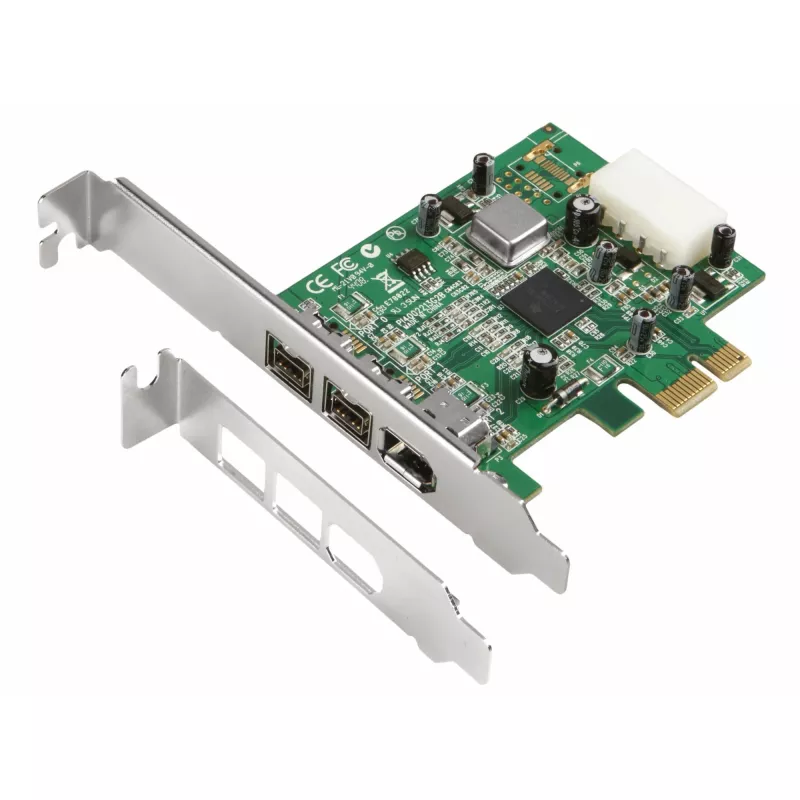
FireWire PCIe Host Adapter Dawicontrol DC-FW800

FireWire PCIe Host Adapter Dawicontrol DC-FW800
R1,127
The DAWICONTROL DC-FW800 FireWire PCIe Host Adapter provides a stable FireWire (IEEE 1394b) connection for systems with an available PCIe slot. Designed for reliable 800 Mbit/s data transfer, this adapter supports high-speed communication with compatible FireWire devices and integrates into legacy a... Read More
Stock 4 Code 2353453 Brand DAWICONTROL Model DC-FW800PCIE BLISTER Warranty 2 Years

Shipping & Returns

Estimated delivery Monday, October 5
You will be kept updated through our detailed tracking system
Payment options
EFTPayFastBank CardSnapScanZapperGoogle PayApple PayMobicredMoreTymePay on Arrival

The DAWICONTROL DC-FW800 FireWire PCIe Host Adapter provides a stable FireWire (IEEE 1394b) connection for systems with an available PCIe slot. Designed for reliable 800 Mbit/s data transfer, this adapter supports high-speed communication with compatible FireWire devices and integrates into legacy and some older Windows environments. The compact card allows desktop computers to add a dedicated FireWire port without replacing the motherboard or existing controllers.

Advantages

The card delivers sustained 800 Mbit/s transfer capability over a FireWire interface while occupying a single PCIe slot. It is built to be plug-and-play where supported and offers broad compatibility with multiple older Windows operating systems. The adapter's form factor and host interface make installation straightforward and preserve internal expansion space for additional cards.

Key specifications

How to use

Power down the computer and insert the adapter into an available PCIe slot on the motherboard, securing the bracket to the chassis. Boot the system and install any required drivers if the operating system does not automatically recognize the card. Connect FireWire devices to the external port using appropriate cables and verify device status in the system device manager or relevant multimedia software. For video capture or audio interface work, configure the target application to use the connected FireWire device as the input or output source.

Recommendations

Use shielded FireWire cables of appropriate length to maintain signal integrity and limit cable runs to manufacturer-recommended distances. When working with older operating systems, ensure the latest available drivers are installed and consider disabling unused onboard controllers to prevent resource conflicts. For consistent performance, connect high-bandwidth devices directly to the adapter rather than daisy-chaining multiple devices when possible.

Key Highlights
  • Подключения внешних накопителей FireWire, видеокамер и аудиоинтерфейсов
  • Оцифровки видео с устройств IEEE 1394b
  • Работы с мультимедийными приложениями, требующими стабильной передачи данных
  • Добавления FireWire-порта в рабочие станции и настольные ПК
  • Interface to host system: PCIe
  • FireWire transfer rate: up to 800 Mbit/s (IEEE 1394b)
  • Connector type: external FireWire port (compatible with 4- and 6-pin device plugs where applicable)
  • Form factor: low-profile/full-height bracket compatibility depending on model packaging
  • Operating system support: legacy Windows platforms (Windows 2000, 2003, XP, Vista)
Specifications
Built-in processor
Yes
Compatible operating systems
Windows 2000/2003/XP/Vista
Connectivity technology
Wired
Data transfer rate
800 Mbit/s
Harmonized System (HS) code
84733020
Host interface
PCIe
Mac compatibility
No
Plug and Play
Yes
Ports quantity
3
Processor model
TI082AA2 / TI081BA3
Price history over the last 6 months
FireWire PCIe Host Adapter Dawicontrol DC-FW800
Current
R1,127
Lowest
R1,091
Highest
R1,593
Change 24H
+R23   +2%
Week
+R31   +3%
Month
+R25   +2%

Popular products in this category

WhatsApp
Hi, I’m DistriNode’s AI assistant. I can help you find products, compare options, create quote PDFs, or open support requests.