Account Contact
Your Cart
Pay the courier with no extra fees.
Need help? DistriNode AI can handle any task on our site.

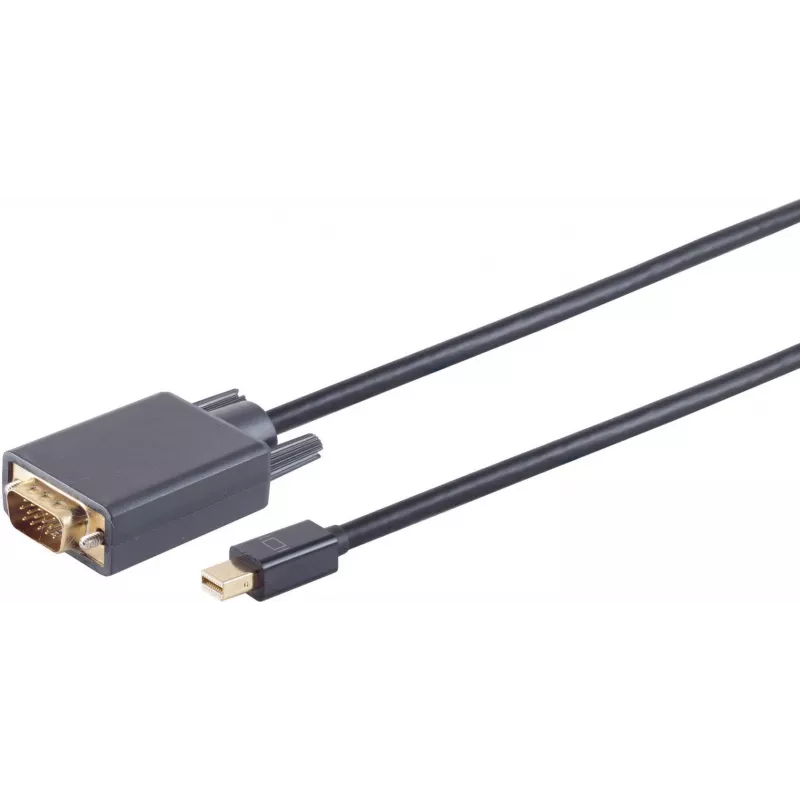
DisplayPort to VGA cable ShiverPeaks 1m Mini DisplayPort 1.2 to VGA, black

DisplayPort to VGA cable ShiverPeaks 1m Mini DisplayPort 1.2 to VGA, black
R462
The ShiverPeaks DisplayPort to VGA cable 1m converts a Mini DisplayPort 1.2 digital video output into an analog VGA signal for use with older monitors and projectors. This one-way cable supports connecting devices that have a Mini DisplayPort output—such as laptops, mini PCs or graphics adapters—to ... Read More
Stock 70 Code 2351844 Brand SHIVERPEAKS Model 10-54025 Warranty 2 Years

Shipping & Returns

Estimated delivery Wednesday, October 7
You will be kept updated through our detailed tracking system
Payment options
EFTPayFastBank CardSnapScanZapperGoogle PayApple PayMobicredMoreTymePay on Arrival

The ShiverPeaks DisplayPort to VGA cable 1m converts a Mini DisplayPort 1.2 digital video output into an analog VGA signal for use with older monitors and projectors. This one-way cable supports connecting devices that have a Mini DisplayPort output—such as laptops, mini PCs or graphics adapters—to displays that only accept VGA input. The compact 1 m length and black jacket make it suitable for short-distance desk or meeting-room connections where a straightforward digital-to-analog video conversion is required.

Advantages

The cable provides a simple, single-cable solution for converting Mini DisplayPort 1.2 output to VGA without additional power or bulky adapters. Its passive design keeps setup minimal: plug the Mini DisplayPort end into the source device and the VGA connector into the display. The 1 m length reduces cable clutter while allowing flexible placement of laptops or small PCs near VGA projectors or monitors. The black outer sheath and molded connectors improve durability for everyday office or home use.

Suitable for

  • Connecting laptops with Mini DisplayPort outputs to VGA projectors in meeting rooms
  • Attaching mini PCs or compact desktops to legacy VGA monitors
  • Using older VGA displays for presentations, classroom equipment or secondary screens

Key specifications

  • Cable length: 1 meter
  • Connector A: Mini DisplayPort (male)
  • Connector B: VGA (male)
  • Supported signal direction: digital (Mini DisplayPort) to analog (VGA), one-way
  • DisplayPort standard: 1.2
  • Casing color: black

How to use

Ensure the source device has an active Mini DisplayPort output. Connect the Mini DisplayPort plug to the source and the VGA plug to the display or projector. Power on both devices; the display should automatically detect the VGA input. If needed, adjust the display resolution and refresh rate in the source device’s display settings to match the capabilities of the VGA monitor or projector. This passive cable provides video only and does not transmit audio.

Recommendations

For best image quality, use at resolutions supported by the VGA display and avoid long extension runs beyond the 1 m cable length. If your source requires an active conversion or you need to transmit audio, consider an active adapter with explicit support for those features.
Key Highlights
  • Connecting laptops with Mini DisplayPort outputs to VGA projectors in meeting rooms
  • Attaching mini PCs or compact desktops to legacy VGA monitors
  • Using older VGA displays for presentations, classroom equipment or secondary screens
  • Cable length: 1 meter
  • Connector A: Mini DisplayPort (male)
  • Connector B: VGA (male)
  • Supported signal direction: digital (Mini DisplayPort) to analog (VGA), one-way
  • DisplayPort standard: 1.2
  • Casing color: black
Price history over the last 6 months
DisplayPort to VGA cable ShiverPeaks 1m Mini DisplayPort 1.2 to VGA, black
Current
R462
Lowest
R451
Highest
R462
Change 24H
+R10   +2%
Week
—   
Month
—   

Popular products in this category

WhatsApp
Hi, I’m DistriNode’s AI assistant. I can help you find products, compare options, create quote PDFs, or open support requests.