Account Contact
Your Cart
Pay the courier with no extra fees.
Need help? DistriNode AI can handle any task on our site.

DeLOCK USB 2.0 Switch 2 PC to 4 devices Black 0.48 Gbit/s

DeLOCK USB 2.0 Switch 2 PC to 4 devices Black 0.48 Gbit/s
R656
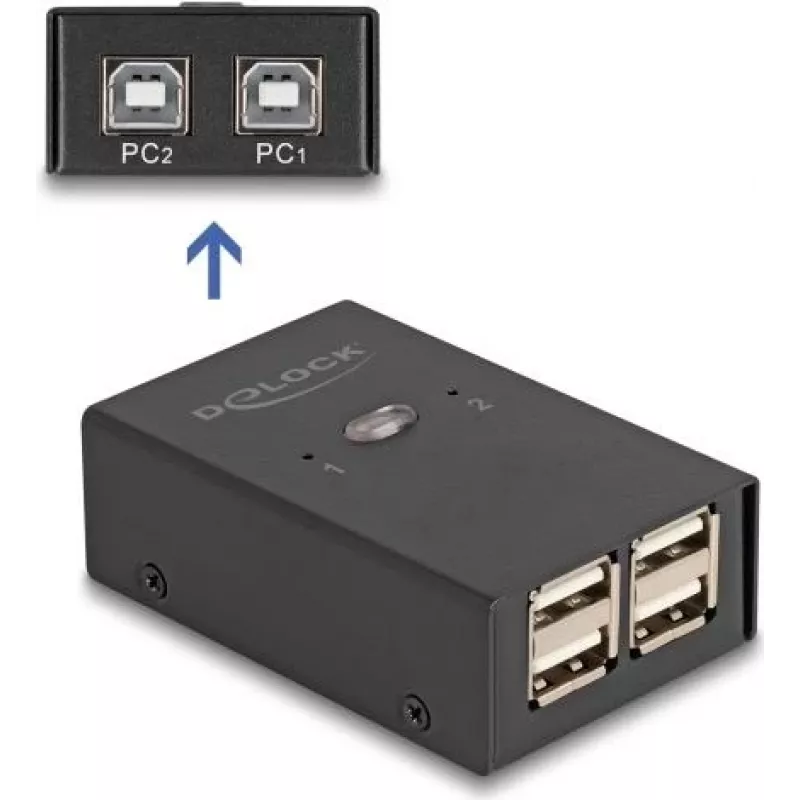
The DELOCK USB 2.0 Switch lets two computers share up to four USB 2.0 peripheral devices without needing to unplug cables or buy duplicate peripherals. It supports a maximum data transfer rate of 0.48 Gbit/s, has LED indicators for device or port status, and comes in a compact black housing measurin... Read More
Stock 15 Code 1734543 Brand DELOCK Model 11505 Warranty 2 Years

Shipping & Returns

Estimated delivery Thursday, October 1
You will be kept updated through our detailed tracking system
Payment options
EFTPayFastBank CardSnapScanZapperGoogle PayApple PayMobicredMoreTymePay on Arrival

The DELOCK USB 2.0 Switch lets two computers share up to four USB 2.0 peripheral devices without needing to unplug cables or buy duplicate peripherals. It supports a maximum data transfer rate of 0.48 Gbit/s, has LED indicators for device or port status, and comes in a compact black housing measuring 45 mm × 69 mm × 23 mm.

Advantages

This USB switch enables convenient sharing of USB peripherals between two PC systems, reducing equipment costs and cable swapping. The device supports the USB 2.0 standard (up to 0.48 Gbit/s) and includes LED indicators for clear status feedback. Its compact form factor makes it suitable for limited-desk spaces.

Suitable for

  • Sharing keyboards and mice between two computers
  • Connecting printers or scanners to two PCs without moving cables
  • Using external storage devices alternately from two systems (within USB 2.0 speed limits)
  • Small offices, home offices, or multi-PC workstations

Key specifications

  • Brand: DELOCK
  • Model / MPN: 11505
  • EAN: 4043619115051
  • Standard: USB 2.0
  • Maximum data rate: 0.48 Gbit/s
  • Supported hosts: 2 PCs
  • Supported device ports: 4 USB devices
  • Colour: Black
  • Dimensions (W × D × H): 45 × 69 × 23 mm

How to use

Connect the switch to each computer using the appropriate host cables, then plug up to four USB peripherals into the device ports. Use the built-in controls or buttons to toggle which computer has access to the connected peripherals. Observe the LED indicators to confirm active connections and data availability. Ensure connected devices are compatible with USB 2.0 and that any required drivers are installed on each computer.

Recommendations

For best results, avoid using high-bandwidth devices that require USB 3.x speeds, and do not rely on the switch for simultaneous multi-host access—only one computer can access the shared devices at a time. Place the switch on a stable surface and keep cable runs within standard USB length recommendations.
Key Highlights
  • Sharing keyboards and mice between two computers
  • Connecting printers or scanners to two PCs without moving cables
  • Using external storage devices alternately from two systems (within USB 2.0 speed limits)
  • Small offices, home offices, or multi-PC workstations
  • Brand: DELOCK
  • Model / MPN: 11505
  • EAN: 4043619115051
  • Standard: USB 2.0
  • Maximum data rate: 0.48 Gbit/s
  • Supported hosts: 2 PCs
  • Supported device ports: 4 USB devices
  • Colour: Black
  • Dimensions (W × D × H): 45 × 69 × 23 mm
Specifications
Compliance certificates
Federal Communications Commission (FCC), CE
Country of origin
China
Depth
69 mm
Height
23 mm
Housing material
Metal
LED indicators
Switch
Maximum data transfer rate
0.48 Gbit/s
Product colour
Black
USB 2.0 ports quantity
6
USB 3.2 Gen 1 (3.1 Gen 1) Type-A ports quantity
0
Width
45 mm

Leaflet

Open Leaflet

Document

Open Document
Price history over the last 6 months
DeLOCK USB 2.0 Switch 2 PC to 4 devices Black 0.48 Gbit/s
Current
R656
Lowest
R636
Highest
R670
Change 24H
+R11   +2%
Week
+R18   +3%
Month
+R16   +2%

Popular products in this category

WhatsApp
Hi, I’m DistriNode’s AI assistant. I can help you find products, compare options, create quote PDFs, or open support requests.