Account Contact
Your Cart
Pay on delivery – no extra fees
Need help? Ask our AI

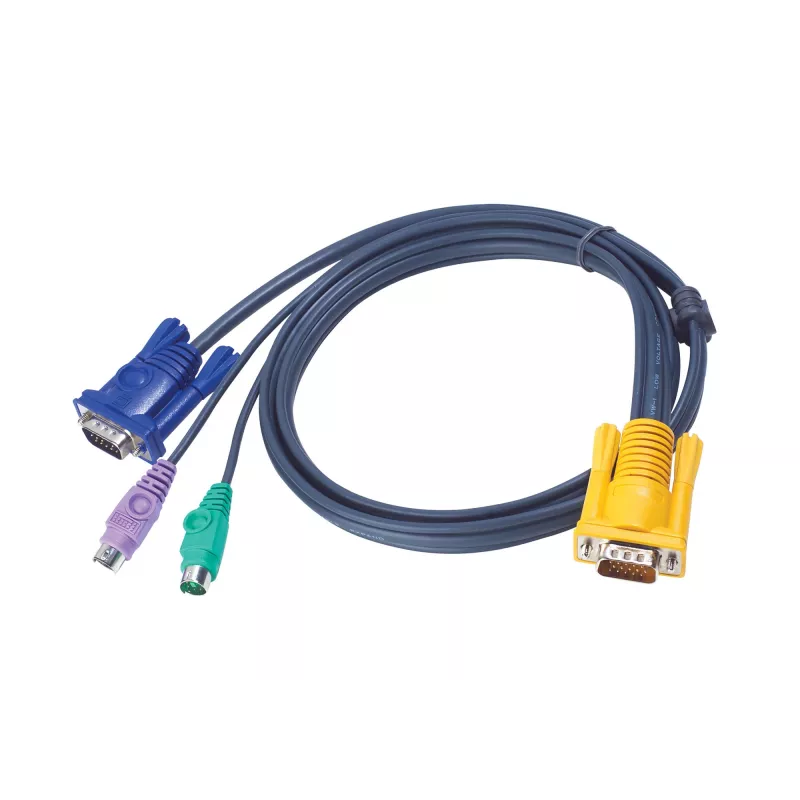
ATEN PS/2 KVM Cable 6m

ATEN PS/2 KVM Cable 6m
R793
PDF
PDF
Stock 5 Code 1464753 Model 2L-5206P Warranty 2 Years

Shipping & Returns

Estimated delivery Monday, December 7
You will be kept updated through our detailed tracking system
Payment options
EFTPayFastBank CardSnapScanZapperGoogle PayApple PayMobicredMoreTymePay on Arrival

Ask a question – the AI assistant answers instantly.

Description

The ATEN PS/2 KVM Cable 6m (model 2L-5206P) is a slim black connection cable designed to link KVM switches with PS/2 computers. The cable includes PS/2 keyboard and mouse connectors plus a VGA video connector in an integrated 3‑in‑1 SPHD console plug, offering a tidy single-cable solution for setups that require extended reach up to 6 meters. The cable weighs 0.528 kg and is intended for use with compatible ATEN KVM switches — consult the KVM Cables Table for compatibility details.

Advantages

This 6 m ATEN cable combines keyboard, mouse and video signals in a single slim assembly to reduce cable clutter and simplify installation. The integrated SPHD console connector ensures a compact connection to supported KVM switch consoles, while standard PS/2 and VGA terminations provide compatibility with legacy PS/2 systems. The black jacket and moderate weight make the cable easy to route and manage in rack or desktop environments.

Suitable for

  • Connecting ATEN KVM switches to PS/2 desktop computers
  • Environments requiring a 6 m reach between console and target systems
  • Cable management setups where a single combined cable is preferred

Key specifications

  • Model: 2L-5206P (ATEN)
  • Cable length: 6 m (slim)
  • Console connector: 3‑in‑1 SPHD (keyboard/mouse/video)
  • PC connectors: PS/2 (keyboard & mouse) and VGA video
  • Colour: Black
  • Weight: 0.528 kg
  • EAN: 4710423771475

How to use

Plug the 3‑in‑1 SPHD console connector into the compatible ATEN KVM switch console port. Connect the PS/2 keyboard and mouse plugs and the VGA plug to the target computer’s corresponding ports. Verify the KVM switch is powered and switch to the target port to confirm keyboard, mouse and video signals are transmitted. For best results, route the cable away from strong electromagnetic sources and secure excess length to avoid strain on connectors.

Recommendations

Check the ATEN KVM Cables Table or the KVM switch manual to confirm compatibility with your specific ATEN model before installation. Avoid excessive bending near connector ends and store the cable in a cool, dry place when not in use.
Key Highlights
  • Connecting ATEN KVM switches to PS/2 desktop computers
  • Environments requiring a 6 m reach between console and target systems
  • Cable management setups where a single combined cable is preferred
  • Model: 2L-5206P (ATEN)
  • Cable length: 6 m (slim)
  • Console connector: 3‑in‑1 SPHD (keyboard/mouse/video)
  • PC connectors: PS/2 (keyboard & mouse) and VGA video
  • Colour: Black
  • Weight: 0.528 kg
  • EAN: 4710423771475

Specifications

Specifications
Cable length
6 m
Connector 1
HDB-15, 2xPS/2
Connector 2
SPHD-15
Connector gender
Male/Male
Harmonized System (HS) code
84733080
Master (outer) case gross weight
16.6 kg
Master (outer) case height
240 mm
Master (outer) case length
450 mm
Master (outer) case net weight
15.8 kg
Master (outer) case width
330 mm
Package weight
528 g
Product colour
Black
Products per master (outer) case
30 pc(s)
Video port type
VGA
Weight
528 g

Leaflet

Open Leaflet
Price history over the last 6 months
ATEN PS/2 KVM Cable 6m
Current
R793
Lowest 7d
R793
Highest 7d
R875
Change 24H
-R1   0%
Change 7D
-R82   -9%
Change 30D
-R120   -13%

Write a review

Rating *
Your name will be shown publicly – you can use a nickname. We invite buyers to write reviews; we check reviews before publishing and publish critical ones too.

More ATEN products in this category

12

Popular products in this category

4
WhatsApp
Messenger
Hi, I’m DistriNode’s AI assistant. I can help you find products, compare options, create quote PDFs, or open support requests.
All categories