Account Contact
Your Cart
Pay the courier with no extra fees.
Need help? DistriNode AI can handle any task on our site.

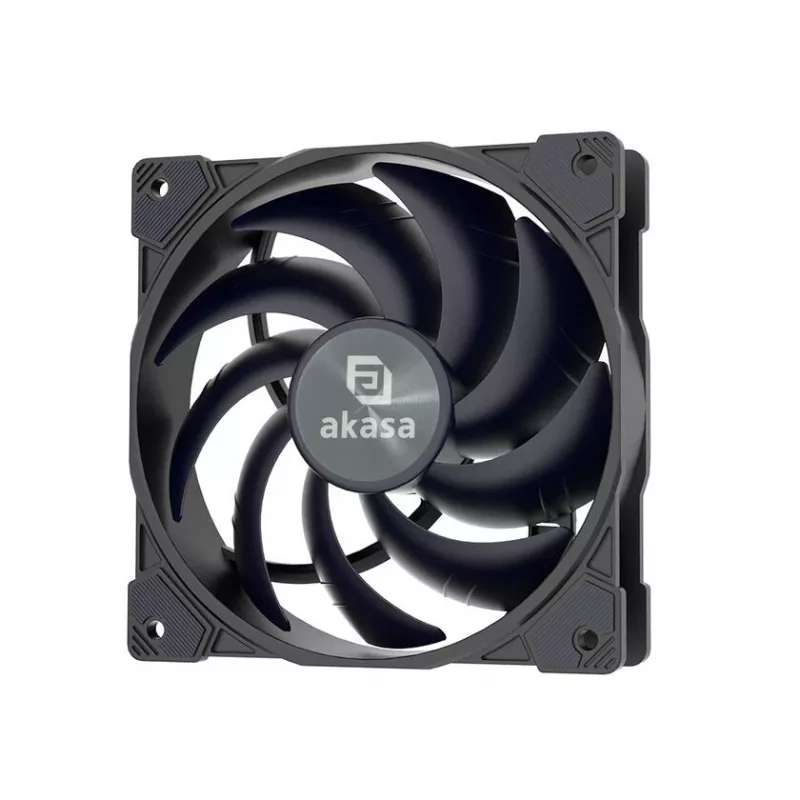
120mm case fan Akasa Alucia SM12 1200RPM, model AK-FN128, 120mm frame, 1200 RPM

120mm case fan Akasa Alucia SM12 1200RPM, model AK-FN128, 120mm frame, 1200 RPM
R510
Akasa Alucia SM12 is a 120mm case fan with a rated speed of 1200 RPM designed for PC chassis ventilation. The fan fits standard 120mm mounting points and provides steady, low-to-moderate speed airflow to support cooling of components such as CPU coolers, graphics cards, storage drives and general ca... Read More
Stock 6 Code 313649 Brand AKASA Model LUAK-077 Warranty 2 Years

Shipping & Returns

Estimated delivery Thursday, October 1
You will be kept updated through our detailed tracking system
Payment options
EFTPayFastBank CardSnapScanZapperGoogle PayApple PayMobicredMoreTymePay on Arrival

Akasa Alucia SM12 is a 120mm case fan with a rated speed of 1200 RPM designed for PC chassis ventilation. The fan fits standard 120mm mounting points and provides steady, low-to-moderate speed airflow to support cooling of components such as CPU coolers, graphics cards, storage drives and general case circulation in everyday or office systems.

Advantages

The fan delivers consistent airflow at a moderate rotational speed to balance cooling performance and acoustic output. Its 120mm frame ensures compatibility with a wide range of desktop cases and mounting locations. The design focuses on reliable operation for prolonged use in systems that require continuous but not extreme cooling.

Suitable for

  • General PC case ventilation in office and home desktops
  • Supplemental airflow for CPU or GPU air-cooled setups
  • Cooling for hard drives, SSDs and other internal components
  • Systems where lower acoustic noise is preferred over maximum airflow

Key specifications

  • Frame size: 120 mm
  • Rated speed: 1200 RPM
  • Mounting: standard 120mm mounting pattern
  • Application: chassis ventilation for desktop computers

How to use

Install the fan into a compatible 120mm mounting location in the PC chassis, orienting it for intake or exhaust according to your airflow plan. Secure the fan with screws or vibration-damping mounts that match the case fittings. Connect the fan to the appropriate motherboard header or fan controller using the supplied cable; verify the connector type on your system before installation. After powering the system, confirm the fan spins and monitor system temperatures and noise to ensure desired performance.

Recommendations

For balanced cooling and low noise, use the Akasa Alucia SM12 as intake at the front of the case or as an exhaust at the rear/top depending on your case layout. Regularly check for dust buildup and clean the fan blades and grille to maintain airflow. If additional airflow or variable speed control is needed, pair the fan with a PWM-capable controller or install multiple fans in a push-pull configuration.

Key Highlights
  • General PC case ventilation in office and home desktops
  • Supplemental airflow for CPU or GPU air-cooled setups
  • Cooling for hard drives, SSDs and other internal components
  • Systems where lower acoustic noise is preferred over maximum airflow
  • Frame size: 120 mm
  • Rated speed: 1200 RPM
  • Mounting: standard 120mm mounting pattern
  • Application: chassis ventilation for desktop computers
Price history over the last 6 months
120mm case fan Akasa Alucia SM12 1200RPM, model AK-FN128, 120mm frame, 1200 RPM
Current
R510
Lowest
R447
Highest
R523
Change 24H
+R34   +7%
Week
+R39   +8%
Month
+R38   +8%

Popular products in this category

WhatsApp
Hi, I’m DistriNode’s AI assistant. I can help you find products, compare options, create quote PDFs, or open support requests.