Account Contact
Your Cart
Pay on delivery – no extra fees
Need help? Ask our AI

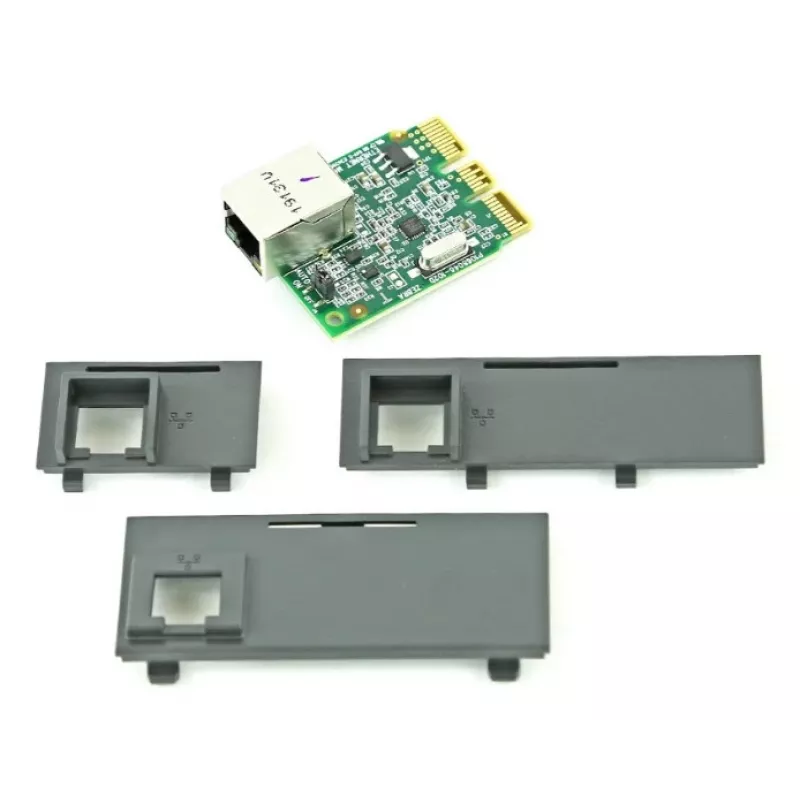
Zebra P1080383-442 printer/scanner spare part/accessory LAN interface

Zebra P1080383-442 printer/scanner spare part/accessory LAN interface
R2,470
PDF
PDF

Shipping & Returns

Estimated delivery Thursday, November 19
You will be kept updated through our detailed tracking system
Payment options
EFTPayFastBank CardSnapScanZapperGoogle PayApple PayMobicredMoreTymePay on Arrival

Ask a question – the AI assistant answers instantly.

Description

The Zebra P1080383-442 LAN interface provides network connectivity for compatible Zebra label printers, including ZD420C, ZD420D, ZD420T and ZD410D. Designed as a spare part, this LAN interface restores or adds Ethernet communication capability so printers can be connected to local area networks for centralized printing, job management and remote configuration.

Advantages

This LAN interface delivers stable wired network performance and is engineered to integrate with multiple Zebra models without altering printer operation. It supports reliable data transfer for label print jobs, helps reduce downtime by enabling network-based diagnostics and job queuing, and preserves original printer functions when installed as a factory-compatible spare part.

Suitable for

  • Connecting Zebra ZD420C, ZD420D, ZD420T and ZD410D printers to a wired Ethernet network
  • Replacing a faulty or missing LAN interface in supported Zebra printers
  • Enabling centralized print management in small offices, retail, warehousing or manufacturing environments
  • Integrating printers into existing networked POS or inventory systems

Key specifications

  • Interface type: wired Ethernet LAN
  • Compatibility: Zebra ZD420C, ZD420D, ZD420T, ZD410D printer models
  • Function: network communication for print job transfer and remote configuration
  • Form factor: replaceable printer expansion/interface module

How to use

Install the LAN interface into the designated expansion slot or port on the compatible Zebra printer following the printer manufacturer’s service instructions. After physical installation, connect an Ethernet cable from the interface to your network switch or router. Power on the printer and configure network settings either via the printer control panel or the printer’s web-based configuration page. Verify network connectivity by printing a network configuration or test label.

Recommendations

Use factory-recommended installation procedures and static-safe handling when fitting the LAN interface. Ensure network security by assigning IP addresses according to your network plan and by using secure network segments for printers handling sensitive data. Keep firmware and drivers up to date for optimal compatibility and performance.

Key Highlights
  • Connecting Zebra ZD420C, ZD420D, ZD420T and ZD410D printers to a wired Ethernet network
  • Replacing a faulty or missing LAN interface in supported Zebra printers
  • Enabling centralized print management in small offices, retail, warehousing or manufacturing environments
  • Integrating printers into existing networked POS or inventory systems
  • Interface type: wired Ethernet LAN
  • Compatibility: Zebra ZD420C, ZD420D, ZD420T, ZD410D printer models
  • Function: network communication for print job transfer and remote configuration
  • Form factor: replaceable printer expansion/interface module

Specifications

Specifications
Brand compatibility
Zebra
Compatibility
ZD420C, ZD420D, ZD420T, ZD410D
Type
LAN interface

Leaflet

Open Leaflet
Price history over the last 6 months
Zebra P1080383-442 printer/scanner spare part/accessory LAN interface
Current
R2,470
Lowest
R2,321
Highest
R2,925
Change 24H
+R2   +0%
Week
R0   0%
Month
+R121   +5%

Write a review

Rating *
Your name will be shown publicly – you can use a nickname. We invite buyers to write reviews; we check reviews before publishing and publish critical ones too.

Same series and alternatives

12

Popular products in this category

8
WhatsApp
Messenger
Hi, I’m DistriNode’s AI assistant. I can help you find products, compare options, create quote PDFs, or open support requests.
All categories