Account Contact
Your Cart
Pay the courier with no extra fees.
Need help? DistriNode AI can handle any task on our site.

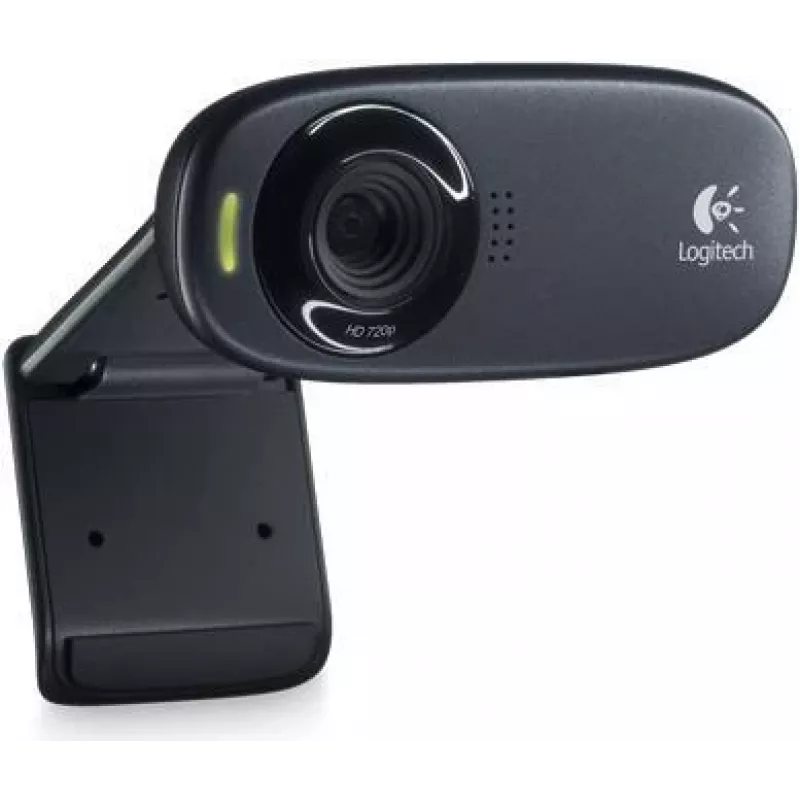
Webcam Logitech HD C310 1280 x 720 pixels USB 2.0 Black

Webcam Logitech HD C310 1280 x 720 pixels USB 2.0 Black
R838
The Logitech C310 is an affordable HD webcam designed for laptops and monitors, offering improved image and audio quality compared with built-in laptop cameras. It delivers 1280 x 720 (HD 720p) video at 30 fps with a 60° diagonal field of view and connects via USB 2.0. RightLight 2 technology adjust... Read More
Stock 25 Code 1468996 Brand LOGITECH Model 960-000585 Warranty 2 Years

Shipping & Returns

Estimated delivery Wednesday, October 7
You will be kept updated through our detailed tracking system
Payment options
EFTPayFastBank CardSnapScanZapperGoogle PayApple PayMobicredMoreTymePay on Arrival

The Logitech C310 is an affordable HD webcam designed for laptops and monitors, offering improved image and audio quality compared with built-in laptop cameras. It delivers 1280 x 720 (HD 720p) video at 30 fps with a 60° diagonal field of view and connects via USB 2.0. RightLight 2 technology adjusts exposure for clearer images in varying lighting, and the integrated noise-reducing microphone helps transmit voice clearly during calls or streaming.

Advantages

The Logitech HD C310 provides crisp 720p video at 30 fps, a compact plug-and-play USB 2.0 connection, and a 60° field of view that keeps the focus on the user. RightLight 2 improves image brightness and clarity in different lighting conditions, while the built-in noise-reducing microphone reduces background interference for clearer voice capture.

Suitable for

  • Video calls and conferences (Zoom, Teams, Skype)
  • Remote work and online meetings
  • Basic live streaming and content creation
  • Online classes and virtual learning

Key specifications

  • Maximum video resolution: 1280 x 720 (HD 720p) at 30 fps
  • Interpolated image resolution: up to 5 MP
  • Field of view: 60° diagonal
  • Interface: USB 2.0
  • Colour: Black
  • Manufacturer part number (MPN): 960-000585
  • EAN: 5715063064863

How to use

Connect the webcam to an available USB 2.0 port on your computer. Position the camera on top of your monitor or laptop screen using the adjustable clip, or place it on a flat surface. Allow the operating system to recognize the device; most systems will install drivers automatically. Select the Logitech C310 as the camera and microphone source in your video conferencing or streaming application settings.

Recommendations

For best results, place the webcam at eye level and avoid backlighting. Ensure adequate front lighting or use a desk lamp to improve image clarity. Close other applications that use the microphone to reduce background noise and select the C310 as the active audio input in your software.
Key Highlights
  • Video calls and conferences (Zoom, Teams, Skype)
  • Remote work and online meetings
  • Basic live streaming and content creation
  • Online classes and virtual learning
  • Maximum video resolution: 1280 x 720 (HD 720p) at 30 fps
  • Interpolated image resolution: up to 5 MP
  • Field of view: 60° diagonal
  • Interface: USB 2.0
  • Colour: Black
  • Manufacturer part number (MPN): 960-000585
  • EAN: 5715063064863
Specifications
Built-in microphone
Yes
Interface
USB 2.0
Laptop clamp
Yes
Master (outer) case gross weight
716.4 g
Master (outer) case height
95 mm
Master (outer) case length
235 mm
Master (outer) case width
157 mm
Maximum interpolated image resolution
5 MP
Maximum video resolution
1280 x 720
Package depth
104 mm
Package height
84 mm
Package weight
139.2 g
Package width
53 mm
Product colour
Black

Leaflet

Open Leaflet
Price history over the last 6 months
Webcam Logitech HD C310 1280 x 720 pixels USB 2.0 Black
Current
R838
Lowest
R781
Highest
R838
Change 24H
+R25   +3%
Week
+R32   +4%
Month
+R32   +4%

Popular products in this category

WhatsApp
Hi, I’m DistriNode’s AI assistant. I can help you find products, compare options, create quote PDFs, or open support requests.