Account Contact
Your Cart
Pay on delivery – no extra fees
Need help? Ask our AI

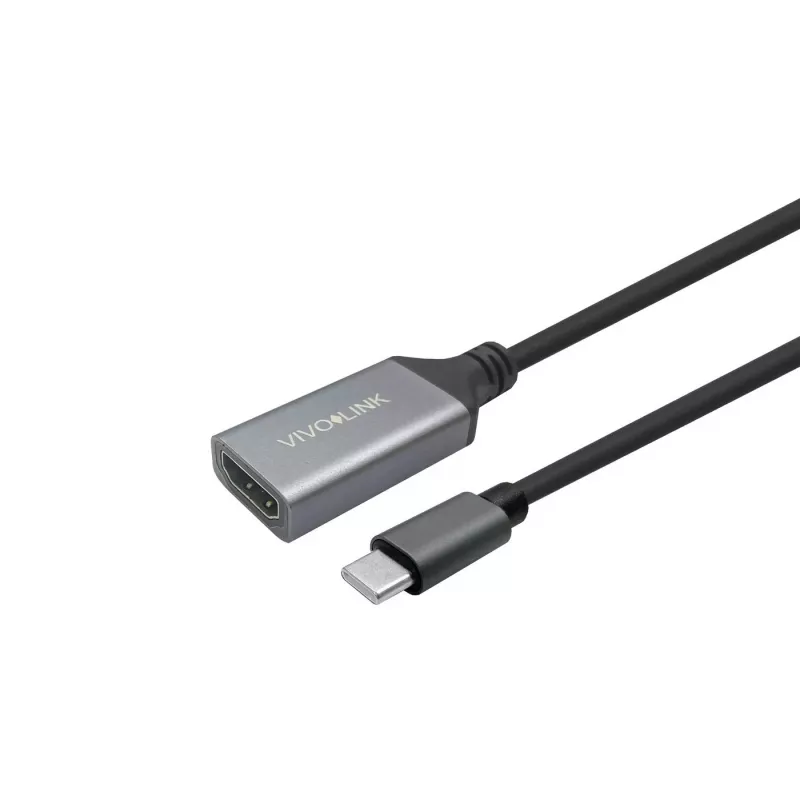
Vivolink PROHDMIUSBCFM1 USB cable USB 3.2 Gen 1 (3.1 Gen 1) 1 m USB C Black

Vivolink PROHDMIUSBCFM1 USB cable USB 3.2 Gen 1 (3.1 Gen 1) 1 m USB C Black
R1,139
Vivolink high performance HDMI to USB-C cable converts an HDMI source to a display with a USB-C input. This Vivolink PROHDMIUSBCFM1 cable is 1 m long, has USB-C connectors, and supports high-speed data transfer while enabling HDMI video output to USB-C only displays. The cable is not bi-directional.... Read More
Stock 48 Code 1185833 Brand VIVOLINK Model PROHDMIUSBCFM1 Warranty 2 Years

Shipping & Returns

Estimated delivery Wednesday, October 28
You will be kept updated through our detailed tracking system
Payment options
EFTPayFastBank CardSnapScanZapperGoogle PayApple PayMobicredMoreTymePay on Arrival

Vivolink high performance HDMI to USB-C cable converts an HDMI source to a display with a USB-C input. This Vivolink PROHDMIUSBCFM1 cable is 1 m long, has USB-C connectors, and supports high-speed data transfer while enabling HDMI video output to USB-C only displays. The cable is not bi-directional.

Advantages

The cable supports up to 4K@60Hz resolution and an 18 Gbit/s transfer rate, providing a high-quality video signal for compatible displays. It supplies up to 500 mA of current and comes in a compact 1 m black design that fits standard USB-C ports.

Suitable for

  • Connecting HDMI video sources (e.g., media players, set-top boxes) to monitors or laptops with USB-C video input
  • Upgrading existing HDMI connections to displays that accept USB-C input
  • Temporary or portable setups where a short 1 m cable is preferred

Key specifications

  • Model: Vivolink PROHDMIUSBCFM1
  • Connectors: USB-C to USB-C (adapts HDMI source to USB-C display)
  • USB version: USB 3.2 Gen 1 (3.1 Gen 1)
  • Cable length: 1 m
  • Max video: 4K @ 60 Hz
  • Transfer speed: 18 Gbit/s
  • Max current: 500 mA
  • Colour: Black
  • Note: Not bi-directional

How to use

Connect the HDMI source to the cable’s adapted HDMI input side and plug the USB-C connector into the display’s USB-C port that accepts video input. Ensure the display supports USB-C video input and set the display input to the connected USB-C port. This cable does not convert USB-C output back to HDMI.

Recommendations

Use with devices and displays that explicitly support USB-C video input. For reliable 4K@60Hz performance, use compatible source and display hardware and avoid excessive cable bends or long extension runs.
Key Highlights
  • Connecting HDMI video sources (e.g., media players, set-top boxes) to monitors or laptops with USB-C video input
  • Upgrading existing HDMI connections to displays that accept USB-C input
  • Temporary or portable setups where a short 1 m cable is preferred
  • Model: Vivolink PROHDMIUSBCFM1
  • Connectors: USB-C to USB-C (adapts HDMI source to USB-C display)
  • USB version: USB 3.2 Gen 1 (3.1 Gen 1)
  • Cable length: 1 m
  • Max video: 4K @ 60 Hz
  • Transfer speed: 18 Gbit/s
  • Max current: 500 mA
  • Colour: Black
  • Note: Not bi-directional
Specifications
Cable length
1 m
Connector 1
USB C
Connector 1 form factor
Straight
Connector 1 gender
Female
Connector 2
USB C
Connector 2 form factor
Straight
Connector 2 gender
Male
Package weight
85 g
Product colour
Black
Quantity per pack
1 pc(s)
USB version
USB 3.2 Gen 1 (3.1 Gen 1)
Weight
60 g

Leaflet

Open Leaflet
Price history over the last 6 months
Vivolink PROHDMIUSBCFM1 USB cable USB 3.2 Gen 1 (3.1 Gen 1) 1 m USB C Black
Current
R1,139
Lowest
R1,123
Highest
R1,321
Change 24H
+R15   +1%
Week
+R14   +1%
Month
+R15   +1%

Popular products in this category

WhatsApp
Hi, I’m DistriNode’s AI assistant. I can help you find products, compare options, create quote PDFs, or open support requests.