Account Contact
Your Cart
Pay the courier with no extra fees.
Need help? DistriNode AI can handle any task on our site.

Video Cable Adapter VALUE 11.99.5846 2m DisplayPort USB Type-C Black

Video Cable Adapter VALUE 11.99.5846 2m DisplayPort USB Type-C Black
R523
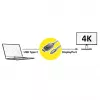
Connect a MacBook, Ultrabook, notebook, laptop or PC with a USB Type‑C port to a DisplayPort monitor or projector using this 2 m VALUE video cable adapter. The VALUE 11.99.5846 supports video output up to 3840×2160 at 60 Hz and is designed for reliable signal transmission between USB Type‑C source d... Read More
Stock 300 Code 1461383 Brand VALUE Model 11.99.5846 Warranty 2 Years

Shipping & Returns

Estimated delivery Thursday, October 1
You will be kept updated through our detailed tracking system
Payment options
EFTPayFastBank CardSnapScanZapperGoogle PayApple PayMobicredMoreTymePay on Arrival

Connect a MacBook, Ultrabook, notebook, laptop or PC with a USB Type‑C port to a DisplayPort monitor or projector using this 2 m VALUE video cable adapter. The VALUE 11.99.5846 supports video output up to 3840×2160 at 60 Hz and is designed for reliable signal transmission between USB Type‑C source devices and displays with DisplayPort input.

Advantages

The cable adapter provides a stable connection for high‑resolution video, comes in a 2‑metre length for flexible setups and uses robust connectors to minimise signal loss. Its straightforward plug‑and‑play design requires no drivers and is compatible with devices that support DisplayPort Alternate Mode over USB Type‑C.

Suitable for

  • Connecting laptops or Ultrabooks with USB Type‑C to DisplayPort monitors
  • Connecting MacBook to external DisplayPort displays or projectors
  • Presentations and desktop workstation setups requiring 4K@60Hz

Key specifications

  • Brand: VALUE
  • Model / MPN: 11.99.5846
  • EAN: 7611990158409
  • Cable length: 2 m
  • Connector A: USB Type‑C (source)
  • Connector B: DisplayPort (display)
  • Maximum resolution: 3840×2160 @ 60 Hz

How to use

Plug the USB Type‑C connector into the Type‑C port of your laptop or compatible device. Connect the DisplayPort connector to the monitor or projector input. Select the appropriate input on the display and configure the display settings in your operating system if necessary. No additional drivers are normally required if the host device supports DisplayPort Alternate Mode.

Recommendations

For optimal performance, use with devices that explicitly support DisplayPort over USB Type‑C and ensure the display input is set to DisplayPort. Avoid sharp bends near the connectors and keep the cable away from strong electromagnetic sources.
Key Highlights
  • Connecting laptops or Ultrabooks with USB Type‑C to DisplayPort monitors
  • Connecting MacBook to external DisplayPort displays or projectors
  • Presentations and desktop workstation setups requiring 4K@60Hz
  • Brand: VALUE
  • Model / MPN: 11.99.5846
  • EAN: 7611990158409
  • Cable length: 2 m
  • Connector A: USB Type‑C (source)
  • Connector B: DisplayPort (display)
  • Maximum resolution: 3840×2160 @ 60 Hz
Specifications
Cable length
2 m
Connector 1
DisplayPort
Connector 1 form factor
Straight
Connector 1 gender
Male
Connector 2
USB Type-C
Connector 2 form factor
Straight
Connector 2 gender
Male
Connector contacts plating
Chrome
DisplayPort version
1.2
Maximum resolution
3840 x 2160
Plug and Play
Yes
Product colour
Black
Quantity per pack
1 pc(s)
Supported graphics resolutions
1920 x 1080 (HD 1080), 3860 x 2160
Supported video modes
2160p, 1440p, 1080p

Leaflet

Open Leaflet
Price history over the last 6 months
Video Cable Adapter VALUE 11.99.5846 2m DisplayPort USB Type-C Black
Current
R523
Lowest
R507
Highest
R534
Change 24H
+R10   +2%
Week
+R14   +3%
Month
+R14   +3%

Popular products in this category

WhatsApp
Hi, I’m DistriNode’s AI assistant. I can help you find products, compare options, create quote PDFs, or open support requests.