Account Contact
Your Cart
Pay on delivery – no extra fees
Need help? Ask our AI

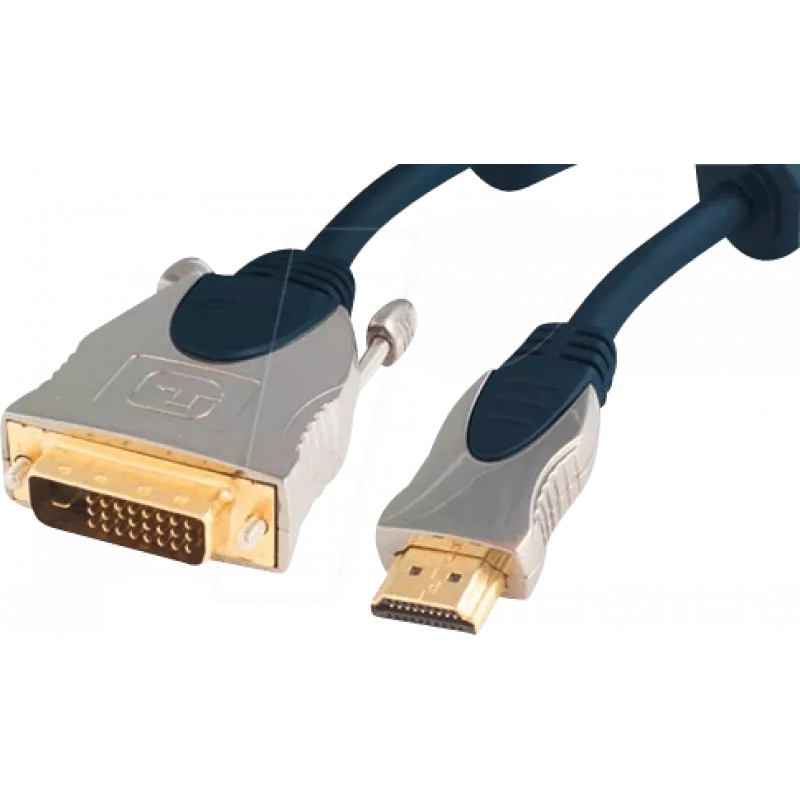
Video Cable Adapter ShiverPeaks SP77483 3m HDMI Type A DVI-D Blue

Video Cable Adapter ShiverPeaks SP77483 3m HDMI Type A DVI-D Blue
R444
The ShiverPeaks SP77483 3m HDMI Type A to DVI-D video cable adapter provides a straightforward wired connection between HDMI-equipped sources and DVI-D displays. With a three-meter length and rigid connectors, the cable supports uncompressed digital video transfer from laptops, PCs, media players or... Read More
Stock Out Of StockNo Stock Code 2256297 Brand SHIVERPEAKS Model SP77483 Warranty 2 Years

Shipping & Returns

The ShiverPeaks SP77483 3m HDMI Type A to DVI-D video cable adapter provides a straightforward wired connection between HDMI-equipped sources and DVI-D displays. With a three-meter length and rigid connectors, the cable supports uncompressed digital video transfer from laptops, PCs, media players or set-top boxes to monitors and projectors that accept DVI-D input. The cable is designed for applications where a reliable digital video signal is required without additional audio transmission.

Advantages

This adapter ensures direct digital video compatibility between HDMI Type A sources and DVI-D displays, reducing the need for intermediate converters. The 3 m length allows flexible placement of equipment while maintaining stable signal integrity. The physical construction and connector housings are built to withstand repeated plugging and unplugging, providing a durable solution for home and office setups.

Suitable for

  • Connecting laptops or desktop graphics cards with HDMI output to DVI-D monitors
  • Linking media players or set-top boxes to DVI-D projectors or displays
  • Temporary or permanent workstation arrangements where audio is handled separately
  • Presentation setups and meeting rooms requiring a simple digital video link

Key specifications

  • Cable length: 3 meters
  • Connector A: HDMI Type A (standard)
  • Connector B: DVI-D (digital only)
  • Signal type: Digital video (no analog pins on DVI-D)
  • Audio: Not carried over DVI-D; separate audio connection required if needed
  • Color: Blue connector housings

How to use

Connect the HDMI Type A end to the video source device and plug the DVI-D end into the display’s DVI-D input. Ensure both devices are powered off before connecting to avoid hot-plug issues, then power them on and select the appropriate input on the display. If audio is required, route it via a dedicated audio cable or external speakers connected to the source device, as this adapter carries only digital video.

Recommendations

To maintain optimal signal quality, avoid running the cable parallel to high-power electrical lines and keep bends gentle to prevent stress on the internal conductors. For displays that also accept HDMI, consider direct HDMI-to-HDMI connections when audio pass-through is required.
Key Highlights
  • Connecting laptops or desktop graphics cards with HDMI output to DVI-D monitors
  • Linking media players or set-top boxes to DVI-D projectors or displays
  • Temporary or permanent workstation arrangements where audio is handled separately
  • Presentation setups and meeting rooms requiring a simple digital video link
  • Cable length: 3 meters
  • Connector A: HDMI Type A (standard)
  • Connector B: DVI-D (digital only)
  • Signal type: Digital video (no analog pins on DVI-D)
  • Audio: Not carried over DVI-D; separate audio connection required if needed
  • Color: Blue connector housings
Specifications
Cable length
3 m
Connector 1
HDMI Type A (Standard)
Connector 1 form factor
Straight
Connector 1 gender
Male
Connector 2
DVI-D
Connector 2 form factor
Straight
Connector 2 gender
Male
Connector contacts plating
Gold
Product colour
Blue
Quantity per pack
1 pc(s)
Price history is not available yet
We are still collecting enough daily price data for this product.

Popular products in this category

WhatsApp
Hi, I’m DistriNode’s AI assistant. I can help you find products, compare options, create quote PDFs, or open support requests.